
Memory Units: Bit, Byte, KB, MB, GB, TB and Beyond
Memory Units: Bit, Byte, KB, MB, GB, TB and Beyond. Foundational Computer Awareness explanations, examples and explained practice questions for banking and recruitment exam preparation.
By Akhilesh Saini
What you will learn
- The difference between bit, byte, kilobyte, megabyte and larger units.
- Why b and B cannot be interchanged.
- The difference between decimal (1000-based) and binary (1024-based) prefixes.
- How to solve simple storage and transfer-rate questions.
Why this topic matters
Bank-exam computer awareness sometimes asks “How many bits make a byte?”, “How many bytes are in 1 KB?” or “Which is larger, MB or GB?” The first question is straightforward. The second needs care because standard terminology and traditional exam convention are not always the same.
Bit and byte: the foundations
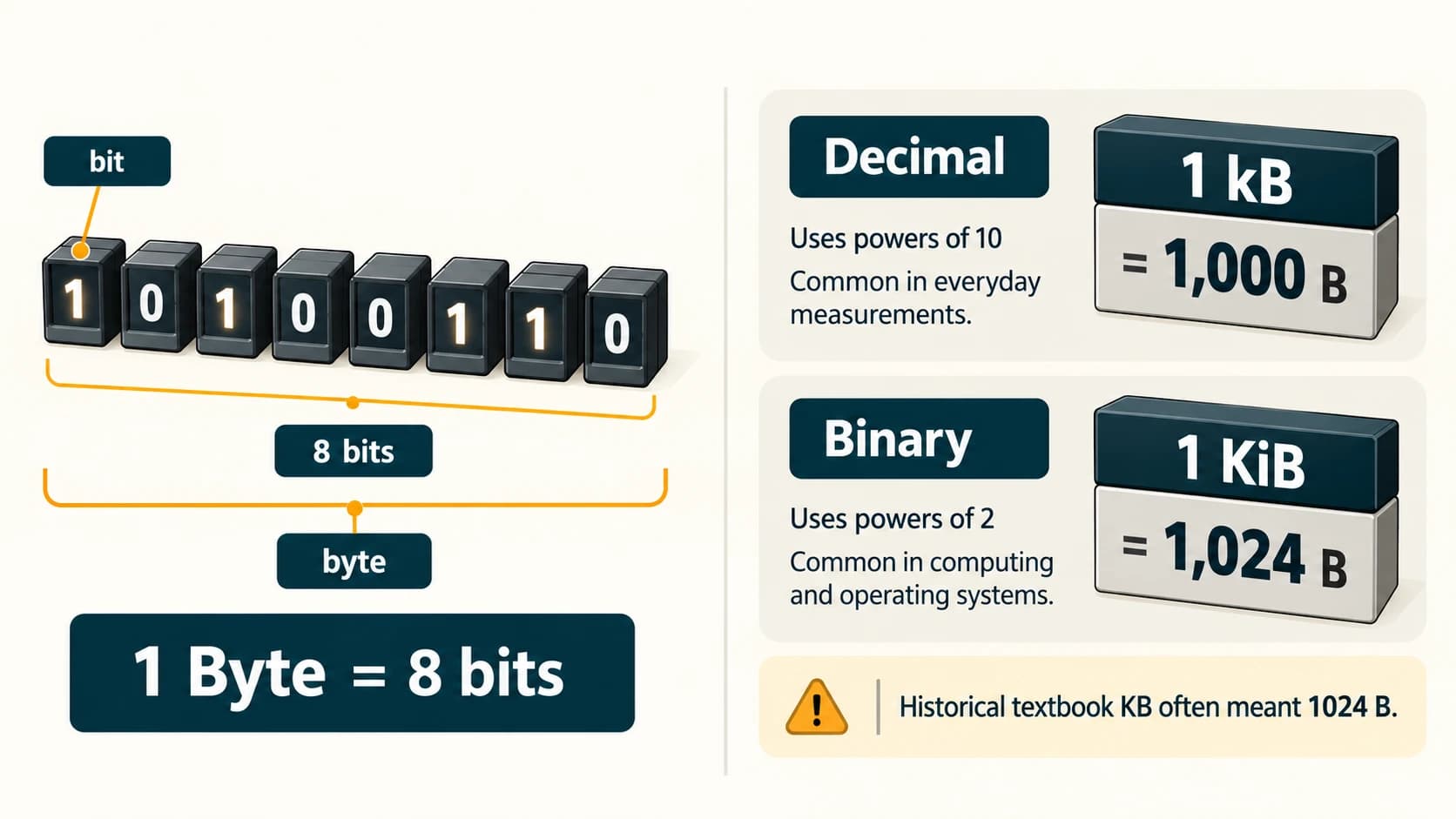
A bit (binary digit) represents one of two binary states, conventionally 0 or 1. A byte is a group of 8 bits in common computing usage.
- Lowercase b = bit.
- Uppercase B = byte.
- 1 B = 8 b.
- A nibble is a group of 4 bits.
A binary value such as 10110101 contains eight bits, so it occupies one byte when stored as an eight-bit value. The meaning of those bits depends on the data format.
Two families of prefixes
For technical accuracy, distinguish the international decimal (SI) family from the binary (IEC) family:
| Decimal unit | Exact bytes | Binary counterpart | Exact bytes |
|---|---|---|---|
| 1 kB (kilobyte; often written KB) | 1,000 | 1 KiB (kibibyte) | 1,024 |
| 1 MB (megabyte) | 1,000,000 | 1 MiB (mebibyte) | 1,048,576 |
| 1 GB (gigabyte) | 1,000,000,000 | 1 GiB (gibibyte) | 1,073,741,824 |
| 1 TB (terabyte) | 1,000,000,000,000 | 1 TiB (tebibyte) | 1,099,511,627,776 |
| 1 PB (petabyte) | 10¹⁵ | 1 PiB (pebibyte) | 2⁵⁰ |
| 1 EB (exabyte) | 10¹⁸ | 1 EiB (exbibyte) | 2⁶⁰ |
The larger decimal prefixes continue ZB (zettabyte, 10²¹) and YB (yottabyte, 10²⁴); binary equivalents include ZiB (zebibyte, 2⁷⁰) and YiB (yobibyte, 2⁸⁰). For ordinary bank-exam practice you rarely need to memorize huge exact byte values. Learn the ordering and the two base systems.
Important exam convention: Many traditional objective questions and older computer books say “1 KB = 1024 bytes.” That reflects historical binary usage of the term KB. In standard unambiguous notation, however, 1 KiB = 1024 bytes and 1 kB = 1000 bytes. If an exam explicitly defines a binary convention or clearly follows a conventional textbook table, follow its given convention; do not mix conventions within one calculation. When a question is ambiguous, recognize the ambiguity instead of treating both values as simultaneously exact.
Worked examples, step by step
Example 1 — Convert bytes into bits. A file contains 25 bytes. How many bits is that?
25 bytes × 8 bits/byte = 200 bits.
Example 2 — How many bytes in 3 KiB?
3 × 1,024 = 3,072 bytes.
Example 3 — How many bytes in 3 kB (decimal)?
3 × 1,000 = 3,000 bytes.
Example 4 — Compare 1 GiB with 1 GB.
1 GiB = 1,073,741,824 bytes; 1 GB = 1,000,000,000 bytes. GiB is larger.
Example 5 — Bits per second versus bytes per second. An ideal connection carries 40 megabits per second (40 Mb/s). Dividing by 8 gives an ideal 5 megabytes per second (5 MB/s). Real file-transfer throughput is typically lower due to overhead and other limits.
Example 6 — Capacity convention: A storage manufacturer states 1 TB in decimal bytes. A system displaying the same capacity in TiB will show about 0.91 TiB, before considering reserved space and file-system details. This does not imply the drive “lost” those bytes.
Bits, bytes and communication speeds
Storage capacities are usually shown in bytes: GB, TB. Communication rates are commonly shown in bits per second, such as Mb/s or Gb/s. Uppercase and lowercase matter:
- 8 Mb = 1 MB when both use the corresponding decimal prefix and units.
- 100 Mb/s is not 100 MB/s.
- Mbps means megabits per second; MB/s means megabytes per second.
Important terms
| Term | Meaning |
|---|---|
| Bit | Binary digit |
| Byte | Eight bits in common modern usage |
| Nibble | Four bits |
| SI prefix | Decimal multiple, e.g., kilo = 10³ |
| IEC binary prefix | Power-of-two multiple, e.g., kibi = 2¹⁰ |
| Capacity | Amount of data a storage medium can hold |
| Transfer rate | Amount of data transferred per unit time |
Common confusions
- b versus B: lowercase bit, uppercase byte.
- KB (old textbook use) versus KiB: 1024 is exact for KiB, not for standard decimal kB.
- GB versus Gb: a gigabyte is eight times a gigabit when using corresponding decimal prefixes.
- Capacity versus speed: GB measures amount; Mb/s measures data per second.
- Bigger listed capacity versus usable space: formatting and unit conventions affect what is displayed.
Fact to remember
1 byte = 8 bits; 1 nibble = 4 bits. In standard units, 1 kB = 1000 bytes and 1 KiB = 1024 bytes. Older exam convention may write 1 KB = 1024 bytes, so look for the question's stated basis.
Quick revision
- Smallest conventional binary digit → bit.
- Byte → 8 bits.
- Nibble → 4 bits.
- Decimal units → multiply by 1000 each step.
- Binary units → multiply by 1024 each step.
- Bytes versus bits → multiply/divide by 8.
- Increasing order → B, kB, MB, GB, TB, PB, EB, ZB, YB (decimal family).
Practice questions — CA-02-07
Q1. How many bits make one byte in normal computing usage?
A. 2 · B. 4 · C. 8 · D. 16
Q2. A nibble is equal to:
A. 2 bits · B. 4 bits · C. 8 bits · D. 16 bits
Q3. Which symbol normally represents a byte rather than a bit?
A. b · B. B · C. Hz · D. s
Q4. According to unambiguous IEC binary notation, 1 KiB equals:
A. 100 bytes · B. 1000 bytes · C. 1024 bytes · D. 2048 bytes
Q5. In decimal SI units, 1 MB is exactly:
A. 1,000,000 bytes · B. 1,048,576 bytes · C. 1024 bytes · D. 8 bytes
Q6. How many bits are in 25 bytes?
A. 100 · B. 200 · C. 25 · D. 250
Q7. How many bytes make 3 KiB?
A. 3000 · B. 3072 · C. 4096 · D. 1024
Q8. Which is larger?
A. 1 GB and 1 GiB are identical · B. 1 GB · C. 1 GiB · D. Neither is a data unit
Q9. Which is the correct ascending order of decimal capacities?
A. TB, GB, MB, kB · B. kB, MB, GB, TB · C. GB, MB, TB, kB · D. MB, kB, TB, GB
Q10. An ideal data rate of 40 Mb/s is equal to how many decimal MB/s before overhead?
A. 5 · B. 8 · C. 40 · D. 320
Q11. A traditional exam key says “1 KB = 1024 bytes.” What is the best technical explanation?
A. A bit and byte are identical · B. It uses an older binary convention for KB; KiB is the precise binary symbol · C. The decimal SI kilo has always meant 1024 · D. All drives use 1024-based GB labels
Q12. Which unit represents a rate rather than an amount of data?
A. GB · B. TiB · C. MB · D. Mb/s
Answers and explanations — CA-02-07
| Q | Answer | Why |
|---|---|---|
| 1 | C | One byte contains eight bits. |
| 2 | B | A nibble is four bits. |
| 3 | B | Uppercase B is the standard byte symbol. |
| 4 | C | KiB is exactly 2¹⁰ = 1024 bytes. |
| 5 | A | Decimal mega means 10⁶, so 1 MB = 1,000,000 bytes. |
| 6 | B | 25 × 8 = 200 bits. |
| 7 | B | 3 × 1024 = 3072 bytes. |
| 8 | C | 1 GiB has 1,073,741,824 bytes, more than 1 GB. |
| 9 | B | Each step increases by a decimal multiple of 1000. |
| 10 | A | Dividing 40 megabits by 8 gives 5 megabytes. |
| 11 | B | Historical usage of KB sometimes meant 1024; KiB removes ambiguity. |
| 12 | D | /s means “per second,” so Mb/s expresses a rate. |