
Ports, Connectors and Common Peripherals
Ports, Connectors and Common Peripherals. Foundational Computer Awareness explanations, examples and explained practice questions for banking and recruitment exam preparation.
By Akhilesh Saini
What you will learn
- The difference between a port, a connector and an attached peripheral.
- What USB, HDMI, DisplayPort, VGA, Ethernet and audio connectors are used for.
- Why connector shape does not guarantee transfer speed, charging power or display support.
Why this topic matters
Questions ask which connector is used for a monitor or a wired network, or which item is a peripheral. In practice a device can be physically compatible yet lack an expected function; understanding what the interface actually carries prevents mistaken assumptions.
What are ports and connectors?
A port is an interface through which a computer communicates with a connected device or system. A connector is the physical plug/socket system used for the connection. The term “port” also has other meanings in networking and software; here we mean hardware ports.
A peripheral is a device attached to or used with a computer to extend input, output, storage or communication functions. Typical peripherals include a keyboard, mouse, scanner, webcam, printer and external storage drive. Some devices, such as a graphics card or integrated camera, blur the everyday internal/external boundary; the key question is the device's function, not just where it sits.
Common external interfaces
| Port / connector | Primary use | Examples and exam note |
|---|---|---|
| USB (Universal Serial Bus) | Data communication and often power | Keyboard, mouse, flash drive, phone |
| USB Type-A | Familiar rectangular USB connector | Form factor; not a particular performance level |
| USB Type-C | Small reversible USB connector | Can support different data, power and optional display features |
| HDMI | Digital video and audio | Computer-to-TV/monitor/projector |
| DisplayPort | Digital video and often audio | Connecting compatible displays |
| VGA | Legacy analog video | Older monitors and projectors |
| DVI | Legacy display connection | Video; variant-dependent analog/digital capability |
| Ethernet (commonly 8P8C/RJ45-style connector) | Wired local networking | Router or network switch connection |
| 3.5 mm audio jack | Analog audio input/output according to socket | Headphones, headset, microphone |
| PS/2 | Legacy keyboard/mouse connection | Older PC peripherals |
| SD/microSD reader | Memory-card access | Camera-card transfer |
An Ethernet connector is commonly described as an RJ45 port in exam notes. More technically, the familiar plug uses an 8P8C modular connector, and RJ45 is often used loosely as its common name. Ethernet is the network technology, not the guarantee that internet access is available.
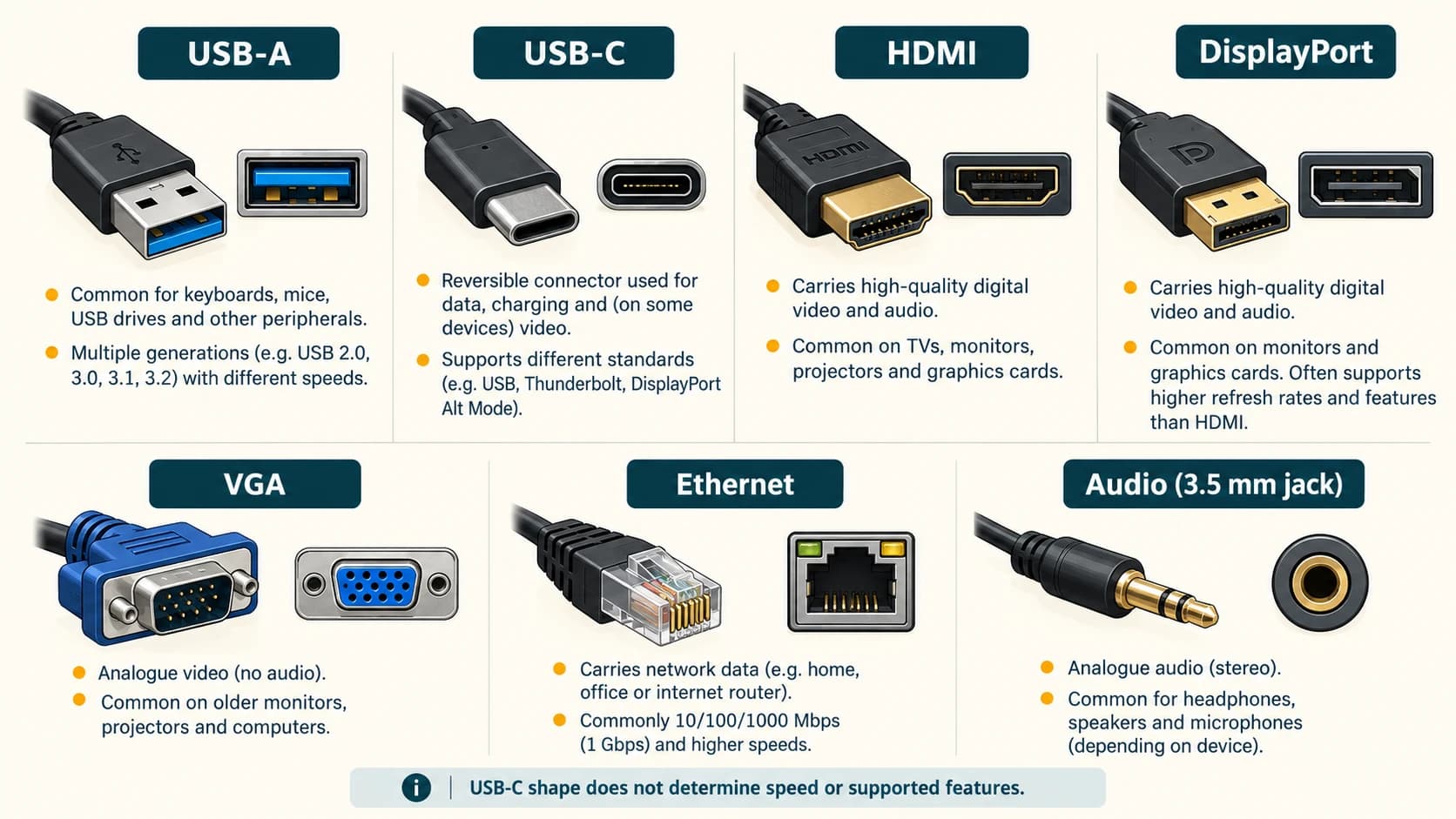
Important caution: USB-C is not a speed label
USB Type-C identifies a connector design. It does not by itself guarantee a specific USB transfer speed, fast charging capability, Thunderbolt support or video output. Actual capabilities depend on the computer/device, cable and supported specifications. Likewise, Thunderbolt may use a USB-C-shaped connector while adding its own protocol requirements. Even two cables with identical plugs can support different features.
USB Power Delivery (USB PD) is a specification used to negotiate supported power delivery. A connector can be physically correct but the device/cable may still lack the advertised data or power capability. For an exam, the simplest correct pairing remains USB → peripheral/data connection, HDMI/DisplayPort → digital display, Ethernet → wired networking.
Internal connections: do not confuse with external ports
- SATA: commonly connects internal HDDs and SATA SSDs.
- PCIe: high-speed internal expansion/interface for cards and some SSDs.
- M.2: internal module/socket form factor used by SSDs and some other devices.
- RAM slot: holds memory modules; not a USB port.
Internal sockets are not “output devices” merely because they transfer data.
Common peripherals and their roles
| Peripheral | Role |
|---|---|
| Keyboard and mouse | Input |
| Scanner / barcode reader | Input |
| Fingerprint reader | Biometric input |
| Monitor | Output |
| Printer | Output |
| Speaker/headphones | Output |
| Webcam | Input |
| Touchscreen | Input and output |
| External SSD | Secondary storage |
| Network adapter | Communications interface |
| UPS (uninterruptible power supply) | Temporary power backup and power protection; not document storage |
Plug and Play (PnP) refers to system support for recognizing and configuring compatible hardware with limited user effort. It does not guarantee a device will work without drivers or that any cable can be plugged into any socket.
Worked examples
Example 1 — Connecting a screen: A computer connects to a modern TV with sound through one suitable HDMI cable. HDMI commonly carries digital video and audio.
Example 2 — Networking: A branch workstation plugs an Ethernet cable into a local switch. This establishes a potential wired network connection, not automatic proof of internet access.
Example 3 — USB-C cable mismatch: Two USB-C cables fit the same ports, but one supports only slower data transfer or limited power. Connector shape alone does not determine the supported functionality.
Important terms
| Term | Meaning |
|---|---|
| Port | Hardware communication interface |
| Connector | Physical plug/socket used for a connection |
| Peripheral | Attached device providing input, output, storage or communication |
| USB | Universal Serial Bus |
| HDMI | High-Definition Multimedia Interface |
| VGA | Video Graphics Array, often used for a legacy analog video connector |
| Ethernet | Family of wired local-network technologies |
| PnP | Plug and Play, device discovery/configuration support |
| UPS | Uninterruptible power supply |
Common confusions
- USB-C connector ≠ guaranteed high data rate: check capabilities.
- HDMI versus USB: HDMI is principally an audio/video interface; USB is a general peripheral/data interface.
- Ethernet versus internet: a wired network connection does not guarantee access to the wider internet.
- Port versus protocol: the physical socket and the communication rules are distinct concepts.
- UPS versus storage: a UPS supplies temporary electrical backup, not a place to save files.
- Plug and Play versus universal compatibility: device support still matters.
Fact to remember
USB = Universal Serial Bus. HDMI = High-Definition Multimedia Interface. Ethernet = wired networking. VGA = legacy analog video. USB Type-C describes a connector, not a fixed speed, power level or display feature.
Quick revision
- General peripheral connection → USB.
- Common reversible USB connector → USB Type-C.
- Digital display + audio → HDMI.
- Display connection → DisplayPort.
- Old analog monitor → VGA.
- Wired LAN → Ethernet.
- Earphones/headset → audio jack (depending on device).
- Keyboard/mouse historical port → PS/2.
Practice questions — CA-02-08
Q1. USB stands for:
A. Universal Serial Bus · B. Unified Storage Base · C. Universal Software Board · D. User System Backup
Q2. Which interface is commonly used to carry digital video and audio to a television?
A. HDMI · B. PS/2 · C. SATA power cable · D. DIMM slot
Q3. An Ethernet port is commonly used for:
A. Wired networking · B. Printing directly on paper · C. CPU cooling · D. Measuring pixels
Q4. USB Type-C most directly specifies:
A. A universal fixed speed · B. A connector form · C. A disk file format · D. A type of RAM
Q5. Which is a legacy analog display connector?
A. VGA · B. HDMI · C. Ethernet · D. SATA
Q6. Which device is a peripheral mainly used for output?
A. Monitor · B. Keyboard · C. Barcode reader · D. Microphone
Q7. The old PS/2 port was mainly associated with:
A. Keyboard and mouse · B. CD recording only · C. Network fibre optic cables · D. Processor cache
Q8. Which statement about two USB-C cables with the same plug shape is correct?
A. They must offer identical features · B. They may differ in data and power capabilities · C. Neither can transfer data · D. Both are optical discs
Q9. A UPS is primarily intended to:
A. Provide temporary backup power · B. Store ordinary documents like an SSD · C. Perform ALU calculations · D. Print account statements
Q10. What does Plug and Play generally describe?
A. Automatic discovery/configuration of compatible devices · B. A requirement to solder every mouse · C. Guaranteed internet access · D. A kind of optical disc
Q11. Which connector is primarily associated with wired local networks in common PC exam terminology?
A. RJ45-style Ethernet connector · B. 3.5 mm headphone jack · C. HDMI cable plug · D. VGA video plug
Q12. Which is the best example of an external storage peripheral?
A. External SSD · B. Control unit · C. Program counter · D. CPU register
Answers and explanations — CA-02-08
| Q | Answer | Why |
|---|---|---|
| 1 | A | USB is Universal Serial Bus. |
| 2 | A | HDMI commonly carries digital audio/video signals. |
| 3 | A | Ethernet is used for wired network communication. |
| 4 | B | USB-C names the reversible connector form. |
| 5 | A | VGA is commonly used as the legacy analog video-port name. |
| 6 | A | A monitor displays visual output. |
| 7 | A | PS/2 is associated with older keyboards and mice. |
| 8 | B | Connector shape does not guarantee protocol, speed or power support. |
| 9 | A | A UPS keeps equipment powered briefly during interruptions. |
| 10 | A | Plug and Play helps recognize and configure supported devices. |
| 11 | A | A familiar modular 8P8C Ethernet connection is often called RJ45. |
| 12 | A | An external SSD provides persistent file storage. |