
System Software vs Application Software
System Software vs Application Software. Foundational Computer Awareness explanations, examples and explained practice questions for banking and recruitment exam preparation.
By Akhilesh Saini
What you will learn
- What software means and how it differs from physical hardware.
- The purposes of system software and application software.
- How to classify operating systems, drivers, utilities, word processors and browsers.
- Why an application depends on several underlying software layers.
Why this topic matters
Recruitment-exam questions often provide four names and ask which one is system software, or whether a web browser is an operating system. Rather than memorize a random list, use this question: Does it mainly manage/provide the computing environment, or help the user perform a particular task?
Software: the instructions, not the device
Software is the collection of programs, instructions and related data that direct a computing system. Hardware is the physical equipment—such as the processor, RAM, keyboard and monitor. A keyboard is hardware; the program that recognizes key events and displays typed characters is software.
A program is a set of instructions. A software package or application can contain many programs, supporting files and libraries. These terms overlap in everyday use, but the key awareness point is that software is not a physical component.
The two broad software categories
System software provides and manages the environment in which other programs work. It includes an operating system (OS), many drivers, system utilities and certain language-processing tools. Application software serves a particular user-oriented purpose, such as editing a document, calculating spreadsheet totals or accessing a bank's authorized transaction software.
| Feature | System software | Application software |
|---|---|---|
| Primary purpose | Operate/manage computer resources and provide common services | Perform tasks useful to people or organizations |
| Common examples | Operating system, device driver, system-management utility | Word processor, browser, accounting package, image editor |
| Relationship to hardware | Often handles hardware access and resource management | Usually requests services from OS or system libraries |
| Runs automatically? | Many components start without explicit user action | Often launched when needed; background apps also exist |
| Essential distinction | Supplies/maintains the computing environment | Uses that environment to accomplish a task |
Examples: Windows and Linux are operating systems. A driver that allows a printer to communicate with a computer is system software. A PDF reader that opens a downloaded statement is application software. A backup tool may be described as a utility; in foundational exam classifications, system maintenance utilities are generally placed under system software.
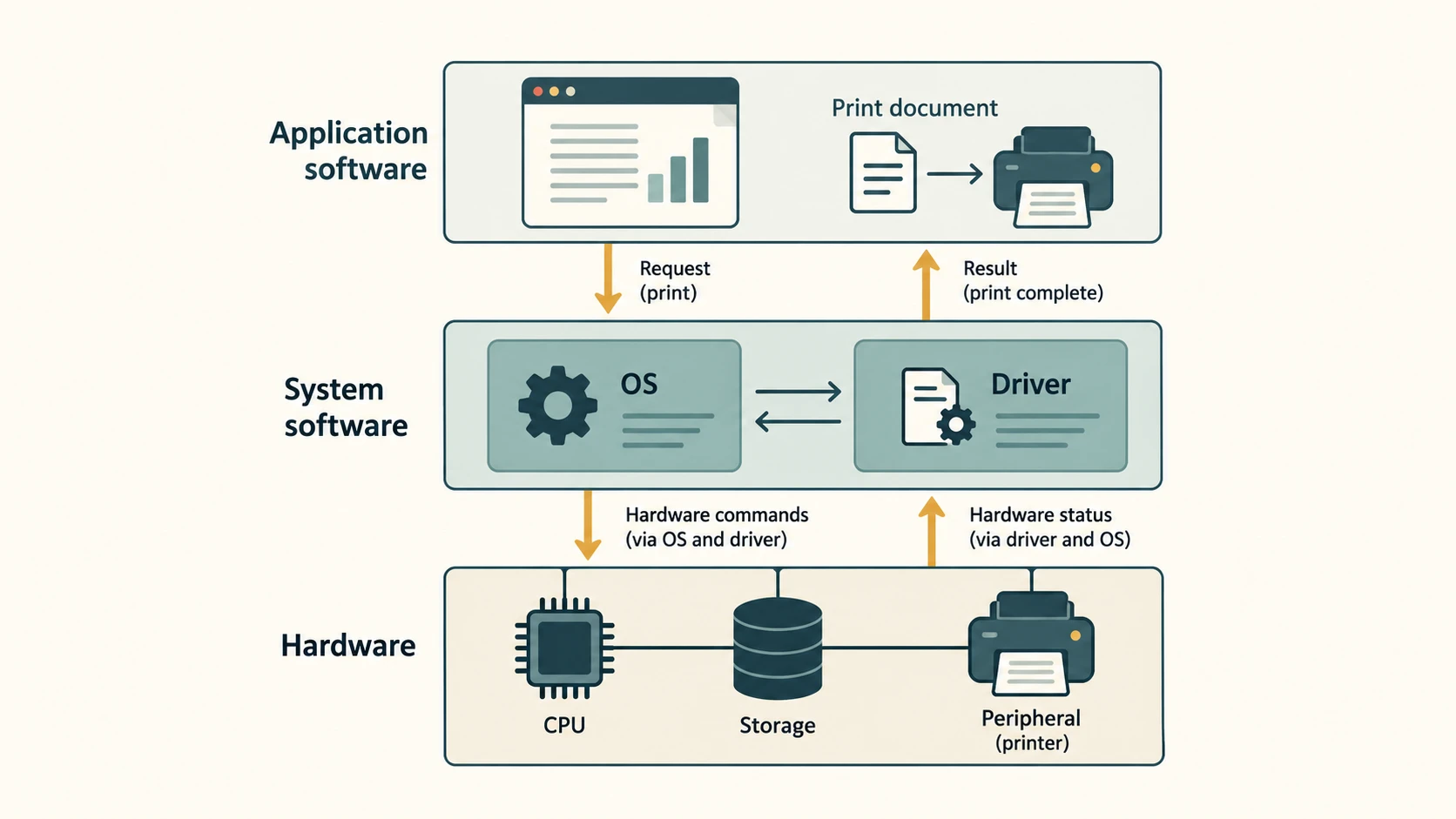
An application works through layers
Suppose a bank employee opens a spreadsheet and presses Print:
- The spreadsheet application prepares the cells and printable pages.
- It asks the operating system's printing services to send the job.
- A suitable printer driver translates requests into instructions the printer can use.
- The printer hardware produces the paper copy.
This layered description is simplified, but it prevents the common mistake of treating an application as if it directly controls every hardware component.
General-purpose, special-purpose and packaged applications
Application software may be general-purpose (such as a browser or text editor) or special-purpose/customized (such as an organization's specific inventory or account-management application). It may be installed locally, accessed through a web browser, or delivered in another supported form. These delivery methods do not turn a normal end-user application into an operating system.
Licensed/proprietary software and open-source software describe licensing and source availability, not the system-versus-application distinction. An operating system and an application can each be proprietary or open-source.
Worked examples
Example 1 — Antivirus: An antivirus program scans files for potential threats. It is commonly classified as a security utility or system utility for basic objective questions. Its role is maintenance/protection, not document writing.
Example 2 — Web browser: A browser may be included with an OS, but its user-facing purpose is to access web content and applications. Therefore it is application software.
Example 3 — OS with a graphical interface: The desktop, taskbar and windows are part of a user's OS experience; an office spreadsheet running on that desktop is still an application.
Important terms
| Term | Beginner-friendly meaning |
|---|---|
| Hardware | Tangible physical equipment |
| Software | Programs/instructions and related resources |
| Operating system | System software that manages hardware and software resources |
| Application | Software intended to accomplish a user/business task |
| Driver | Software that enables interaction with a specific device or device class |
| Utility | Software for maintenance, administration, protection or optimization |
| Open source | Software distributed under a license allowing access, modification and redistribution of source under stated conditions |
Common confusions
- Preinstalled does not mean system software. A factory-installed browser remains an application.
- Free does not mean open-source. A product can be free to use but have closed source.
- Utility is a purpose/category, not a universal hardware label. Many utilities are considered system software in basic classifications.
- Software versus data: A document is typically data being processed by a program, not the word-processing software itself.
Fact to remember
System software runs and manages the computing environment; application software helps complete user tasks. An operating system is the standard example of system software; a word processor is the standard example of application software.
Quick revision
| Exam clue | Best answer |
|---|---|
| Manages memory and processes | Operating system (system software) |
| Controls use of a printer model | Device driver (system software) |
| Creates/edit documents | Word processor (application software) |
| Visits websites | Web browser (application software) |
| Maintains or scans a disk | Utility (typically system software) |
| Source code available under appropriate license | Open-source software |
Practice questions — CA-03-01
Q1. Which of these is normally classified as system software?
A. Word processor · B. Operating system · C. Photo editor · D. Web browser
Q2. A customer-accounting package used at a branch is primarily:
A. Application software · B. Firmware · C. A CPU component · D. System boot code
Q3. A program that allows an OS to communicate with a model of printer is a:
A. Spreadsheet · B. Slide editor · C. Device driver · D. Webpage
Q4. Which pairing is correct?
A. Browser—hardware · B. OS—application software · C. Mouse—software · D. Word processor—application software
Q5. An antivirus scanning tool is most commonly called a:
A. Storage chip · B. Security utility · C. CPU register · D. Source document
Q6. An office computer has a browser preinstalled. Is the browser therefore system software?
A. Yes, factory installation makes all software system software · B. Yes, any internet tool is an OS · C. No, its normal role is application software · D. No, it is automatically hardware
Q7. Which statement best describes hardware and software?
A. Hardware is physical, software contains programs and instructions · B. Both mean the keyboard · C. Only software uses electricity · D. Software is always stored on paper
Q8. Which of the following is best described as data rather than application software?
A. Installed PDF reader · B. Spreadsheet program · C. Printer driver · D. A saved annual-report PDF document
Q9. A user clicks Print in a spreadsheet. Which component usually coordinates the printing service?
A. Monitor glass · B. Operating system · C. Keyboard keycap · D. Paper tray
Q10. Which claim about open-source software is most accurate?
A. It is always application software · B. It cannot be an OS · C. Its license permits source access and certain reuse/modifications under stated conditions · D. It never uses a license
Q11. Which example shows application software working with system software?
A. A PDF reader asks the OS to open a stored file · B. A cable is itself an OS · C. A mouse converts into a word processor · D. A monitor becomes a utility
Q12. Why is system software important for applications?
A. It is identical to every application · B. It always contains the user's personal documents · C. It physically replaces the CPU · D. It provides common services and manages resources that applications use
Answers and explanations — CA-03-01
| Q | Correct answer | Explanation |
|---|---|---|
| 1 | B. Operating system | An operating system manages computing resources and supplies services for other programs; the others are primarily user-task applications. |
| 2 | A. Application software | It performs an organization-specific task; it relies on the OS and other software for access to hardware and storage. |
| 3 | C. Device driver | A device driver supports OS-to-device communication and is therefore classified as system software. |
| 4 | D. Word processor—application software | A word processor helps a user create documents; the browser is also an app, the OS is system software and the mouse is hardware. |
| 5 | B. Security utility | Antivirus tools are utilities for protection and system maintenance, rather than parts of the processor or a saved document. |
| 6 | C. No, its normal role is application software | How an app was installed does not define its category; web browsing is a user-oriented software task. |
| 7 | A. Hardware is physical, software contains programs and instructions | Hardware refers to tangible components while software represents executable instructions and supporting program resources. |
| 8 | D. A saved annual-report PDF document | The PDF document is content being opened or processed; the reader is an application and the driver is system software. |
| 9 | B. Operating system | The application requests printing; OS services manage the operation and commonly use a driver to communicate with the printer. |
| 10 | C. Its license permits source access and certain reuse/modifications under stated conditions | Open-source describes licensing/source availability rather than system/application function, and open-source licenses still have terms. |
| 11 | A. A PDF reader asks the OS to open a stored file | The reader performs the user's task while relying on operating-system services to find and access the saved file. |
| 12 | D. It provides common services and manages resources that applications use | Applications commonly depend on system software for memory, files, processes, hardware communication and security services. |