
Operating System: Purpose and Main Functions
Operating System: Purpose and Main Functions. Foundational Computer Awareness explanations, examples and explained practice questions for banking and recruitment exam preparation.
By Akhilesh Saini
What you will learn
- Why a computer needs an operating system.
- The OS's roles in process, memory, file and device management.
- User interfaces, permissions and basic security services.
- The difference between a program stored on disk and one running as a process.
Why this topic matters
An OS is often called the intermediary between a user/applications and hardware. Exams also ask which OS function handles files, how multitasking works or what allocates memory to a running program. Understanding these roles helps answer all such questions.
What is an operating system?
An operating system (OS) is system software that manages computer resources and supplies services and interfaces used by applications and people. It makes a general-purpose computer practical: you can launch programs, access saved files, enter input, print documents and communicate over a network without personally controlling each hardware instruction.
The kernel is the central part of an OS responsible for core services such as scheduling execution, coordinating memory and handling hardware interactions. The full OS usually also includes supporting components and interfaces. Kernel and complete operating system are not identical terms.
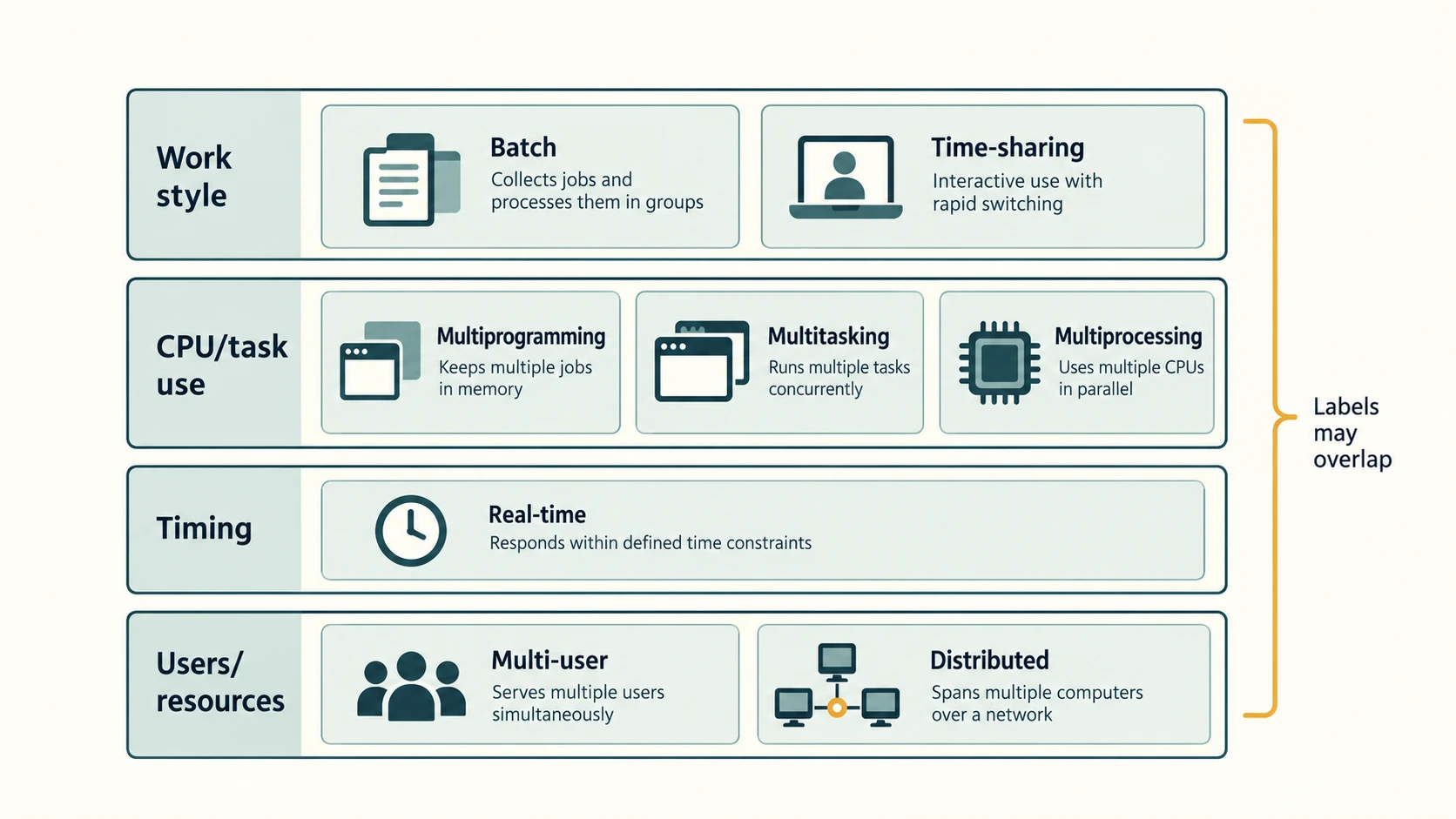
Main OS functions
| Function | What the OS does | Everyday illustration |
|---|---|---|
| Process management | Starts, schedules, coordinates and ends running processes | Browser and calculator both respond |
| Memory management | Allocates/protects working memory and manages virtual-memory mechanisms | Several apps keep active data in RAM |
| File-system management | Organizes files, directories and operations on stored information | Save a document in a folder |
| Device / I/O management | Coordinates access to devices with help from drivers | Scan a paper page; print a receipt |
| User interface | Provides access through graphical and/or command interfaces | Open an app using a desktop or terminal |
| Security and access control | Maintains identities, permissions and isolation mechanisms | Different accounts have different access |
| Networking services | Supports communications and network connections | Retrieve a permitted resource from a server |
| Error handling / accounting | Reports problems and may record or track resource use | Log a failed service or application event |
These functions differ in detail across platforms, but the general categories are stable.
Program versus process
A program is stored instructions; a process is an instance of a program being executed with resources assigned by the OS. The same program may run in more than one process. One process can also contain more than one thread (an execution sequence within the process). For this introductory track, remember: program = instructions; process = executing instance.
How multitasking works
With multitasking, the OS allows more than one task/process to make progress during the same period. On one CPU core it can switch rapidly between tasks (time-sharing), creating the experience of simultaneous activity. On a multicore machine, different tasks can also run literally at the same instant on different cores. Therefore multitasking does not automatically imply multiple processors.
Memory and virtual memory
Programs and their active data need working memory. The OS tracks allocation, helps prevent one process from accidentally using protected memory belonging to another, and can use virtual memory. Virtual memory gives processes managed address spaces, with some data potentially moved to backing storage as needed. It is not simply a synonym for extra RAM or an SSD. Detailed paging algorithms are outside this awareness lesson.
File and device access
When you save a report, the application requests an OS file operation. The OS and filesystem cooperate to store and retrieve its bytes. When you print, the OS coordinates a printing path, often using a queue and printer driver. Drivers were introduced in CA-03-01 and are covered in depth in CA-03-06.
Worked example: three tasks at a branch counter
An employee views an account statement, edits a document and starts a print job. The OS may allocate each running application's memory, schedule CPU work, allow the document to be saved in the user's permitted folder and queue printing. The applications perform the business tasks; the OS coordinates shared resources. Actual bank systems may add servers, access controls and audit procedures not shown in this simplified model.
Important terms
| Term | Meaning |
|---|---|
| OS | Operating system |
| Kernel | Core operating-system component providing fundamental resource services |
| Process | Running instance of a program |
| Thread | Execution path within a process |
| Multitasking | Several tasks making progress over the same period |
| Scheduling | Choosing when runnable work receives processor time |
| Virtual memory | OS/hardware-supported mechanism for managed virtual address spaces |
| File system | Structures and rules for organizing stored files and directories |
| Permission | Rule specifying allowed access/action for a user or process |
Common confusions
- OS versus CPU: The OS is software; the CPU is hardware executing instructions.
- Program versus process: An
.exeor other program file can exist without currently running. - Multitasking versus multiprocessing: Multitasking can happen on one CPU/core; multiprocessing uses multiple processors/cores.
- Memory management versus file management: Active memory allocation differs from organization of persistent files.
- Security is not automatic perfection: An OS provides controls, but safe configuration, updates and user behavior remain important.
Fact to remember
An OS manages processes, memory, files, devices, user access and system services. A kernel is its central technical component; a process is a running program instance.
Quick revision
| Question asks about | OS area |
|---|---|
| Starting/scheduling programs | Process management |
| Allocating RAM | Memory management |
| Creating/renaming folders | File management |
| Handling printer requests | Device/I/O management |
| Login and access rights | User/security management |
| Connecting over a network | Networking services |
Practice questions — CA-03-02
Q1. Which software is chiefly responsible for managing a computer's memory and processes?
A. Operating system · B. PDF file · C. Scanner · D. Spreadsheet cell
Q2. What is a process?
A. A monitor showing an image · B. An executing instance of a program · C. A saved image file · D. An internet address
Q3. Which is a central component of an OS?
A. Mouse pad · B. Power cable · C. Kernel · D. Printer paper
Q4. An OS decides which runnable task receives CPU time. This is:
A. Printing · B. File compression · C. Optical scanning · D. Scheduling
Q5. Saving a document into Reports chiefly uses the OS's:
A. File management · B. Speaker volume · C. Display brightness · D. Clock display
Q6. Which function is associated with allocating RAM to an active program?
A. Slide design · B. Memory management · C. Image capture · D. Ink replenishment
Q7. What is correct about multitasking?
A. It needs a separate monitor for every task · B. It requires exactly two CPUs · C. Multiple tasks can make progress by scheduled switching on one core · D. It means the computer runs no applications
Q8. A thread is best described as:
A. A keyboard wire · B. A disk partition · C. A USB standard · D. An execution path within a process
Q9. Which OS service most directly handles a printer request?
A. Device / I/O management · B. Presentation animation · C. Web search · D. Spreadsheet chart design
Q10. Virtual memory is best described as:
A. A bigger physical RAM module · B. A managed address-space mechanism that may use backing storage · C. A type of printed paper · D. Always a separate external SSD
Q11. When two users have different file access rights, the OS is using:
A. A graphics filter · B. Text wrapping · C. Access control and permissions · D. Audio equalization
Q12. Which statement is true?
A. The OS and CPU are identical · B. A process must be the same as a folder · C. Multitasking guarantees four physical cores · D. An OS supports applications through common system services
Answers and explanations — CA-03-02
| Q | Correct answer | Explanation |
|---|---|---|
| 1 | A. Operating system | Memory allocation and process scheduling are core operating-system responsibilities. |
| 2 | B. An executing instance of a program | A program is stored instructions; a process is a running instance with execution context and resources. |
| 3 | C. Kernel | The kernel provides core services for processor scheduling, memory and hardware interactions. |
| 4 | D. Scheduling | Scheduling selects work to run on the processor, part of process management. |
| 5 | A. File management | The file-system and OS organize persistent files and directories and service save/open requests. |
| 6 | B. Memory management | Working-memory allocation and protection are memory-management tasks. |
| 7 | C. Multiple tasks can make progress by scheduled switching on one core | Time-slicing permits several tasks to progress even if a single core executes only one task at a given instant. |
| 8 | D. An execution path within a process | Threads are schedulable execution sequences within processes, not hardware cables or storage layouts. |
| 9 | A. Device / I/O management | The OS coordinates input/output with devices and may invoke a driver and a printer queue. |
| 10 | B. A managed address-space mechanism that may use backing storage | Virtual memory organizes process address spaces and can use storage backing; it is not synonymous with a physical memory module. |
| 11 | C. Access control and permissions | Permissions and identity checks help prevent unauthorized access to stored resources. |
| 12 | D. An OS supports applications through common system services | The OS is software supporting execution and hardware access, while the CPU is physical processing hardware. |