
Software and Operating Systems
Computer Awareness lessons on system and application software, operating systems, OS types, GUI and CLI, major operating-system families, utilities and firmware, language translators, booting, files, folders and extensions, with 96 explained MCQs.
Track: Computer Awareness for Banking and Recruitment Examinations
Level: Beginner
Scope: Eight complete lessons (CA-03-01 through CA-03-08)
Practice: 96 original multiple-choice questions with explained answers
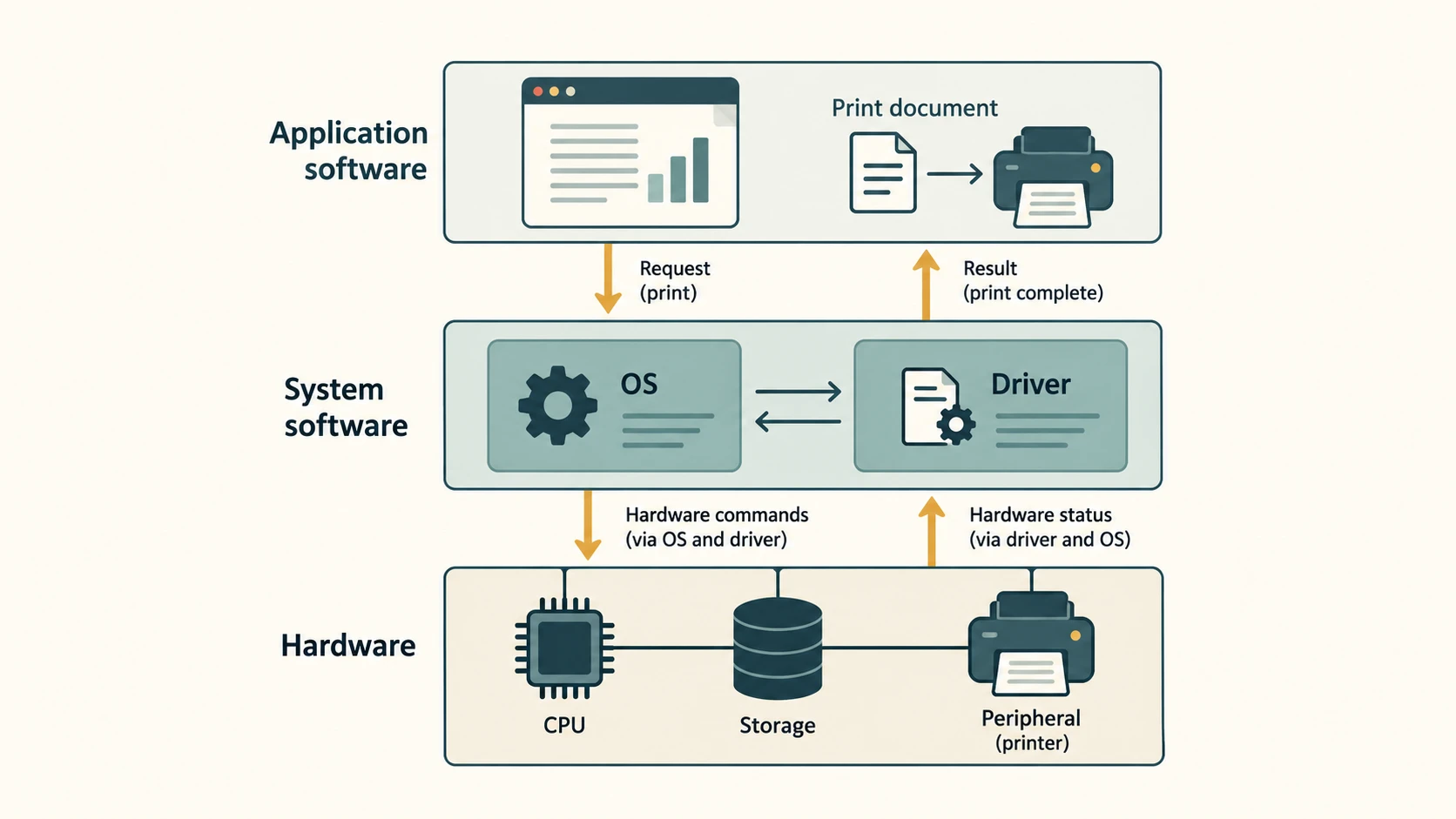
A computer's hardware becomes useful when software tells it what to do. The operating system manages the hardware, makes applications usable, and helps you organize files. These ideas appear repeatedly in computer-awareness questions: a question may ask whether a printer driver is system software, what makes a process different from a program, or why a file extension cannot guarantee that a document is safe.
This module builds understanding before asking you to memorize names. It uses common office and banking situations, but does not assume that every organization uses the same operating system or software.
How to study: Read the explanations, trace the examples, then memorize the highlighted distinctions. Answer each lesson's 12 original MCQs before checking the explanations. These are exam-style practice questions, not claims of authentic previous-year questions.
What you will learn
- Distinguish system software from application software using examples.
- Explain how an operating system manages processes, memory, files, devices, users and security.
- Identify batch, time-sharing, multiprogramming, multiprocessing, real-time and distributed system concepts.
- Compare graphical and command-line interfaces without confusing an interface with an operating system.
- Recognize essential facts about Windows, Linux, macOS, Android and iOS.
- Explain utilities, device drivers and firmware and their different roles.
- Distinguish a compiler, interpreter and assembler at exam-awareness level.
- Explain booting, file paths, folders, extensions and safe file handling.
Chapters
System Software vs Application Software
System Software vs Application Software. Foundational Computer Awareness explanations, examples and explained practice questions for banking and recruitment exam preparation.
Operating System: Purpose and Main Functions
Operating System: Purpose and Main Functions. Foundational Computer Awareness explanations, examples and explained practice questions for banking and recruitment exam preparation.
Types of Operating Systems
Types of Operating Systems. Foundational Computer Awareness explanations, examples and explained practice questions for banking and recruitment exam preparation.
GUI vs CLI
GUI vs CLI. Foundational Computer Awareness explanations, examples and explained practice questions for banking and recruitment exam preparation.
Windows, Linux, macOS, Android and iOS Basics
Windows, Linux, macOS, Android and iOS Basics. Foundational Computer Awareness explanations, examples and explained practice questions for banking and recruitment exam preparation.
Utilities, Device Drivers and Firmware
Utilities, Device Drivers and Firmware. Foundational Computer Awareness explanations, examples and explained practice questions for banking and recruitment exam preparation.
Compiler, Interpreter and Assembler
Compiler, Interpreter and Assembler. Foundational Computer Awareness explanations, examples and explained practice questions for banking and recruitment exam preparation.
Booting, Files, Folders and File Extensions
Booting, Files, Folders and File Extensions. Foundational Computer Awareness explanations, examples and explained practice questions for banking and recruitment exam preparation.