
Utilities, Device Drivers and Firmware
Utilities, Device Drivers and Firmware. Foundational Computer Awareness explanations, examples and explained practice questions for banking and recruitment exam preparation.
By Akhilesh Saini
What you will learn
- Why utilities are used for maintenance, security, backup and administration.
- How device drivers help an OS communicate with peripherals.
- What firmware is and why it often resides in non-volatile memory.
- How to distinguish firmware, a driver, an application and an OS.
Why this topic matters
A printer-driver question, a disk-cleanup question and a BIOS/UEFI question may look unrelated. All are easier when you learn the distinct roles of utility (maintenance), driver (device communication) and firmware (low-level device control/startup).
Utility software
A utility is a program designed to inspect, maintain, protect, repair, organize or manage aspects of a computer system. Familiar examples include:
| Utility category | Typical purpose | Important caution |
|---|---|---|
| Antivirus/anti-malware | Detect, block or remove known/suspicious threats | Cannot guarantee safety from every attack |
| Backup utility | Copy files or system data for recovery | A backup needs suitable storage and restoration testing |
| Disk cleanup | Remove selected temporary/unneeded files | Must avoid deleting needed information |
| Disk check/diagnostic | Detect some storage or filesystem issues | Does not replace hardware repair |
| File compression/archiving | Combine or reduce size of files | Compression is not the same as backup or encryption |
| Firewall management | Configure/inspect traffic rules | Firewall is not an antivirus substitute |
| Storage optimization | Perform maintenance suited to a storage medium | Operations appropriate for HDD may differ from SSD |
A disk defragmenter reorganizes file fragments to improve access patterns on certain traditional hard drives. Defragmenting an SSD as if it were an HDD is not generally the relevant optimization method; modern systems manage SSDs differently. The exact utilities shipped with an OS may vary.
Device drivers
A device driver is software that enables an operating system to interact with hardware or a device class through a defined interface. The OS/application asks for an operation; driver and other lower layers help translate that request into device-appropriate instructions.
Printer example: A document app requests printing → OS print services manage the request → suitable driver helps communicate with the printer → printer produces paper. A driver does not transform the printer into application software. Drivers can be included with an OS, provided by a vendor, or obtained through approved updates.
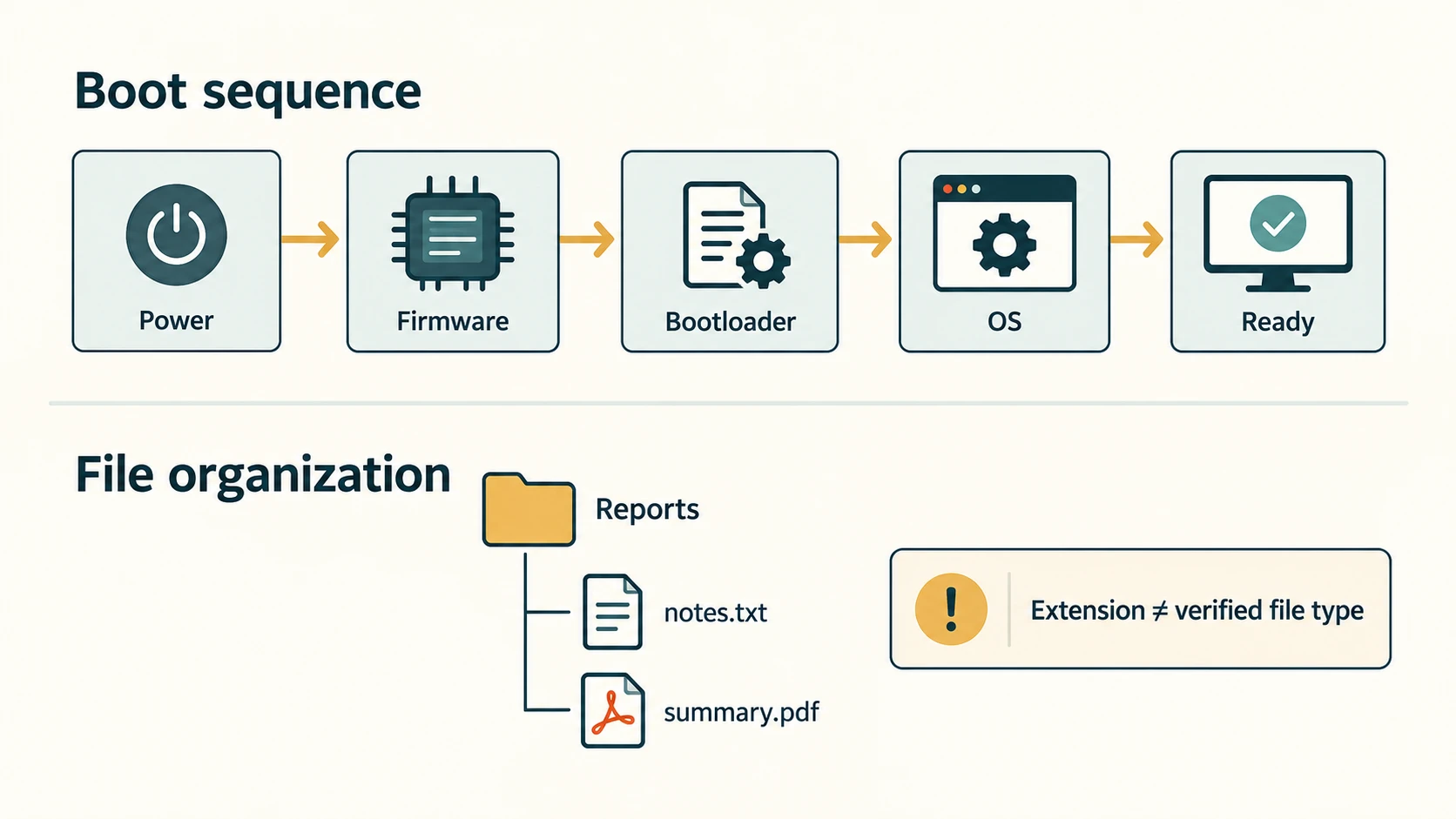
Firmware
Firmware is software stored in non-volatile memory closely associated with a device's low-level operation or startup. It often initializes hardware or provides basic control routines. It may be updated through a carefully controlled process.
A PC typically uses UEFI firmware (historically, BIOS is the familiar textbook term) to perform startup preparation and launch the next stage of booting. Firmware also exists in printers, network equipment, storage devices and other electronics.
The phrase "firmware = permanent, unchangeable software" is not generally correct: much modern firmware resides in rewritable flash memory and can be updated. However, an incorrect firmware update can prevent a device from starting, so updates should follow authentic instructions and reliable power arrangements.
BIOS and UEFI at awareness level
| Term | Meaning | Exam perspective |
|---|---|---|
| BIOS | Basic Input/Output System, familiar name for classic PC startup firmware | Often asked as a full form |
| UEFI | Unified Extensible Firmware Interface, modern PC firmware interface/specification | Associated with current-style boot preparation and boot management |
| POST | Power-On Self-Test, initial hardware checks performed during startup | May be part of early firmware startup |
| Bootloader/boot manager | Software stage that locates/starts OS loading | Distinct from the full operating system |
POST and startup steps vary by device; do not treat every computer as using one identical BIOS screen.
Worked examples
Example 1 — A new scanner is connected: A suitable driver may allow the OS to use scanner functions. The scanning application remains application software; it may rely on that driver.
Example 2 — A missing file needs recovery: First locate backup or recovery options; a disk-cleanup utility would not recreate missing work just because it maintains storage.
Example 3 — A router's firmware is updated: Firmware updates affect the device's built-in control software. They are different from installing a word processor on a PC.
Important terms
| Term | Meaning |
|---|---|
| Utility | Maintenance/administration/security software |
| Driver | Software facilitating OS-device communication |
| Firmware | Device-associated low-level software in non-volatile storage |
| BIOS | Basic Input/Output System |
| UEFI | Unified Extensible Firmware Interface |
| POST | Power-On Self-Test |
| Defragmentation | Reorganizing stored file fragments, historically useful for HDD access |
| Backup | A retained recoverable copy of selected information |
Common confusions
- Driver ≠ hardware. The printer is hardware; the printer driver is software.
- Firmware ≠ ordinary user app. Firmware operates close to hardware and startup.
- Firmware ≠ necessarily ROM that cannot be updated. Non-volatile flash can be rewritten.
- Backup ≠ automatic synchronization. A synchronized deletion can propagate; independent recoverable backup copies are preferable.
- Antivirus ≠ firewall. Threat detection and network-traffic filtering are different functions.
- Compression ≠ encryption. Smaller files are not automatically confidential.
Fact to remember
Utility = maintain/protect; driver = connect OS and device; firmware = low-level device/startup software. BIOS is the classic PC firmware term; UEFI is a modern firmware interface.
Quick revision
| Exam clue | Correct category |
|---|---|
| Recognizes a printer device | Device driver |
| Creates a recoverable copy | Backup utility |
| Searches for malicious code | Anti-malware utility |
| Initializes hardware during startup | Firmware |
| Full form of BIOS | Basic Input/Output System |
| Full form of POST | Power-On Self-Test |
| Built-in device control stored persistently | Firmware |
Practice questions — CA-03-06
Q1. Which utility category is designed to create recoverable file copies?
A. Backup utility · B. Display resolution editor · C. Word processor · D. Keyboard switch
Q2. What is the main role of a device driver?
A. Compress images into ZIP · B. Help the OS interact with a device · C. Provide electricity to the CPU · D. Display only videos
Q3. Which is a common example of firmware?
A. Spreadsheet formula · B. Printed contract · C. UEFI startup code in non-volatile memory · D. Desk fan
Q4. BIOS stands for:
A. Binary Internet Operating Service · B. Basic Internal Office Software · C. Boot Interface Output Standard · D. Basic Input/Output System
Q5. UEFI stands for:
A. Unified Extensible Firmware Interface · B. Universal Email File Interpreter · C. User External Format Index · D. Unified Ethernet File Interface
Q6. What does POST commonly refer to during startup?
A. Printing an office document · B. Power-On Self-Test · C. Portable Open Source Tool · D. Process Output Storage Table
Q7. Which claim about firmware is correct?
A. It is always impossible to update · B. It is the same as printer paper · C. Modern firmware may be stored in rewritable non-volatile flash · D. It only exists in computer monitors
Q8. Which statement correctly contrasts antivirus and firewall functions?
A. Both are physical USB cables · B. Both always remove files after printing · C. Firewall means file compression · D. Antivirus scans for threats; a firewall controls network traffic according to rules
Q9. Disk defragmentation is classically most associated with optimizing:
A. Mechanical HDD file access · B. LCD screen colors · C. Wi-Fi antenna direction · D. A PDF font
Q10. Does a ZIP archive automatically provide a secure encrypted backup?
A. Yes, because smaller means encrypted · B. No, compression/archiving, encryption and backup are distinct · C. Yes, all ZIP files are immutable · D. Yes, it always creates three remote copies
Q11. A printer application opens correctly, but the OS cannot use the attached printer. Which software might need checking?
A. Browser bookmarks · B. Audio playlist · C. Printer driver · D. Presentation theme
Q12. Which is safest when offered an unknown firmware update file?
A. Install it because firmware is an application · B. Ignore vendor compatibility · C. Disconnect power during installation · D. Verify source, compatibility and official update instructions
Answers and explanations — CA-03-06
| Q | Correct answer | Explanation |
|---|---|---|
| 1 | A. Backup utility | Backup utilities create retained copies for potential restoration after accidental loss or failure. |
| 2 | B. Help the OS interact with a device | Drivers implement device-facing communication and capabilities for OS services. |
| 3 | C. UEFI startup code in non-volatile memory | UEFI is low-level platform firmware used in initialization and startup; it is software, not the hardware fan. |
| 4 | D. Basic Input/Output System | BIOS is the classic abbreviation for Basic Input/Output System. |
| 5 | A. Unified Extensible Firmware Interface | UEFI names the modern PC firmware interface specification/platform firmware environment. |
| 6 | B. Power-On Self-Test | POST is a startup hardware-check concept associated with firmware initialization. |
| 7 | C. Modern firmware may be stored in rewritable non-volatile flash | Firmware often resides in flash and can be updated through suitable authenticated procedures. |
| 8 | D. Antivirus scans for threats; a firewall controls network traffic according to rules | Anti-malware software and firewalls provide different kinds of protection; neither replaces all other precautions. |
| 9 | A. Mechanical HDD file access | Reorganizing fragments historically helps rotating-disk access; SSD maintenance principles differ. |
| 10 | B. No, compression/archiving, encryption and backup are distinct | ZIP usually means archiving and potentially compression; confidentiality and recoverability require separate assurances. |
| 11 | C. Printer driver | The suitable driver/device configuration is directly relevant when a device is not recognized or cannot communicate. |
| 12 | D. Verify source, compatibility and official update instructions | Incorrect or interrupted firmware updates can cause startup problems; authentication, compatibility and reliability matter. |