
GUI vs CLI
GUI vs CLI. Foundational Computer Awareness explanations, examples and explained practice questions for banking and recruitment exam preparation.
By Akhilesh Saini
What you will learn
- The meaning of graphical user interface (GUI) and command-line interface (CLI).
- Common elements of a GUI: windows, icons, menus and pointers.
- How a terminal and a command shell relate to an operating system.
- Strengths, limitations and safe examples of each interaction style.
Why this topic matters
A question may ask what WIMP stands for, what distinguishes a CLI from a GUI, or whether using a terminal changes the underlying operating system. These are easier if you understand that GUI and CLI are interface styles, not necessarily different OS families.
An interface is how you communicate with a system
A user interface (UI) is the method by which people interact with software. A GUI displays graphical objects and receives actions such as clicks and taps. A CLI primarily accepts typed commands and returns text or structured output. A modern OS may offer both.
GUI — graphical user interface
A GUI typically presents windows, icons, menus and a pointer—often remembered by the abbreviation WIMP. On touch-first devices, gestures and touch controls also play a major role, so every GUI is not strictly mouse-dependent.
GUI example: You locate report.pdf in a file manager, double-click or tap it, and the associated PDF reader opens. The file is a document; the file manager is a software interface; the OS supplies services underneath.
CLI — command-line interface
A CLI lets a user enter commands through a shell or command interpreter, commonly displayed inside a terminal. The terminal displays the session; the shell interprets and executes commands or invokes programs. Examples include Command Prompt and PowerShell on Windows, and shells such as Bash and Zsh on Unix-like systems.
CLI example: In a suitable Windows Command Prompt, dir lists directory entries. In a typical Linux/macOS shell, ls lists directory entries. These are illustrative platform-specific commands, not universal commands that work everywhere.
Comparing GUI and CLI
| Consideration | GUI | CLI |
|---|---|---|
| Main interaction | Icons, windows, menus, pointers/touch | Typed commands |
| Learning basic operations | Often easier to discover visually | Requires learning command syntax |
| Repeating many tasks | May need repeated clicks unless automated | Can be efficient with scripts/automation |
| Feedback | Graphical dialogs, windows and status indicators | Text output, errors and exit status |
| Use cases | Daily desktop/mobile operations | Administration, troubleshooting, batch operations |
| Availability | Many desktop/mobile environments | Many desktop/server environments |
Neither is always faster or safer. A GUI can be efficient for complex visual work; a CLI can be efficient for repeated scripted tasks. Both require proper permissions and care.
Shell, terminal and operating system are different
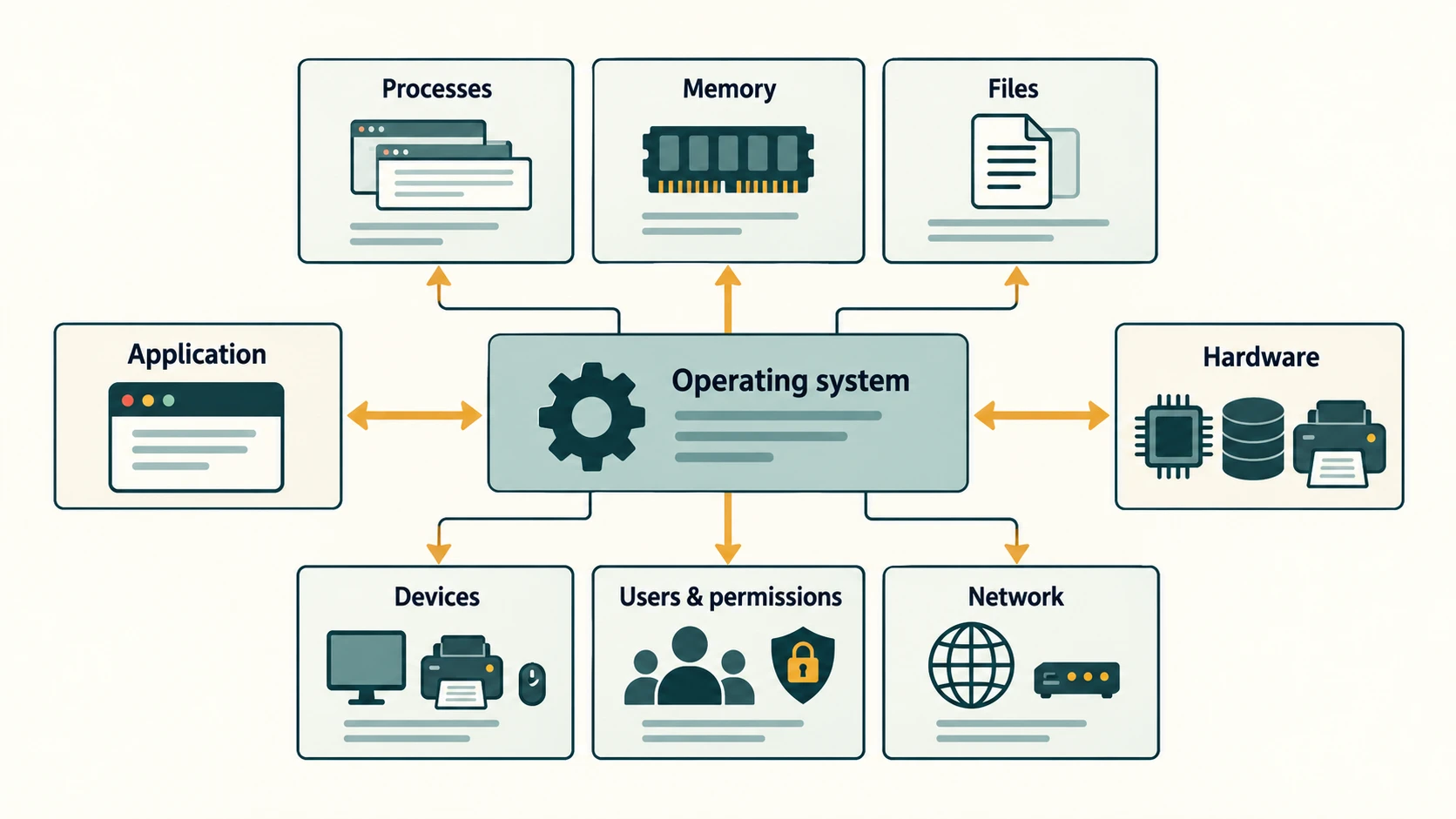
- Operating system: manages processes, memory and devices.
- Shell: interprets commands and launches operations; some shells provide a graphical desktop, while a command shell is text-oriented.
- Terminal/terminal emulator: the interface window/device through which a command-line session is accessed.
- Command: an instruction entered into a shell to perform an action.
A Linux system can offer a full desktop GUI. Windows also offers command-line environments. Therefore GUI = Windows and CLI = Linux are both incorrect.
Worked examples
Example 1 — Create a folder: In a GUI, select New Folder and enter a name. In a supported shell, a command such as mkdir Reports can create a folder. The goal is identical; the interaction differs.
Example 2 — Repetitive task: Renaming a few files may be easiest visually. Renaming hundreds with a reliable tested rule may be simpler through a script. Before running bulk operations, confirm the correct directory and test on sample files.
Example 3 — Malicious-looking instruction: A message tells an employee to paste an unfamiliar administrator command into a terminal. Using a CLI is not itself dangerous, but the effect of the command can be. Never execute unknown commands simply because they appear to solve a problem.
Important terms
| Term | Meaning |
|---|---|
| GUI | Graphical user interface |
| CLI | Command-line interface |
| WIMP | Windows, Icons, Menus, Pointer |
| Shell | Interface/program that interprets user commands |
| Terminal emulator | Application displaying and interacting with a terminal session |
| Command | Text instruction to the command interpreter/program |
| Script | Series of commands/instructions for automated execution |
Common confusions
- An OS can support both GUI and CLI. It is not a choice of different kernel types.
- CLI ≠ programming language. Commands to a shell are not the same as source code translated by a compiler, though shells support scripting.
- Terminal ≠ operating system. A terminal is one way to access system tools.
- GUI ≠ always touch-driven. It can use mouse, keyboard, touch or accessibility aids.
- Typing text in a search box is not automatically CLI use. A CLI interprets structured commands.
Fact to remember
GUI uses graphical controls; CLI uses typed commands. WIMP = Windows, Icons, Menus, Pointer. Both interfaces can be available on the same operating system.
Quick revision
| Exam asks | Answer |
|---|---|
| Full form of GUI | Graphical User Interface |
| Full form of CLI | Command-Line Interface |
| GUI acronym for four elements | WIMP |
| Example Windows command-line shell | PowerShell or Command Prompt |
| Example common Unix-like shell | Bash or Zsh |
| Command often used to list Linux directory | ls |
| Program that interprets typed commands | Shell |
Practice questions — CA-03-04
Q1. GUI stands for:
A. Graphical User Interface · B. General Utility Instruction · C. Global Unified Internet · D. Graphic Unit Input
Q2. CLI primarily relies on:
A. Only voice gestures · B. Typed commands interpreted by a shell/program · C. Only touchscreen swipes · D. A printer ribbon
Q3. WIMP most commonly expands to:
A. Wi-Fi, Internet, Memory, Printer · B. Windows, Input, Mouse, Program · C. Windows, Icons, Menus, Pointer · D. Web, Image, Machine, Program
Q4. A user selects an icon in a file manager to open a document. This illustrates:
A. Disk formatting · B. Assembly translation · C. CPU manufacturing · D. GUI interaction
Q5. Which statement about Linux and Windows is correct?
A. Both can provide GUI and command-line interfaces · B. Linux is always CLI-only · C. Windows is always GUI-only with no shells · D. An OS changes identity whenever a terminal opens
Q6. Which tool is a common Windows command shell?
A. PowerPoint · B. PowerShell · C. Paintbrush · D. Optical scanner
Q7. On many Linux systems, which command lists directory entries?
A. pptx · B. boot · C. ls · D. html
Q8. What is a shell?
A. A CPU fan · B. A type of flash chip · C. The monitor's bezel · D. A program/interface that interprets user commands
Q9. A terminal emulator is best described as:
A. A program presenting a terminal session · B. A replacement physical processor · C. A document extension · D. A printer controller card
Q10. Which case benefits particularly from a tested CLI script?
A. Drawing a freehand illustration · B. Repeating a controlled change over many files · C. Manually inspecting a single image's colors · D. Selecting a slide layout by sight
Q11. A message asks you to paste an unexplained administrator command. The best response is:
A. Run it because CLI is always safe · B. Run it only because it came by email · C. Verify purpose and source before running · D. Rename it to .txt and run it
Q12. Which is NOT a reliable conclusion?
A. GUI can use pointer or touch · B. CLI can run inside an application window · C. A system can have more than one interface · D. A GUI necessarily means the operating system is Windows
Answers and explanations — CA-03-04
| Q | Correct answer | Explanation |
|---|---|---|
| 1 | A. Graphical User Interface | A GUI uses graphical interaction elements such as windows and icons. |
| 2 | B. Typed commands interpreted by a shell/program | A CLI lets users issue commands through a command interpreter or similar text-driven interface. |
| 3 | C. Windows, Icons, Menus, Pointer | WIMP is a familiar mnemonic for traditional graphical interface elements. |
| 4 | D. GUI interaction | Icons and windows are graphical controls used to navigate and launch applications. |
| 5 | A. Both can provide GUI and command-line interfaces | Interface choice does not determine the underlying OS family; both have GUI and CLI options. |
| 6 | B. PowerShell | PowerShell is a command shell and scripting environment; PowerPoint is a presentation application. |
| 7 | C. ls | ls is a common directory-listing command in Unix-like shells, but command availability can vary. |
| 8 | D. A program/interface that interprets user commands | Command shells accept and carry out commands or start other programs, distinct from hardware or the OS kernel. |
| 9 | A. A program presenting a terminal session | It provides a terminal interface to interact with a shell or text-based system session. |
| 10 | B. Repeating a controlled change over many files | Automation through scripts can efficiently repeat a verified operation across many files. |
| 11 | C. Verify purpose and source before running | Unknown administrator commands may make harmful changes; the interface itself does not guarantee safety. |
| 12 | D. A GUI necessarily means the operating system is Windows | Graphical desktops exist on Linux, macOS and many other systems; GUI is a style, not a vendor label. |