
Types of Computers: Micro, Mini, Mainframe, Supercomputer
Types of Computers: Micro, Mini, Mainframe, Supercomputer. Foundational Computer Awareness explanations, examples and explained practice questions for banking and recruitment exam preparation.
By Akhilesh Saini
What you will learn
- The conventional classification based on size, capability, and intended workload.
- The uses of microcomputers, historical minicomputers, mainframes, and supercomputers.
- The difference between handling many transactions and performing very large scientific calculations.
- Why modern computer categories are not determined only by physical size.
Why this topic matters
Banking exams often ask Which system is suitable for high-volume transaction processing? or Which computer is used for large scientific simulations? Matching purpose to computer type is more useful than assuming the physically largest machine must always be the fastest at everything.
A note about the classification
A conventional awareness-textbook classification uses four labels: microcomputer, minicomputer, mainframe, and supercomputer. Historically, these reflected differences in price, size, capacity, and users served. Today their boundaries are not precise: modern servers, clusters, smartphones, and cloud infrastructure do not always fit neatly into the old size-based ladder.
1. Microcomputer
A microcomputer is a computer based on a microprocessor, traditionally designed for use by an individual or a small number of users. Personal computers (PCs) are its best-known examples.
Examples: Desktop PCs, laptops, and many small single-board computing systems. Smartphones and tablets are also microprocessor-based personal computing devices, although textbooks may list them separately as mobile computers.
Typical uses: Office work, learning, web browsing, personal finance, document creation, and communication.
Fact to remember: A personal computer is the standard exam example of a microcomputer.
2. Minicomputer (historical category)
A minicomputer was a mid-range computer smaller and generally less expensive than the major mainframes of its era, often used by departments, laboratories, factories, or smaller organizations. It could support multiple terminals and users.
Historical example: DEC PDP-11, a well-known minicomputer family.
Minicomputers are important for computer history and traditional objective questions. In modern terminology, many of their former roles are handled by servers or other systems; “minicomputer” is not a universal modern performance category.
Fact to remember: A minicomputer historically sat between a microcomputer and a large mainframe in the conventional classification.
3. Mainframe computer
A mainframe is a high-capacity enterprise computer designed to process large volumes of business transactions and data with strong reliability, security, and availability.
Typical uses: Banking transaction processing, insurance records, airline reservations, and large government systems.
Mainframes excel at handling many business operations, often from many users or applications, while maintaining dependable records. They are not defined merely by occupying a giant room; modern mainframes are much more compact than their historical ancestors.
Banking example: A high-volume bank processing transactions throughout the day may use mainframe systems as part of its central infrastructure. This does not mean every bank uses only mainframes or that an ATM itself is a mainframe.
Fact to remember: Mainframe → large-scale, reliable transaction processing.
4. Supercomputer
A supercomputer is an extremely powerful computer system designed for computationally intensive problems that require enormous amounts of calculation, often by using many processors working in parallel.
Typical uses: Weather and climate modelling, scientific simulations, computational physics, and some large-scale research workloads.
A supercomputer's major strength is completing very large calculations, not necessarily processing the largest number of small business transactions. Supercomputers are usually evaluated with measures of computational performance relevant to their workloads.
Fact to remember: Supercomputer → large scientific and mathematical computations.
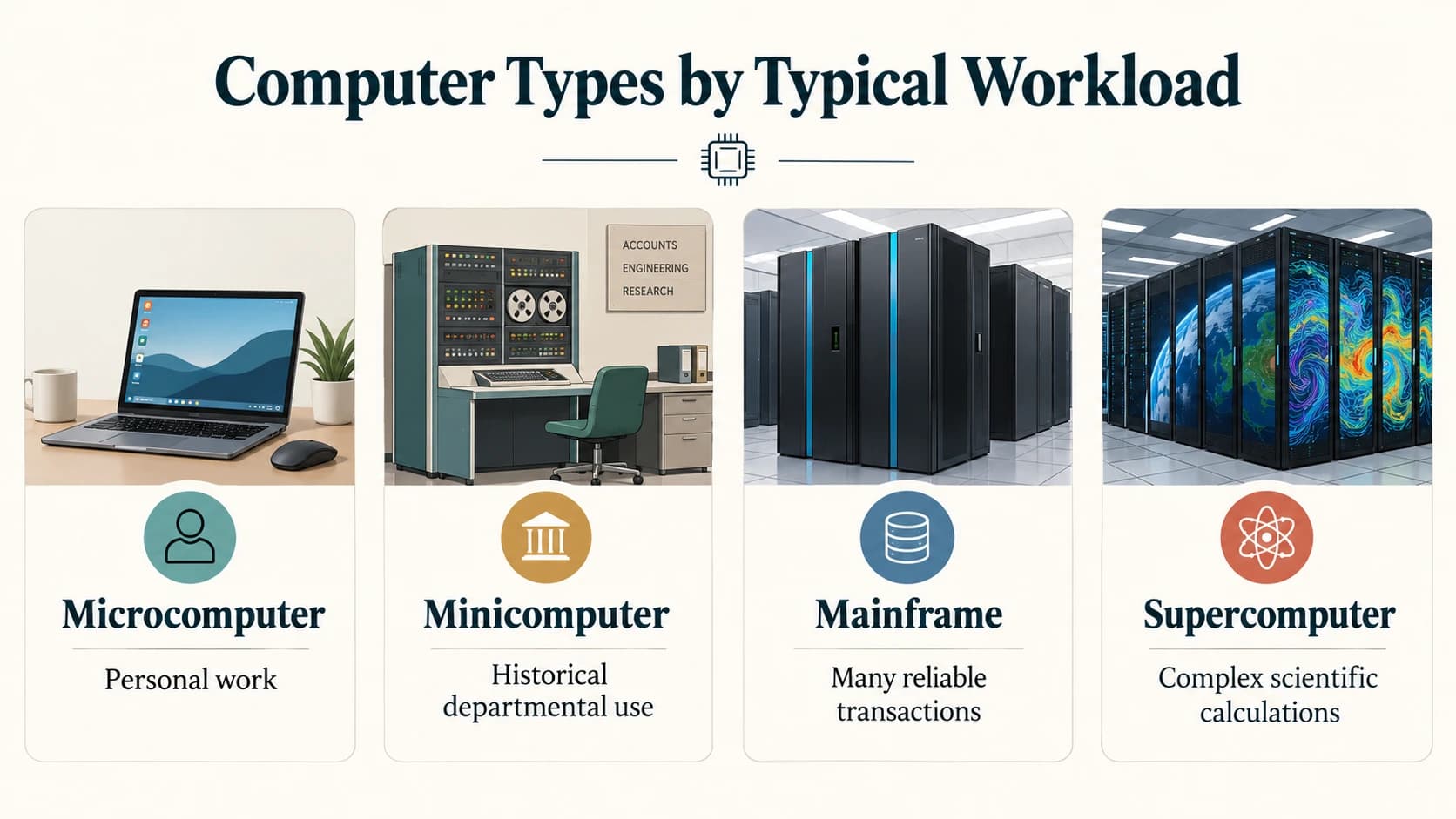
The comparison that matters most
| Type | Conventional identification | Typical users / workload | Useful example |
|---|---|---|---|
| Microcomputer | Personal, microprocessor-based computer | Individual everyday tasks | Desktop or laptop |
| Minicomputer | Historical mid-range multiuser computer | Departmental work, industrial or laboratory tasks | DEC PDP-11 |
| Mainframe | Highly reliable enterprise processing platform | Large transaction volumes, critical records | Core banking operations |
| Supercomputer | Extremely high computational capability | Complex scientific calculations and simulations | Climate modelling |
Mainframe versus supercomputer: the key distinction
Imagine two questions:
Question A: A bank needs to process and record very large numbers of payment transactions reliably.
Best textbook answer: Mainframe-oriented enterprise computing.
Question B: Researchers need to simulate atmospheric behaviour using enormous numerical calculations.
Best textbook answer: Supercomputing.
Neither category is automatically “better” in every situation. Their architectures and workloads are different.
What about servers, workstations, and embedded computers?
You may encounter these words in the same chapter of an exam book:
- Server: A computer or software service that provides resources or functions to other devices/users. A physical server is not a universally separate “fifth size” in the conventional four-type chart.
- Workstation: A computer configured for demanding professional work, such as design or analysis; usually a kind of personal computer.
- Embedded computer: A computer built into another device for a dedicated purpose, such as a payment terminal or industrial controller.
These terms classify computers by role or deployment, not necessarily by the old micro/mini/mainframe/supercomputer scale.
Important terms
| Term | Meaning |
|---|---|
| Personal computer (PC) | Computer intended primarily for personal use. |
| Microcomputer | Traditionally a small, microprocessor-based computer. |
| Minicomputer | Historical mid-range, often multiuser computer. |
| Mainframe | Enterprise machine optimized for dependable high-volume work. |
| Supercomputer | Machine or system built for exceptionally demanding calculations. |
| Server | System providing a service or resource to other systems. |
| Embedded computer | Computer integrated into a larger device. |
Common confusions
- A mainframe is not the same as a supercomputer. Match each to its workload.
- “Mini” is historical terminology, not another word for today's miniature laptop.
- An ATM is usually a terminal or endpoint, not the bank's central mainframe.
- A server is identified by what it does, not by one fixed physical size.
- A supercomputer need not be one enormous single processor: It often comprises many cooperating processors or nodes.
Quick revision
| Exam clue | Best conventional choice |
|---|---|
| Laptop or desktop PC | Microcomputer |
| DEC PDP-11 and departmental computing history | Minicomputer |
| Large-scale banking transactions | Mainframe |
| Weather/climate simulation | Supercomputer |
| Computing unit built into a washing machine | Embedded computer |
Practice questions — CA-01-04
Q1. Which is the most familiar example of a microcomputer?
A. A desktop personal computer
B. A weather-simulation cluster
C. A historical bank mainframe
D. A national supercomputing installation
Q2. Which computer category is most strongly associated with high-volume, reliable enterprise transaction processing?
A. Supercomputer
B. Mainframe
C. Pocket calculator only
D. Analog thermometer
Q3. Which category is most strongly associated with large-scale scientific simulation?
A. Minicomputer
B. Manual typewriter
C. Supercomputer
D. Basic desktop printer
Q4. The DEC PDP-11 is historically an example of a:
A. Minicomputer
B. Smartphone operating system
C. Cloud-storage protocol
D. Printer driver
Q5. Which statement best distinguishes mainframes from supercomputers?
A. Mainframes handle large transaction workloads; supercomputers specialize in very large computations.
B. Mainframes do only printing; supercomputers do only email.
C. Mainframes never store records; supercomputers never calculate.
D. Both words always describe exactly the same machine.
Q6. A computer built into a washing machine is typically a(n):
A. Mainframe
B. Embedded computer
C. Historical minicomputer
D. Weather supercomputer
Q7. A workstation is generally associated with:
A. Professional, computing-intensive personal work
B. Exclusively sending SMS messages
C. Only storing paper files
D. Eliminating all software
Q8. Which statement about minicomputers is most accurate?
A. The name always means a modern pocket-sized device.
B. It is a historical term for a mid-range computing class.
C. Every minicomputer is a supercomputer.
D. Minicomputers were invented after smartphones.
Q9. A server is mainly identified by:
A. Being a particular colour
B. Its role in providing services or resources
C. Having only one fixed physical size
D. Never communicating with clients
Q10. Which use most naturally suits a mainframe?
A. Maintaining critical transaction records at large scale
B. Simulating planetary motion with massive parallel calculations as its defining purpose
C. Replacing a keyboard key
D. Measuring rainfall without a computing system
Q11. Which statement is most accurate about the old four-type classification?
A. It remains a perfectly rigid classification for all new computers.
B. It is historically useful, but modern computing roles can overlap.
C. It proves all smartphones are mainframes.
D. It groups devices only by screen brightness.
Q12. What is a primary strength of a modern supercomputer?
A. Running exceptionally demanding numerical calculations
B. Printing one page per week
C. Acting only as a telephone
D. Replacing a manual filing cabinet without processing
Answers and explanations — CA-01-04
| Q | Answer | Explanation |
|---|---|---|
| 1 | A | A personal desktop is a familiar microcomputer. |
| 2 | B | Mainframes are designed for enterprise-scale, dependable transaction workloads. |
| 3 | C | Supercomputers are suited to large numerical simulations and related research tasks. |
| 4 | A | PDP-11 is a prominent historical minicomputer family. |
| 5 | A | Mainframes emphasize transaction throughput and reliability; supercomputers emphasize large computations. |
| 6 | B | An embedded computer performs functions inside another product. |
| 7 | A | Workstations are configured for demanding professional applications. |
| 8 | B | Minicomputer is a historical mid-range category, not a synonym for a tiny present-day device. |
| 9 | B | “Server” is a role that can be delivered by different hardware types. |
| 10 | A | Reliable transaction records and high-volume business operations are classic mainframe strengths. |
| 11 | B | The four-type ladder is an exam convention, not an exact taxonomy of every modern computer. |
| 12 | A | Supercomputers are built for exceptionally large and complex calculations. |
Previous lesson: CA-01-03 — Generations of Computers.
Next lesson: CA-01-05 — Analog, Digital and Hybrid Computers.