
Network Topologies
Network Topologies. Foundational Computer Awareness explanations, examples and explained practice questions for banking and recruitment exam preparation.
By Akhilesh Saini
What you will learn
- The idea of topology as a pattern of network connections.
- Recognize bus, star, ring, mesh, tree and hybrid arrangements.
- Compare characteristic strengths and failure points without assuming any design is perfect.
- Distinguish physical connections from logical traffic movement.
Why this topic matters
Questions often give a short phrase—all devices connect to one central switch, a single common backbone, a closed loop, or many alternate paths—and ask you to name the topology. These are patterns to visualize, not advanced network-design mathematics.
What does topology mean?
A network topology describes how network devices or connections are arranged. It can describe the physical topology (actual cables, radio links and locations) or a logical topology (how traffic conceptually moves between devices). The two need not be identical.
Example: A conventional switched office Ethernet LAN may be wired like a star around a switch. This is a physical description. Traffic forwarding depends on switching and addressing rules; it is not automatically broadcast in every direction like the old shared-medium Ethernet of a bus.
Bus topology
In a traditional bus, devices share a common main communication line or backbone, and signals travel along it under the medium's transmission rules. Historical coaxial Ethernet is a familiar textbook example.
- Advantage: The simplified traditional arrangement uses one common backbone rather than a separate central link for every node.
- Disadvantage: A fault in the shared backbone may disrupt many devices; troubleshooting and collisions can be issues in legacy shared-medium networks.
- Exam clue: Single backbone/common cable.
Do not confuse this with modern switched Ethernet just because all traffic eventually reaches one building's uplink.
Star topology
In a star, devices connect to a central device such as an Ethernet switch. A typical office network with PCs connected individually to a switch is a good example.
- Advantage: Failure of one individual cable generally affects that connected device rather than every other cable; it is easy to add or isolate endpoints.
- Disadvantage: Failure of the sole central device can interrupt the entire star segment.
- Exam clue: Central switch/hub with individual spokes.
Ring topology
In a ring, each participating node is connected to two adjacent nodes to form a closed loop in the basic textbook diagram. Traffic follows the ring's defined communication rules; not every ring works in the same direction or has identical fault tolerance.
- Advantage: Structured path around the ring; some implementations use deterministic access or fault-recovery mechanisms.
- Disadvantage: A simple single-ring design without protection can be disrupted by a failed link or node.
- Exam clue: Closed loop.
Mesh topology
A mesh has multiple interconnections that provide alternative paths. In a full mesh, every node connects directly to every other node; in a partial mesh, only some such links exist.
- Advantage: Alternate routes can improve resilience when designed correctly.
- Disadvantage: More links and connections increase complexity and potential cost.
- Exam clue: Multiple alternate paths / many-to-many connections.
Note: A product marketed as “mesh Wi-Fi” is a particular wireless-network arrangement; the conceptual topology describes interconnected nodes and paths. It does not mean every mesh product is full mesh.
Tree and hybrid topologies
A tree is a hierarchical, branching arrangement of nodes or smaller stars, often shown with a main/root link and branches. A hybrid combines characteristics of more than one topology—such as different LAN arrangements within a larger network.
Tree clue: Hierarchy / branches.
Hybrid clue: Combination of two or more patterns.
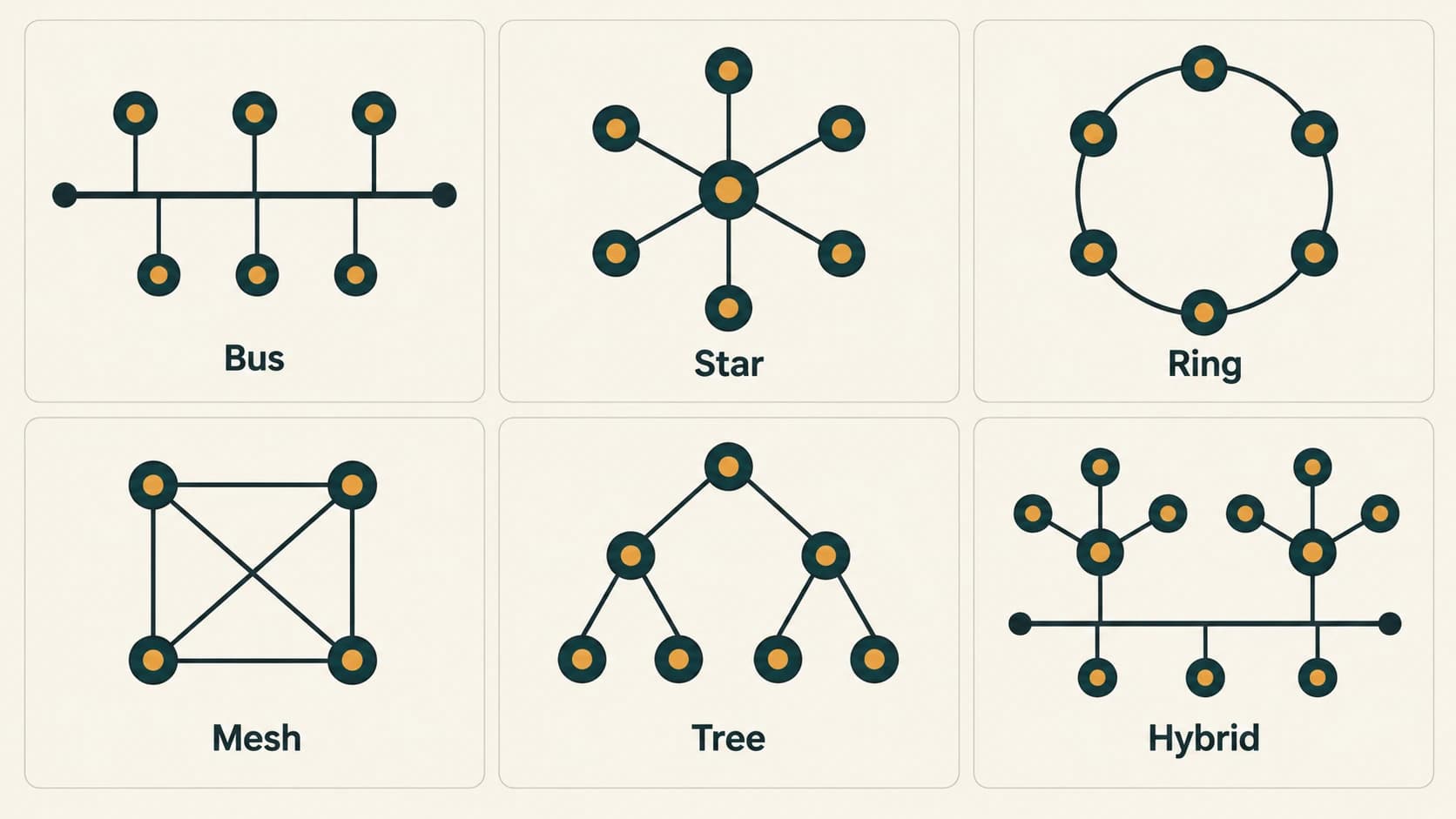
Topology recognition table
| Topology | Visual pattern | Common exam clue | Typical weakness/consideration |
|---|---|---|---|
| Bus | One main cable | Shared backbone | Backbone fault |
| Star | Central point with spokes | Central switch/hub | Central equipment fault |
| Ring | Closed loop | Each node joins neighbours | Simple ring may be affected by a break |
| Mesh | Multiple interconnections | Alternate paths | Complexity/cost |
| Tree | Hierarchical branches | Root and branches | Upper-level faults may affect branches |
| Hybrid | Mixed patterns | Combination of topologies | Depends on constituent designs |
Worked examples
Example 1 — Office floor: Twelve PCs use separate cables to one central switch. Best answer: star.
Example 2 — Historical coaxial installation: Multiple devices share a continuous backbone cable. Best answer: bus.
Example 3 — Diagram puzzle: Four nodes connect in a closed loop, each directly to its immediate two neighbours. Best answer: ring.
Example 4 — Resilient interconnection: Several nodes have alternate direct paths between them. Best answer: mesh.
Example 5 — Campus branches: Several local star networks join through higher-level switches in a branching structure. Best textbook answer: tree or hierarchical star; the precise naming depends on the diagram.
Important terms
| Term | Meaning |
|---|---|
| Topology | Arrangement of network nodes and links |
| Physical topology | Actual connection layout |
| Logical topology | Pattern of traffic flow or logical links |
| Backbone | Main communications path serving connected segments |
| Full mesh | Each node directly linked to all others in the chosen group |
| Partial mesh | Some, but not all, direct interconnections |
| Redundancy | Alternative component/link improving fault tolerance |
| Central point of failure | One component whose failure disrupts many dependent devices |
Common confusions and exam traps
- Star ≠ no single point of failure: Its central device remains important.
- Mesh ≠ zero possibility of outage: It provides alternatives only when routes and design support them.
- Physical topology ≠ logical topology: Cabling shape alone does not fully describe traffic behaviour.
- Ring ≠ all links permanently unidirectional: Implementations vary.
- Bus ≠ standard topology for every modern LAN: It is especially common in historical/basic textbook examples.
Objective-exam facts to remember
| Wording in question | Most likely answer |
|---|---|
| All endpoints connected to a central switch | Star |
| Common backbone | Bus |
| Closed circular chain | Ring |
| Multiple paths/links among nodes | Mesh |
| Hierarchical branching layout | Tree |
| Combination of different layouts | Hybrid |
Quick revision
- Topology describes a network's connection pattern.
- Star uses a central connection device.
- Bus uses a common backbone; ring uses a closed loop.
- Mesh supplies multiple paths; tree branches hierarchically.
- Physical layout and logical traffic paths may differ.
Practice questions — CA-07-03
1. Which topology connects endpoints to one central switch?
A. Ring
B. Star
C. Full mesh
D. Bus
2. A traditional network with one common main backbone illustrates:
A. Bus
B. Cellular
C. Star
D. Mesh
3. Each node connects to two immediate neighbours to form a closed loop. This is a:
A. Bus
B. Hybrid by definition
C. Tree
D. Ring
4. Which topology is associated with multiple alternate paths?
A. Bus
B. Star only
C. Straight line
D. Mesh
5. A hierarchy of network devices with a root and branching connections is a:
A. Tree
B. Point-to-point serial file
C. Bus
D. Ring
6. A network using more than one structural arrangement is described as:
A. Always a PAN
B. Hybrid
C. Only a bus
D. Only a ring
7. In a simple star with a single central switch, failure of that switch can:
A. Automatically switch to a second path
B. Only affect a disconnected cable
C. Disrupt the entire connected star segment
D. Make every workstation faster
8. Which description defines physical rather than logical topology?
A. The TCP port numbers used
B. The application login screen
C. Actual layout of cables and connections
D. The organization's password policy
9. Which claim about full mesh is correct?
A. One central hub is mandatory
B. Every link is automatically encrypted
C. Every node in the selected set has a direct link to every other node
D. Only one common backbone is present
10. Which topology is especially associated with historical shared-coaxial Ethernet?
A. Bus
B. Tree-only fibre network
C. Wireless mesh only
D. Star with switch
11. A failed cable in a basic star normally:
A. Changes the network into a mesh
B. Guarantees complete network failure
C. Destroys all other separate cables
D. Affects primarily the endpoint attached by that cable
12. Which statement is a sound qualification?
A. Mesh can never fail
B. Topology names describe patterns, not universal fault-tolerance guarantees
C. Physical and logical topologies must always match
D. Ring traffic must always move one direction
Answers and explanations — CA-07-03
1. B — Star. Star networks use individual links to a common central device.
2. A — Bus. The shared backbone is the defining clue for a conventional bus topology.
3. D — Ring. The basic ring diagram joins devices in a loop.
4. D — Mesh. Mesh networks use multiple interconnections; full mesh connects every selected node pair directly.
5. A — Tree. A tree topology is hierarchical, with branches below higher-level connections.
6. B — Hybrid. Hybrid topology combines characteristics of different topologies.
7. C — Disrupt the entire connected star segment. The central device is a potential common failure point unless redundancy has been designed.
8. C — Actual layout of cables and connections. Physical topology depicts real links and equipment placement; logical topology describes traffic relationships.
9. C — Every node in the selected set has a direct link to every other node. A full mesh has direct connections between all node pairs in the chosen set.
10. A — Bus. Classic coaxial Ethernet used shared-medium cabling with bus-like layouts.
11. D — Affects primarily the endpoint attached by that cable. Individual spoke faults are typically localized, unlike failure of the central switch.