
What Is a Computer Network?
What Is a Computer Network?. Foundational Computer Awareness explanations, examples and explained practice questions for banking and recruitment exam preparation.
By Akhilesh Saini
What you will learn
- Why connecting two or more computing devices creates a network.
- What nodes, links, packets and shared resources mean.
- How basic client-server and peer-to-peer arrangements differ.
- Network benefits and common limitations.
Why this topic matters
When a recruitment question says that several computers share a printer or exchange files, it is testing the fundamental meaning of a network. Other questions may ask which component is a node, whether a network needs the Internet, or why banks connect branches.
What is a network?
A computer network is a collection of two or more devices connected so that they can exchange data, communicate, or share resources. The devices might be desktop computers, servers, mobile phones, printers, ATMs, or network equipment. Connections can be made with cables, optical fibre, radio signals, or combinations of these.
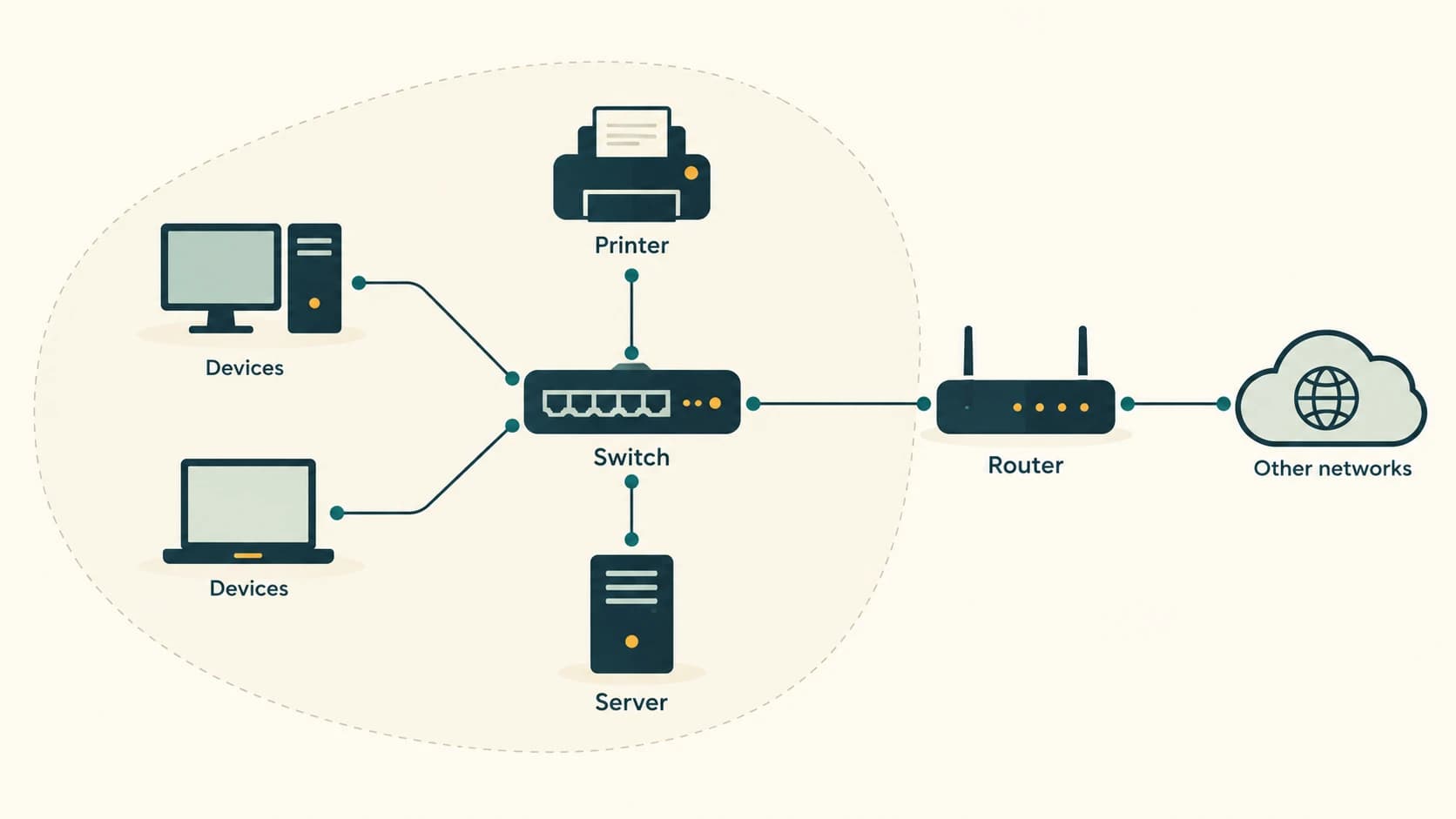
Imagine three office computers connected to a shared printer. Employee A creates a document, sends a print request across the network, and retrieves the paper from that printer. The printer is not physically attached to each computer with a separate direct cable; networking lets the devices share it.
A network does not automatically mean Internet connectivity. Two computers connected to each other without access to any external network can still exchange files if the appropriate networking and sharing features are configured. The Internet is a global system connecting many networks, not a requirement for each small local network to exist.
Main elements of a network
| Element | Simple meaning | Example |
|---|---|---|
| Node/device | A participating device | Laptop, printer, server or router |
| Host | An endpoint that communicates on a network | Desktop, phone or server |
| Network interface | Hardware/logical interface enabling connectivity | Ethernet adapter or Wi-Fi interface |
| Link | A connection between communicating devices | Cable or wireless link |
| Medium | What carries the signal | Copper wire, fibre or radio waves |
| Network device | Equipment that helps traffic reach its destination | Switch, router, access point |
| Protocol | Agreed rules for communication | IP, TCP, HTTP |
| Address | Identifier used for delivery or communication | IP or MAC address |
| Shared resource | A service made available to connected devices | Shared printer or file server |
A NIC (Network Interface Card) or network adapter provides a device with a network interface. Many modern devices have built-in Ethernet and/or wireless networking rather than a removable physical card. A server provides a service; a client requests or uses it. A device can act as both in different situations.
Data travels as signals and packets
When you send a file across an ordinary IP-based network, software organizes data for transmission. A large item may be carried in many smaller units, commonly called packets in network-layer explanations. The packets travel over links, and the receiving system reassembles or processes the received data according to the relevant protocols.
- Sender/source: where the data begins.
- Receiver/destination: where the data is intended to arrive.
- Packet: a unit of network-layer data with information for delivery.
- Bandwidth/link rate: a measure related to how much data a link can carry per second.
- Throughput: the amount of data successfully transferred in a given interval.
- Latency: delay experienced while data travels or a response returns.
- Packet loss: packets that fail to reach their destination successfully.
A connection advertised at a particular bit rate may deliver lower application throughput because of overhead, congestion, interference and other factors. A high bit rate does not guarantee low latency or perfect reliability.
Client-server and peer-to-peer: two useful arrangements
Client-server model: A central service responds to requests from clients. For example, branch computers may request reports from an authorized office server. The client is the requesting device/application, and the server supplies a resource or service. This is a logical relationship, not a rule that the server must be a large cabinet.
Peer-to-peer (P2P) model: Participating devices can share resources with one another without depending on a single dedicated central server for every exchange. A small, trusted office file-sharing arrangement may work this way. P2P does not mean that every device is automatically authorized to read every other device's files.
Network benefits and practical limits
Benefits: sharing data and printers, common access to authorized services, communication, centralized administration, easier collaboration and connection between offices.
Challenges: installation and maintenance cost, equipment failures, network congestion, cyberattacks, unauthorized access, privacy risks and reliance on correct configuration. Network access control, updates, backups and monitoring remain necessary.
Worked examples
Example 1 — Shared printer: Four PCs and one printer connect to an office switch. Users can print over the local network when permissions and printer configuration allow. The printer is a network node and shared resource.
Example 2 — Branch reporting: A branch system sends a report to a centrally hosted service. The two locations need a working communications path and suitable network/service permissions. The traffic may traverse several networks.
Example 3 — Internet outage: A home broadband service fails, but two PCs on the home network can still share files. This shows that a local network may remain operational even without public Internet access.
Example 4 — Video call: A call can suffer delays despite relatively high download capacity. Throughput, latency, packet loss and congestion affect different aspects of the experience.
Important terms
| Term | Meaning |
|---|---|
| Computer network | Connected devices exchanging data/resources |
| NIC | Network Interface Card/adapter |
| Host | Network-connected endpoint capable of communication |
| Node | Any participating point/device in a network |
| Packet | Network-layer unit of transmitted data |
| Client | Requests or consumes a service |
| Server | Provides a service to clients |
| Protocol | Communication rules |
| Throughput | Successfully achieved data rate |
| Latency | Communication delay |
| ISP | Internet Service Provider |
Common confusions and exam traps
- Network ≠ Internet: A disconnected LAN is still a network.
- Server ≠ necessarily a physically large computer: Server means service role; a virtual or cloud instance can be a server.
- Bandwidth ≠ achieved speed in every situation: Throughput may be lower.
- NIC ≠ network cable: An adapter provides an interface; a cable is a transmission medium.
- Packet ≠ the entire file: Files may be transferred using many packets.
- P2P ≠ automatically unsafe or unrestricted: Permissions and protocol design still matter.
Objective-exam facts to remember
| Question clue | Answer |
|---|---|
| Two or more connected computers share resources | Computer network |
| Card/adapter enabling network access | NIC |
| Device/service responding to requests | Server |
| Device/application making a request | Client |
| Rules for communicating | Protocol |
| Network unit used for IP delivery | Packet |
| Actual transfer achieved | Throughput |
| Communication delay | Latency |
Quick revision
- Networks connect devices for data exchange or sharing.
- Nodes, interfaces, links, addressing and protocols all contribute to communication.
- A local network can function without the public Internet.
- Client and server describe roles; P2P describes direct participant sharing.
- Bandwidth, throughput, latency and packet loss refer to different properties.
Practice questions — CA-07-01
1. A computer network is primarily a collection of:
A. Connected devices that exchange data or share resources
B. Unconnected devices using separate storage
C. Only computers on the public Internet
D. A single software program
2. Which component generally provides a computer with a network interface?
A. Plotter
B. NIC
C. Speaker
D. Spreadsheet
3. In a client-server arrangement, the client usually:
A. Always stores the entire database
B. Must be a desktop PC
C. Routes all Internet packets
D. Requests or uses a service
4. An office LAN can still share a printer when its Internet connection fails because:
A. All printing needs email
B. Local networking does not necessarily require the Internet
C. A printer is a gateway to every public website
D. A LAN always contains the Internet
5. What term describes agreed rules for exchanging network messages?
A. Compiler
B. Protocol
C. Monitor
D. Worksheet
6. What is the network-layer term for a unit sent with delivery information?
A. Packet
B. Page margin
C. Cell reference
D. Slide
7. A bank employee uses an application to request a report from a central computer. The central service acts as a:
A. Mouse
B. Repeater only
C. Client only
D. Server
8. Which measure is most closely related to communication delay?
A. Latency
B. Printer resolution
C. File extension
D. Address length
9. Which statement about a network is correct?
A. Every endpoint must run the same operating system
B. Every network needs a modem
C. A network can contain printers and mobile devices
D. Every network is a WAN
10. Actual successful data transfer measured during use is commonly called:
A. Authentication
B. Hostname
C. Topology
D. Throughput
11. Which arrangement allows participating computers to share directly without one dedicated central server for every exchange?
A. Only batch processing
B. Star cabling only
C. Peer-to-peer
D. Optical character recognition
12. What is the best statement about a high-bandwidth connection?
A. It is always a fibre link
B. It guarantees zero latency
C. Its practical performance can still be limited by congestion and delay
D. It never loses packets
Answers and explanations — CA-07-01
1. A — Connected devices that exchange data or share resources. Devices connected for communication or resource sharing form a network; public Internet access is not required.
2. B — NIC. A Network Interface Card or built-in adapter supplies a network interface such as Ethernet or Wi-Fi.
3. D — Requests or uses a service. A client is the requesting or consuming role; servers provide services and may be virtual or physical.
4. B — Local networking does not necessarily require the Internet. Local devices can communicate through a functioning LAN even when outside connectivity is unavailable.
5. B — Protocol. Protocols specify how communicating systems exchange information, not simply their hardware arrangement.
6. A — Packet. An IP packet is a network-layer data unit; one file can require many packets.
7. D — Server. It provides the requested report service; server describes the role, not the physical size of a machine.
8. A — Latency. Latency expresses delay; bandwidth and throughput express different aspects of capacity and transfer.
9. C — A network can contain printers and mobile devices. Many kinds of computing and peripheral devices can be nodes in a network.
10. D — Throughput. Throughput refers to achieved transfer rate; it can be below a link's theoretical or rated capacity.
11. C — Peer-to-peer. A peer-to-peer arrangement supports direct participant sharing; permissions and controls still matter.