
Common Data Types and File Formats
Common Data Types and File Formats. Foundational Computer Awareness explanations, examples and explained practice questions for banking and recruitment exam preparation.
By Akhilesh Saini
What you will learn
- Identify everyday data types: numeric, text, Boolean, date/time and binary data.
- Recognize common document, spreadsheet, image, audio, video and archive file formats.
- Understand the difference between data type, file format and file extension.
- Explain why renaming a file extension does not convert or secure its content.
Why this topic matters
Banking and office systems handle customer identifiers, amounts, dates, statements and attachments. A recruitment exam may ask whether PDF is a document format, whether CSV holds comma-separated data, or whether a date should always be treated as ordinary text. A small amount of understanding prevents mix-ups between the kind of value inside a system and the kind of file that holds it.
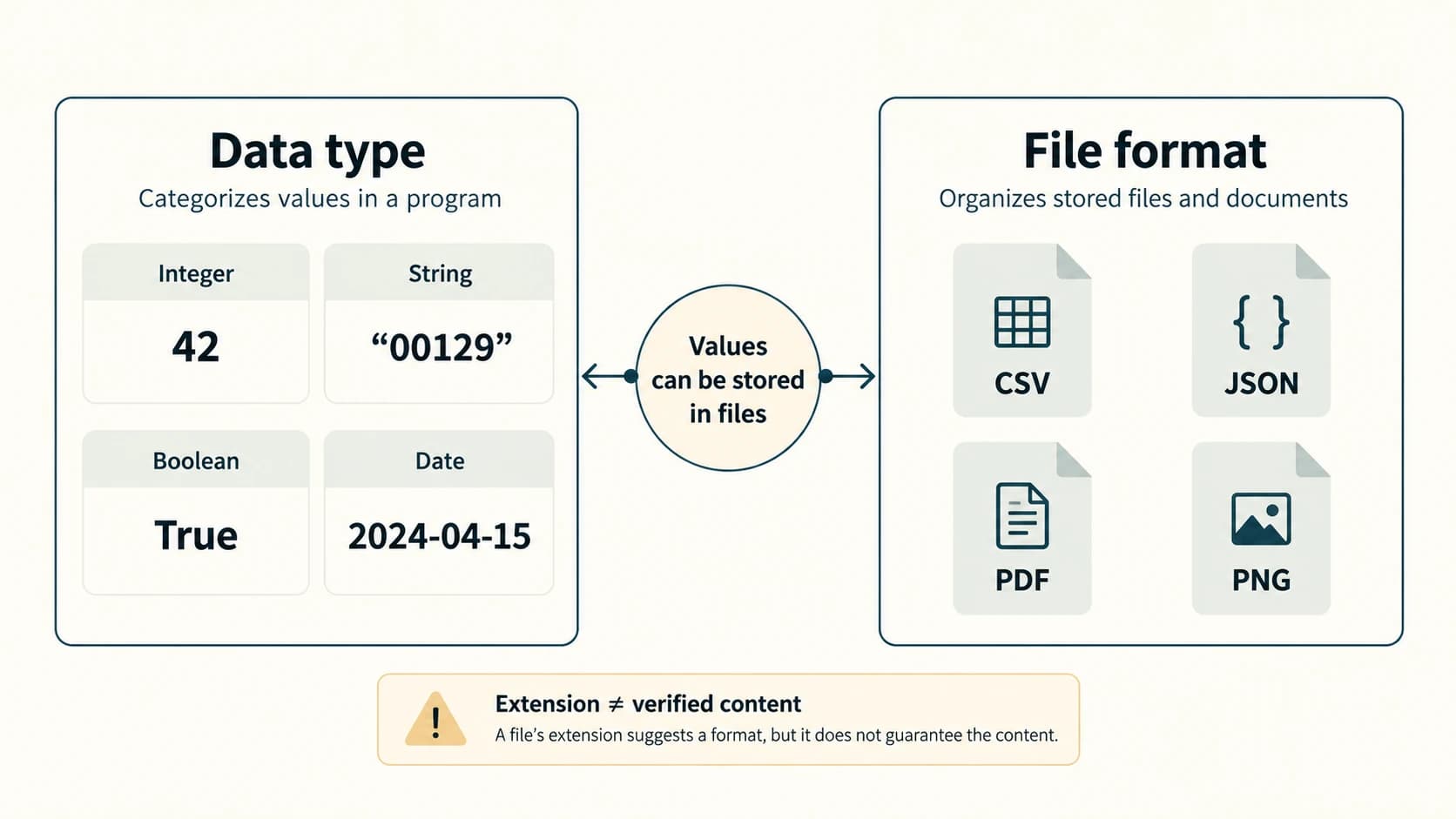
Data type: what sort of value is being represented?
A data type describes a class of values and, in many computer systems, the operations that make sense for those values. Programming languages, databases and spreadsheets have their own type systems, so the categories below are an accessible overview rather than a single universal list of language keywords.
| Data type / category | Example value | Meaning or suitable use |
|---|---|---|
| Integer | 42 | Whole-number count, such as number of records |
| Decimal / floating-point number | 7.5 | Quantity with a fractional part; exact financial storage may use decimal types |
| String / text | "A1029" | Customer reference or name treated as characters |
| Boolean | True / False | Yes/no condition, such as whether a check has passed |
| Date / time | 2024-04-15 | Calendar or clock value handled using appropriate date/time rules |
| Binary data / bytes | Image bytes | Non-text or encoded content such as image or file data |
Financial-accuracy note: Not all decimal-looking numbers are best stored as binary floating-point values. Financial applications commonly use a suitable fixed-point or decimal representation to avoid unintended rounding. The technical implementation differs by language and system; for awareness questions, recognize that integer, decimal, text and Boolean values serve distinct purposes.
A value's appearance does not determine its type
Consider the stored text "00125". It looks like digits but may be a customer code. Converting it to integer 125 would lose the leading zeros and could corrupt the identifier.
Likewise, "12/03/2024" could be treated as text until a system parses it with an explicit date convention. Depending on locale, the same text may be interpreted differently; structured date values reduce this ambiguity when used correctly.
Worked example — A simple transaction record
| Field | Value | Sensible interpretation |
|---|---|---|
| Transaction count | 3 | Integer |
| Amount | 1250.75 | Decimal monetary quantity |
| Reference ID | "00047" | Text identifier |
| Approved | True | Boolean |
| Transaction date | 2024-04-15 | Date value |
These are fictional teaching values, not real banking records. A database or application may use additional types and validation rules.
File format: how content is organized in a file
A file format specifies how the bytes inside a file are arranged and interpreted. A file extension is usually the suffix at the end of its filename—such as .pdf or .png—that provides a useful clue to the intended format. The two are related but not identical.
For example, a file genuinely encoded as JPEG can have a misleading extension if someone renames it. Renaming picture.jpg to picture.png changes the filename label; it does not convert JPEG-encoded image data to PNG. Applications may identify format using file headers/signatures or other mechanisms, and those checks also have limitations.
Document and structured-data formats
| Format / extension | Usual purpose | Important distinction |
|---|---|---|
.txt | Plain text | Generally lacks rich page formatting |
.pdf | Portable Document Format | Designed for document presentation/exchange; may contain text, images and more |
.docx | Modern Word document | Editable rich document format; detailed office features belong to CA-05-05 |
.xlsx | Spreadsheet workbook | Can contain sheets, cells, formulas and formatting |
.pptx | Presentation slides | Contains slide-oriented presentation content |
.csv | Comma-separated values | Common simple text-based table-exchange format; quoting/escaping rules matter |
.json | JavaScript Object Notation | Structured data interchange format |
.xml | Extensible Markup Language | Structured, tagged text format |
.html | HyperText Markup Language | Markup used to describe web-page structure |
.zip | Archive format | Packages files, often using compression; archiving alone does not guarantee encryption |
CSV versus XLSX: A .csv file generally stores a flat set of rows and fields as text. It does not inherently preserve a spreadsheet workbook's formulas, multiple sheets or rich formatting. An .xlsx file is a richer spreadsheet document format. Spreadsheets are covered more fully in CA-05-02 and CA-05-05.
Image, audio and video formats
| Format / extension | Type | Basic point |
|---|---|---|
.jpg / .jpeg | Image | Common photographic format; typical JPEG compression is lossy |
.png | Image | Supports lossless image compression and transparency |
.gif | Image / animation | Commonly uses indexed color and can store simple animations |
.svg | Image | Vector graphics described using XML-based markup |
.mp3 | Audio | Common compressed audio format; normally lossy |
.wav | Audio container | Often stores uncompressed PCM audio, but WAV can contain other audio encodings |
.mp4 | Multimedia container | Common container for video/audio streams, not one unique codec |
Compression fact: Lossless compression allows recovery of the original information; lossy compression discards some information to reduce size. A file format and a compression algorithm are not always the same thing: for example, MP4 is a container, and its actual video encoding can vary.
Executable files, archives and safety
An executable file is intended to run instructions on a compatible system; .exe is a familiar Windows executable extension. Archives such as .zip group one or more files, while executable and archive contents have different purposes. A ZIP can contain executable files, and an archive may or may not be encrypted.
Practical caution: A file named statement.pdf.exe is likely to be an executable when the complete extension is considered on a Windows system, even if a file manager hides some suffixes. Do not conclude safety based on the visible name, a document icon or a download description.
MIME type: another way to describe content
Online systems often describe file formats using a media type (commonly called a MIME type) such as:
text/plain— ordinary plain text;image/png— PNG image;application/pdf— PDF document;text/csv— CSV data.
MIME types help software decide how to handle exchanged data, but a filename extension or a declared type is not sufficient on its own to prove that content is trustworthy. Systems may inspect file contents and apply appropriate security rules. Network protocol details are treated in CA-06 and CA-07.
Worked examples
Example 1 — Identifier versus number: "0098" is an account reference. Keep it as text unless the application explicitly defines a numerical interpretation; integer 98 would drop the leading zeros.
Example 2 — Table exchange: A branch exports a simple table for compatible software. .csv may be convenient, but saving as CSV does not preserve all workbook formatting or formulas.
Example 3 — A print-ready report: A PDF is useful when a document's presentation should remain relatively consistent. It is a file format, not a guarantee that the content is correct or digitally signed.
Example 4 — Picture quality: A line-art graphic might benefit from PNG's lossless compression, while a photograph is commonly distributed as JPEG. Either image can still be poorly captured or too small; the extension alone does not guarantee quality.
Example 5 — Misleading rename: Changing notes.txt to notes.pdf without conversion leaves its internal text data unchanged. The receiving application may reject it or treat it unexpectedly.
Important terms
| Term | Meaning |
|---|---|
| Data type | Category of value used by a program or data system |
| Integer | Whole-number data type |
| String | Sequence of text characters |
| Boolean | True/false value |
| File format | Defined structure/encoding of stored file contents |
| File extension | Filename suffix indicating the likely or intended format |
| Archive | File package holding other files and metadata |
| Compression | Method of reducing storage or transmission size |
| Lossless / lossy | Whether the original information can be fully recovered |
| MIME type | Standardized media-type label for exchanged content |
Common confusions and exam traps
- An ID full of digits may still be text if leading zeros or formatting matter.
- CSV is not the same as an Excel workbook: both can contain tabular data, but their capabilities differ.
- PDF is a format, not a security certificate. A PDF can be genuine, misleading or malicious.
- ZIP does not automatically mean encryption. Packaging and confidentiality are different.
- An extension is not proof of internal format: renaming does not convert content.
- MP4 does not name one video codec. It is a container supporting different encoded streams.
- WAV is not always uncompressed: it can hold different audio encodings.
- Data type and file format describe different layers: a number may be stored inside CSV, JSON, XML or a database.
Objective-exam facts to remember
| If the question asks for… | Common answer |
|---|---|
| Whole-number type | Integer |
| True/false type | Boolean |
| Text characters | String |
| Portable Document Format | |
| Simple rows/columns exchanged as text | CSV |
| Spreadsheet workbook | XLSX |
| Compressed archive | ZIP |
| Lossless image format | PNG |
| Common compressed photo format | JPEG |
| Common webpage markup | HTML |
| Structured data interchange | JSON / XML |
| Video/audio container | MP4 |
Quick revision
- A data type describes the kind of value; a file format describes the organization of file bytes.
- Numeric-looking identifiers may correctly remain text.
- Common office extensions include
.pdf,.docx,.xlsxand.csv. - JPEG is usually lossy; PNG uses lossless image compression.
- Renaming a filename extension does not convert the file or make it safe.
Practice questions — CA-04-05
1. Which data type best represents a yes/no condition?
A. Boolean
B. JPEG
C. Integer only
D. ZIP
2. A code "00129" must preserve leading zeros. Which representation is generally appropriate?
A. Floating-point value
B. String/text
C. Arithmetic integer 129 only
D. Boolean
3. What does PDF stand for?
A. Program Data File
B. Portable Document Format
C. Printed Digital Folder
D. Protected Device Function
4. Which extension commonly indicates a simple comma-separated values file?
A. .exe
B. .png
C. .csv
D. .mp3
5. Which format commonly supports lossless image compression and transparency?
A. PNG
B. MP3
C. TXT
D. EXE
6. Which statement about a .zip file is correct?
A. It is always digitally signed
B. It is always encrypted
C. It is an archive format that may package several files
D. It is necessarily a spreadsheet
7. Renaming photo.jpg to photo.png without converting the contents normally:
A. Converts JPEG data to PNG
B. Makes the image encrypted
C. Changes the filename but not the underlying encoding
D. Guarantees a safe file
8. Which extension commonly represents a modern spreadsheet workbook?
A. .xlsx
B. .mp4
C. .wav
D. .gif
9. What does a MIME/media type such as application/pdf principally describe?
A. The content's advertised or defined media format
B. The document's guaranteed authenticity
C. The account balance of the sender
D. The computer's CPU type
10. Which option most accurately characterizes MP4?
A. A kind of Boolean value
B. A video/audio container format that can hold encoded streams
C. A seven-bit character set
D. A logic gate
11. Which pair is correctly matched?
A. .mp3 — plain-text workbook
B. .html — webpage markup
C. .exe — lossless image
D. .csv — printer firmware
12. A customer-reference number contains leading zeros and must not be used in arithmetic. What is the best reason to treat it as text?
A. Text automatically encrypts it
B. Text maintains its character sequence, including leading zeros
C. Every ID is a Boolean value
D. Text requires a binary gate
Answers and explanations — CA-04-05
| Q | Correct answer | Why it is correct |
|---|---|---|
| 1 | A. Boolean | Boolean represents the two truth values true and false. |
| 2 | B. String/text | Text preserves leading zeros in an identifier rather than normalizing it as a number. |
| 3 | B. Portable Document Format | PDF is the standard name of this document-exchange format. |
| 4 | C. .csv | CSV denotes comma-separated values and is widely used for simple tabular exchange. |
| 5 | A. PNG | PNG supports lossless compression and can represent transparency. |
| 6 | C. Archive format | ZIP packages files and often compresses them, but encryption is optional rather than automatic. |
| 7 | C. Filename only | Renaming a suffix does not modify the original JPEG encoding. |
| 8 | A. .xlsx | XLSX is a common modern spreadsheet-workbook format. |
| 9 | A. Media format | A media type labels the kind of content; it does not prove trust or authenticity. |
| 10 | B. Container | MP4 can carry different encoded audio/video streams. |
| 11 | B. .html — webpage markup | HTML is a markup language used to structure web-page content. |
| 12 | B. Preserve the character sequence | Identifiers can contain significant leading zeros that integer conversion would discard. |