
Cloud Computing: SaaS, PaaS and IaaS Basics
Cloud Computing: SaaS, PaaS and IaaS Basics. Foundational Computer Awareness explanations, examples and explained practice questions for banking and recruitment exam preparation.
By Akhilesh Saini
Learning objectives
Define cloud computing; recognize its basic characteristics and service models; distinguish public, private and hybrid deployment; identify responsibility and reliability limitations; and solve service-model identification questions.
Why this topic matters
An organization need not purchase a separate physical server for every digital application. It can obtain computing, storage and software over a network from shared infrastructure. For example, branch employees may use a centrally hosted document system, a bank may run an application on remotely provisioned servers, and developers may use a hosted platform to publish a service. All involve remote computing in different ways, but their service-model labels depend on what is being supplied and managed.
What is cloud computing?
Cloud computing provides convenient, on-demand network access to a configurable pool of computing resources such as processing power, storage, networks and applications. Those resources can normally be provisioned or released with relatively little direct provider interaction. Physical computers still exist: the word cloud does not mean that information floats outside real data centres.
Traditional on-premises computing often begins with an organization obtaining and operating hardware in its own facilities. Cloud computing uses a delivery and management model in which infrastructure and services are offered through a provider or through an organization's cloud environment. Neither model is automatically better or automatically more secure.
The classic NIST cloud-computing model identifies five important characteristics:
| Characteristic | Meaning | Simple example |
|---|---|---|
| On-demand self-service | Users can provision supported resources when needed | Creating a new virtual server through a management console |
| Broad network access | Capabilities are reachable through networks and suitable interfaces | Opening a hosted app from an authorized laptop |
| Resource pooling | Provider resources serve multiple users/tenants with logical separation | Many customers using a managed computing platform |
| Rapid elasticity | Capacity can be adjusted as demand changes | Increasing compute resources during heavy usage |
| Measured service | Resource use can be monitored, controlled and reported | Metered processing or storage consumption |
These are model characteristics, not promises that every service has identical performance, cost or uptime. 'Pay only for use' is a common billing idea but is not identical to the definition of cloud computing; pricing models vary.
SaaS, PaaS and IaaS: the essential comparison
The question to ask is: What does the customer receive?
| Model | Full form | Customer typically receives | Customer's typical role | Exam example |
|---|---|---|---|---|
| SaaS | Software as a Service | Ready-to-use application | Sign in, use functions, configure permitted settings and manage own information | Hosted office or email application |
| PaaS | Platform as a Service | Managed application-development/deployment platform | Supply application code, data and configuration | Hosted application runtime or managed deployment platform |
| IaaS | Infrastructure as a Service | Fundamental compute, storage and networking resources | Configure virtual servers, guest OS and deployed applications | Provisioned virtual machine and virtual disks |
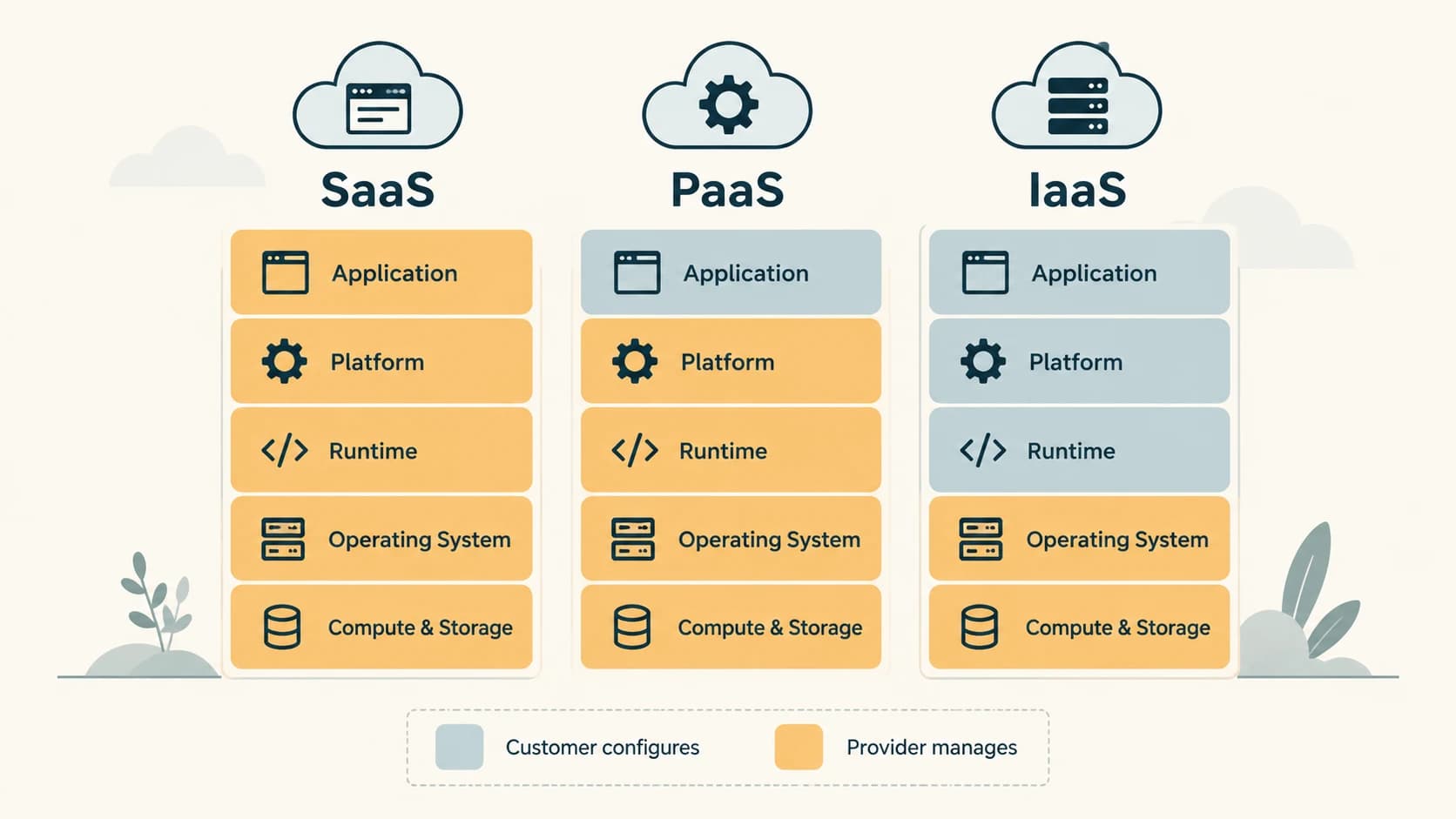
SaaS: Suppose staff log into an online office suite from a web browser. They create files and control sharing, while the provider runs the underlying application and its infrastructure. That is a typical SaaS example. It is wrong to assume the user has no responsibilities: data classification, safe sharing, access management and permitted usage still matter.
PaaS: Suppose a developer writes a banking-demo application and uploads it to a managed service that handles supported runtime provisioning and platform maintenance. This is a PaaS-style arrangement. The customer still owns the responsibility for correct application code, configuration and appropriate use of data. PaaS is not simply a word for every app available online.
IaaS: Suppose an organization rents a virtual server, installs a supported operating system and configures a database application. It handles more of the software stack itself, while the provider supplies the underlying infrastructure. This is an IaaS-style arrangement. IaaS should not be confused with owning physical hardware.
Responsibilities: a useful mental model
The precise shared-responsibility model depends on the service contract. Broadly, SaaS customers operate fewer layers, while IaaS customers configure more software layers. The provider still has responsibilities in all three. Cloud storage and backups are not automatically the same thing; accidental deletion, bad permissions and synchronized mistakes can remain important risks.
Imagine a stack with application, runtime, operating system, virtual compute and physical hardware. SaaS delivers the application service. PaaS supplies a managed platform for running the customer's application. IaaS supplies foundational virtual infrastructure on which the customer operates systems and apps. This is a learning aid; exact boundaries vary.
Deployment models and common related terms
- Public cloud: Infrastructure provisioned for general customer use by a provider; 'public' does not mean all customer files are public.
- Private cloud: Infrastructure provisioned for exclusive use by one organization, whether managed internally or by another party, and whether on or off premises.
- Hybrid cloud: Two or more distinct cloud infrastructures bound to support data/application portability or interaction. Merely owning a laptop and using an online app does not by itself define a hybrid cloud.
- Community cloud: Cloud infrastructure for a set of organizations with shared concerns; this is the fourth model in the classic NIST classification.
- Scalability: Ability to accommodate larger workloads, often by adding resources.
- Elasticity: Ability to increase and decrease provisioned resources in response to demand.
- Multi-tenancy: A service arrangement in which multiple tenants use shared resources with appropriate isolation.
Worked banking example
A fictional financial company uses (a) a hosted email application for employees, (b) a deployment platform for a customer-support app, and (c) rented virtual servers on which it installs its own OS. Classify each:
- Hosted email application → SaaS.
- Managed app development/runtime platform → PaaS.
- Fundamental virtual servers configured by the company → IaaS.
The same organization may use all three models; the label describes the supplied service rather than the organization as a whole.
Important terms and objective-exam facts
| Clue | Most suitable answer |
|---|---|
| Ready-to-use hosted software | SaaS |
| Managed platform for deploying customer-written apps | PaaS |
| Rented compute/storage/network infrastructure | IaaS |
| Capacity grows and shrinks with demand | Elasticity |
| Resources shared among multiple tenants | Resource pooling |
| Provider's data centre is still physical | True |
| Private cloud = internet completely disconnected | False |
Common confusions and exam traps
Cloud vs Internet: The Internet is network connectivity; cloud computing is a service-delivery model that may use the Internet or controlled networks. Cloud vs backup: Storing or synchronizing in a cloud does not necessarily create an independent recoverable backup. SaaS vs PaaS: The former supplies an application to use; the latter is designed to support customer application development or deployment. Public cloud vs public data: Public cloud tenancy does not automatically expose an organization's content.
Quick revision
- Cloud resources are provided on demand over networks using real infrastructure.
- SaaS = software; PaaS = application platform; IaaS = foundational infrastructure.
- Five defining characteristics include resource pooling, rapid elasticity and measured service.
- Public/private/hybrid describe deployment, not SaaS/PaaS/IaaS delivery level.
- Accountability for data, access and configuration does not disappear in the cloud.
Practice questions — CA-10-01
1. A bank employee uses a fully hosted email application without installing or managing the service software. Which model is most suitable?
A. IaaS
B. SaaS
C. PaaS
D. Bare-metal hosting
2. A developer uploads application code to a managed runtime without administering its underlying operating system. This is most typically:
A. PaaS
B. IaaS
C. Local storage
D. A LAN topology
3. An organization provisions a virtual server and installs its own guest OS and programs. Which cloud service model best fits?
A. SaaS
B. Cloud backup only
C. IaaS
D. An API key
4. Which cloud characteristic describes capacity increasing and decreasing with workload?
A. Rapid elasticity
B. Checksum
C. Fragmentation
D. Only redundancy
5. Which is one of the classic five essential NIST cloud characteristics?
A. One fixed physical server per user
B. No physical infrastructure
C. No management responsibilities
D. Measured service
6. A provider shares infrastructure between customers with logical separation. This illustrates:
A. Mandatory public access to files
B. Resource pooling
C. A printed QR code
D. Compiler translation
7. A cloud built for exclusive organizational use is best described as a:
A. Public cloud
B. Private cloud
C. Email protocol
D. WAN by definition
8. Which statement about public cloud is accurate?
A. All stored files must be publicly readable
B. It never uses virtualization
C. The provider can serve many customers, with access controls
D. It must run only on mobile devices
9. An organization connects its separate private and public cloud environments for application/data portability. This is a:
A. Hybrid cloud
B. Community LAN
C. Offline spreadsheet
D. Stand-alone VM only
10. What is the most important remaining customer responsibility in a typical SaaS service?
A. Building the provider’s data center
B. Wiring the provider’s physical servers
C. Replacing the provider’s hypervisor
D. Managing permitted access and its own data
11. A folder is synchronized to a cloud service. Which claim is safest?
A. Sync automatically guarantees independent disaster backup
B. Cloud files are inherently free of malware
C. Deleting a synchronized file can propagate deletion
D. Cloud providers never lose availability
12. Cloud computing and the Internet are:
A. Exactly the same technology
B. Unrelated because cloud never needs a network
C. Both synonyms for blockchain
D. Different: cloud is a computing service model and Internet is networking
Answers and explanations — CA-10-01
1. B — SaaS. SaaS delivers a ready-to-use application. IaaS supplies foundational compute resources; PaaS supports application development/deployment.
2. A — PaaS. PaaS gives developers a managed platform on which to deploy and operate applications.
3. C — IaaS. IaaS supplies fundamental virtual compute/storage/network resources; the customer typically manages the guest OS and apps.
4. A — Rapid elasticity. Elasticity concerns adjusting provisioned capacity in response to demand, in either direction.
5. D — Measured service. Metered usage is a defining cloud characteristic. Cloud services still run on physical resources and retain customer obligations.
6. B — Resource pooling. Resource pooling permits shared underlying resources; isolation and authorization remain necessary.
7. B — Private cloud. Private cloud refers to exclusive organizational use; it may still be hosted outside the organization.
8. C — The provider can serve many customers, with access controls. Public cloud describes the offering/deployment arrangement, not permission for strangers to read each customer’s files.
9. A — Hybrid cloud. Hybrid cloud combines distinct cloud infrastructures bound by appropriate technologies for portability/interoperation.
10. D — Managing permitted access and its own data. Even when software/infrastructure are provider-managed, customer accounts, permissions, data and safe use still matter.
11. C — Deleting a synchronized file can propagate deletion. Synchronization often propagates changes, including unwanted deletion, so separate recoverable backups may still be needed.