
Common Cybersecurity One-Liners
Common Cybersecurity One-Liners. Foundational Computer Awareness explanations, examples and explained practice questions for banking and recruitment exam preparation.
By Akhilesh Saini
Learning objectives
Rapidly distinguish the principal security threats, controls and authentication ideas, and select safer responses to routine online and banking scenarios.
Begin with the security goal
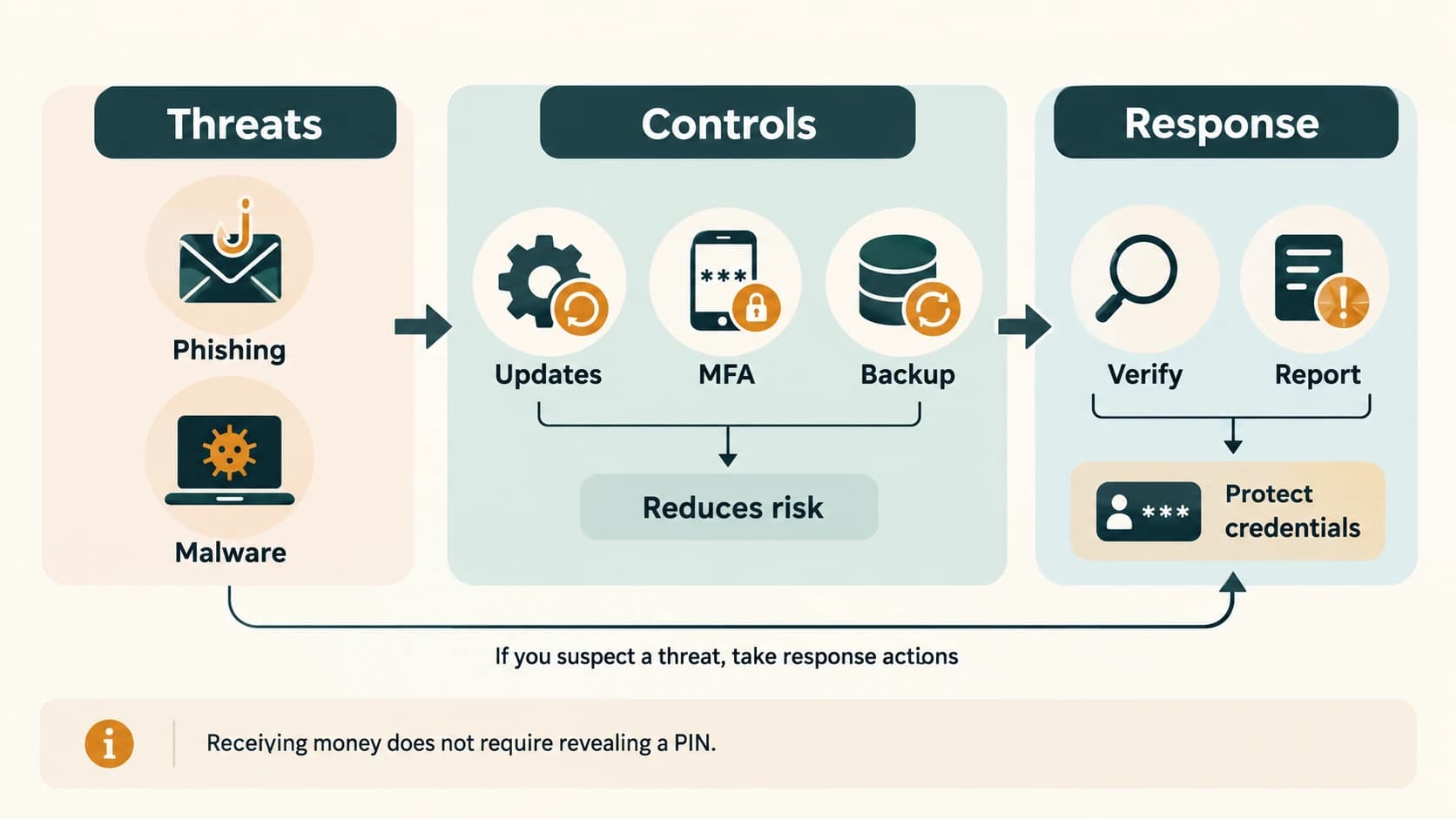
Security is not a single product. Controls seek to protect confidentiality (only authorized disclosure), integrity (prevent/detect unauthorized alteration) and availability (service/data accessible when needed). These form the familiar CIA triad. Authentication, authorization, encryption, backup and user awareness help with different parts of that goal.
Threats and attack terms
| No. | One-liner | Common confusion |
|---|---|---|
| 1 | Malware means malicious software. | Broad category, not one specific virus. |
| 2 | Virus normally propagates by attaching to a host file/program. | Often requires execution of infected host. |
| 3 | Worm can spread autonomously across suitable systems/networks. | Need not depend on a host file in the same way. |
| 4 | Trojan disguises harmful functions as something legitimate. | Disguise is key, not necessarily self-replication. |
| 5 | Spyware secretly collects information/activity. | May exist without visibly locking files. |
| 6 | Ransomware disrupts access or threatens disclosure for extortion. | Encryption is common but not the only extortion pattern. |
| 7 | Phishing uses deceptive digital communication to trick targets. | Email is common; broader forms exist. |
| 8 | Smishing is phishing via SMS/text messaging. | SMS, not a voice call. |
| 9 | Vishing is voice-based phishing/social engineering. | A caller claiming to be a bank is not proof of identity. |
| 10 | Social engineering manipulates people into unsafe actions. | Technical protection alone cannot eliminate it. |
| 11 | DDoS disrupts availability using distributed traffic/sources. | Not automatically a data-theft attack. |
| 12 | Shoulder surfing observes sensitive information nearby. | Screens and physical surroundings matter. |
Security controls and safe administration
| No. | One-liner | Important qualification |
|---|---|---|
| 13 | Anti-malware detects/blocks/quarantines many threats. | Cannot guarantee detection of everything. |
| 14 | Firewall applies traffic-permission rules. | Does not replace patching or careful browsing. |
| 15 | Security update fixes known weaknesses/bugs. | Timely patching reduces many exploitable risks. |
| 16 | Least privilege gives only necessary access. | Reduces exposure from mistakes/account compromise. |
| 17 | Strong unique passwords reduce credential-reuse risk. | Avoid reusing a bank password elsewhere. |
| 18 | Password manager helps create/store unique passwords. | Protect access to the manager itself. |
| 19 | MFA combines different authentication factors. | Two passwords are not two distinct factor categories. |
| 20 | OTP is a one-time credential. | OTPs can be phished; never disclose them to callers. |
| 21 | Security key/passkey can offer phishing-resistant sign-in in supported deployments. | Depends on proper implementation and usage. |
| 22 | Authentication checks an asserted identity. | Authorization decides permitted actions afterward. |
| 23 | Encryption makes data unreadable without proper cryptographic access. | Does not automatically detect every form of tampering. |
| 24 | Cryptographic hash maps input to a fixed-size digest. | Not generally reversible with a decryption key. |
| 25 | Digital signature can support origin/authenticity and integrity verification. | Must verify with a trusted public key/identity binding. |
| 26 | TLS helps protect application data in transit. | A malicious site can also support TLS. |
| 27 | Backup creates a recoverable copy. | Cloud sync alone may propagate deletions. |
| 28 | Restore test checks that a backup is usable. | A failed/unreadable backup is not effective protection. |
| 29 | 3-2-1 backup rule is a useful resilience guideline. | Common wording: 3 copies, 2 media types, 1 off-site. |
| 30 | Offline/isolated backup limits exposure to live-system compromise. | Access and retention still require planning. |
Browser, privacy and digital-payment safety
| No. | One-liner | What the learner should do |
|---|---|---|
| 31 | Check the exact domain before entering information. | Look for deceptive spelling and subdomain tricks. |
| 32 | HTTPS is not proof of trustworthiness. | Verify the service by independent means. |
| 33 | Review app permissions. | Decline access unrelated to the app's purpose. |
| 34 | Sign out of shared devices. | Avoid leaving active sessions accessible. |
| 35 | Do not install unknown attachments/APKs. | Verify sender/source and use official channels. |
| 36 | Never disclose a bank PIN or OTP to an unsolicited caller. | Official staff should not need your secret codes. |
| 37 | Receiving a normal UPI credit does not require entering a UPI PIN. | A requested PIN ordinarily authorizes an outgoing debit/action. |
| 38 | Check recipient and amount before authorizing payment. | Do not rely only on a familiar display name. |
| 39 | Collect requests are requests to pay, not evidence of money received. | Reject unexpected collect requests. |
| 40 | QR codes are optical information carriers. | A scanned code can initiate a payment workflow, so verify details. |
| 41 | NFC is near-field radio, not a printed QR code. | Payment authorization differs by supported method. |
| 42 | Verify credit in the official bank account. | Screenshots/messages can be fabricated. |
| 43 | Act quickly on suspected fraud. | Use official bank/app reporting channels and preserve details. |
| 44 | Report compromised credentials and reset them securely. | Use trusted devices/routes and check account activity. |
Three short practical scenarios
Scenario 1 — suspicious caller: A caller says a card will be blocked unless you reveal an OTP. This is a social-engineering warning sign. Do not share the OTP; end the call and contact the organization using an independently verified official channel.
Scenario 2 — unexpected collect request: A customer expects a refund but receives a request that requires UPI PIN approval. Treat it as an outgoing-payment request, not a credit. Reject or verify independently through the official bank/payment interface.
Scenario 3 — workstation infected: A staff computer displays a ransom demand after files become inaccessible. Avoid unsafe interaction with the message; follow the organization's incident-response procedure, report promptly, and use properly isolated tested backups for recovery as instructed. Security response should be managed rather than improvised.
Confusions to eliminate before the exam
| Looks similar | Actual difference |
|---|---|
| Threat / Vulnerability | Potential cause of harm / weakness that may be exploited |
| Virus / Worm | Host attachment / autonomous spread pattern |
| Phishing / Malware | Deception technique / malicious software |
| Firewall / Antivirus | Traffic filtering / malware-oriented detection and response |
| Authentication / Authorization | Who are you? / What are you allowed to do? |
| Hash / Encryption | One-way digest / reversible protection with appropriate key |
| OTP / MFA | A possible credential / authentication across different factor classes |
| Sync / Backup | Coordinates copies / preserves recoverable independent copies |
| Credit / Debit | Money received / money sent out |
Quick revision
Virus—host; worm—self-spread; Trojan—disguise; spyware—collection; ransomware—extortion; phishing—deception; firewall—traffic rules; updates—fixes; MFA—distinct factor types; OTP—never share; encryption—protected confidentiality; hashing—digest; signature—origin and integrity; backup—restore; UPI PIN—payment authorization, not normal receipt.
Practice MCQs — CA-11-05
1. Which malware type often disguises itself as a useful program?
A. Trojan
B. Worm solely because it replicates
C. Router
D. OCR
2. A suspicious SMS directs a customer to submit bank credentials. Which label fits?
A. Vishing
B. Smishing
C. Hard copy
D. Patching
3. A caller asks for your banking OTP. What is the safest action?
A. Read it out to avoid account blocking
B. Reply with a UPI PIN
C. Do not share it; contact the bank through an independently verified channel
D. Install the link sent by the caller
4. What is the main function of a firewall?
A. Store all backup archives
B. Replace every software update
C. Read magnetic-ink cheques
D. Apply rules to permitted/blocked network traffic
5. Which example clearly uses two different authentication factor types?
A. Password plus a physical security key
B. Two passwords
C. Two PINs
D. The same password entered twice
6. Which statement correctly describes a cryptographic hash?
A. It always hides data reversibly
B. It creates a digest and is not normally reversible by a decryption key
C. It is a form of printer ribbon
D. It grants network access automatically
7. What do digital signatures principally support when verified correctly?
A. Guaranteed truth of every statement in a document
B. Automatic financial profit
C. Origin/authenticity and integrity
D. Elimination of all malware
8. Which statement best separates synchronization from backup?
A. Sync and backup always guarantee the same recovery
B. Backup means no extra stored copy
C. Sync requires printed paper
D. Synchronization can propagate deletions; a backup preserves recoverable copies
9. A request requires UPI PIN entry to “receive a refund.” What is the key warning?
A. Entering the PIN typically authorizes an outgoing payment action
B. Receiving ordinary incoming money always needs PIN entry
C. QR codes automatically pay refunds
D. It cannot be a social-engineering attempt
10. Which of the following is not evidence that a website operator is trustworthy?
A. Independent confirmation through official channels
B. The mere presence of HTTPS
C. Correct verified organization details
D. A domain checked against an independent official reference
11. What should an organization do with backups to improve recoverability?
A. Store every copy only on the affected machine
B. Never verify backup readability
C. Test restoration and keep suitably isolated copies
D. Assume every sync folder is an independent backup
12. What does authorization determine after identity is checked?
A. What the keyboard weighs
B. The monitor’s resolution
C. How many bits are in IPv4
D. Which resources/actions the identity is permitted to access
Answers and explanations — CA-11-05
1. A — Trojan. A Trojan relies on deceptive packaging or appearance; a worm is distinguished by autonomous spreading.
2. B — Smishing. Smishing is text-message-based phishing; voice phishing is vishing.
3. C — Do not share it; contact the bank through an independently verified channel. Unexpected requests for secret credentials are classic social-engineering warning signs.
4. D — Apply rules to permitted/blocked network traffic. Firewalls filter traffic according to rules; malware scanning and backups are separate protections.
5. A — Password plus a physical security key. A knowledge factor plus a possession factor is MFA; repeating one category is not.
6. B — It creates a digest and is not normally reversible by a decryption key. Hash functions produce digests used for integrity and other security tasks; they are not encryption.
7. C — Origin/authenticity and integrity. A trusted public-key verification can establish integrity and source association, not truth of the underlying claims.
8. D — Synchronization can propagate deletions; a backup preserves recoverable copies. Recoverable independent backups protect against file loss in ways simple synchronization may not.
9. A — Entering the PIN typically authorizes an outgoing payment action. Normal receiving of UPI credit does not require authorizing a debit with your PIN; verify independently.
10. B — The mere presence of HTTPS. HTTPS protects communication but a malicious site may use it too.
11. C — Test restoration and keep suitably isolated copies. Restore testing verifies that backups can be read and used; isolation helps resist widespread compromise.
12. D — Which resources/actions the identity is permitted to access. Authentication checks identity; authorization defines permitted operations.