
Common Internet/Network One-Liners
Common Internet/Network One-Liners. Foundational Computer Awareness explanations, examples and explained practice questions for banking and recruitment exam preparation.
By Akhilesh Saini
Learning objectives
Recall network scope, devices, addresses, Internet services and common protocols; use short facts to reason about a practical connectivity problem.
The organising idea
A network has devices and links that exchange data. Higher-level services use the network to perform jobs such as opening webpages, sending emails or resolving names. Problems arise when candidates confuse the physical or link technology (fibre, Wi-Fi), network delivery (IP, routing) and applications (HTTP, email). Keep these levels separate.
Network types and topologies
| No. | One-liner | Important qualification |
|---|---|---|
| 1 | PAN covers nearby personal devices. | Often Bluetooth, not always. |
| 2 | LAN connects a relatively local site. | Does not require public Internet. |
| 3 | WLAN is a wireless LAN. | Wi-Fi is common WLAN technology. |
| 4 | MAN generally spans metropolitan areas. | Coverage categories are approximate. |
| 5 | WAN joins distant sites or networks. | A private bank WAN is not automatically the Internet. |
| 6 | Bus topology uses a shared main backbone in the classic model. | Traditional model; modern Ethernet is typically switched. |
| 7 | Star topology links endpoints to a central device. | Central device can be a failure point. |
| 8 | Ring topology forms a closed logical/physical loop. | Direction and resilience vary by design. |
| 9 | Mesh topology supplies multiple interconnections. | Full and partial mesh differ. |
| 10 | Tree topology branches hierarchically. | Often described using interconnected stars. |
| 11 | Hybrid topology combines patterns. | A topology label does not guarantee security. |
Network devices and transmission media
| No. | One-liner | Exam distinction |
|---|---|---|
| 12 | Switch commonly forwards Ethernet frames using learned MAC information. | Link-layer forwarding, unlike normal IP routing. |
| 13 | Router moves packets between IP networks. | Default gateway can be a router interface. |
| 14 | Hub repeats received signals to its ports in classic Ethernet. | Does not selectively forward by MAC destination. |
| 15 | Repeater regenerates/relays signal to extend a link. | Not necessarily a router. |
| 16 | Modem adapts data for a communication medium. | Exact techniques depend on service. |
| 17 | Gateway is a connecting/translation or default-hop point. | Meaning varies by layer and usage. |
| 18 | Wireless access point offers wireless LAN connectivity. | Internet connectivity is a separate upstream matter. |
| 19 | Twisted-pair copper carries electrical signals. | Often used for Ethernet cabling. |
| 20 | Optical fibre carries modulated light. | Resistant to ordinary electromagnetic interference. |
| 21 | Coaxial cable uses a central conductor and shield. | Used in various cable systems. |
| 22 | Wireless radio communicates without a cable over the air. | Range/security depend on standards and configuration. |
Addressing, transport and web/email protocols
| No. | One-liner | Exam distinction |
|---|---|---|
| 23 | IPv4 address has 32 bits. | Example documentation address: 192.0.2.10. |
| 24 | IPv6 address has 128 bits. | Example: 2001:db8::10. |
| 25 | Typical Ethernet MAC address has 48 bits. | Can be locally administered or randomized. |
| 26 | DHCP helps devices receive configuration automatically. | Can provide address, gateway and DNS settings. |
| 27 | DNS returns requested naming-related records. | Not a database of full website page content. |
| 28 | ARP resolves nearby IPv4 addresses to link-layer addresses on relevant LANs. | IPv6 uses neighbour discovery rather than ARP. |
| 29 | IP supports network-layer packet delivery. | Not a guarantee of arrival or confidentiality. |
| 30 | TCP supports a reliable, ordered byte stream. | TCP does not encrypt by itself. |
| 31 | UDP sends connectionless datagrams. | Applications may add their own reliability mechanisms. |
| 32 | HTTP is an application protocol for web messages. | It is not a physical cable. |
| 33 | HTTPS uses HTTP with transport protection (TLS). | Does not prove a site is harmless. |
| 34 | FTP is a traditional file-transfer protocol. | Plain FTP lacks built-in encryption. |
| 35 | SMTP is for sending/relaying email. | Not a typical inbox synchronization protocol. |
| 36 | POP3 retrieves email; IMAP accesses/synchronizes mailbox state. | POP3 server retention is configurable. |
| 37 | URL identifies a resource location/access method. | A domain is one component in many URLs. |
| 38 | Browser retrieves/renders web resources. | Search engines help find resources but aren't mandatory. |
| 39 | Website contains related web resources/pages. | A webpage is one resource within a site. |
| 40 | Internet is the global internetworking system. | The Web is a service that uses it. |
Wireless and speed facts
| No. | One-liner | Qualification |
|---|---|---|
| 41 | Wi-Fi is commonly based on IEEE 802.11 wireless LAN standards. | Can work for local connectivity without Internet. |
| 42 | Bluetooth commonly connects personal peripherals. | Not a substitute for every wide-area network. |
| 43 | NFC is close-range radio, often for contactless interactions. | Distinct from optical QR-code scanning. |
| 44 | Cellular connects through provider-managed cells/infrastructure. | Generations include 4G and 5G, with variable coverage. |
| 45 | Bandwidth describes a link's rated or available capacity. | Actual throughput may be lower. |
| 46 | Mbps means megabits per second. | 8 Mbps = 1 MB/s as a unit conversion before overhead. |
| 47 | Upload sends information from your device to a remote destination. | Download brings data toward your device. |
| 48 | Cloud storage stores data on provider-managed infrastructure. | Sync is not the same as a separate backup. |
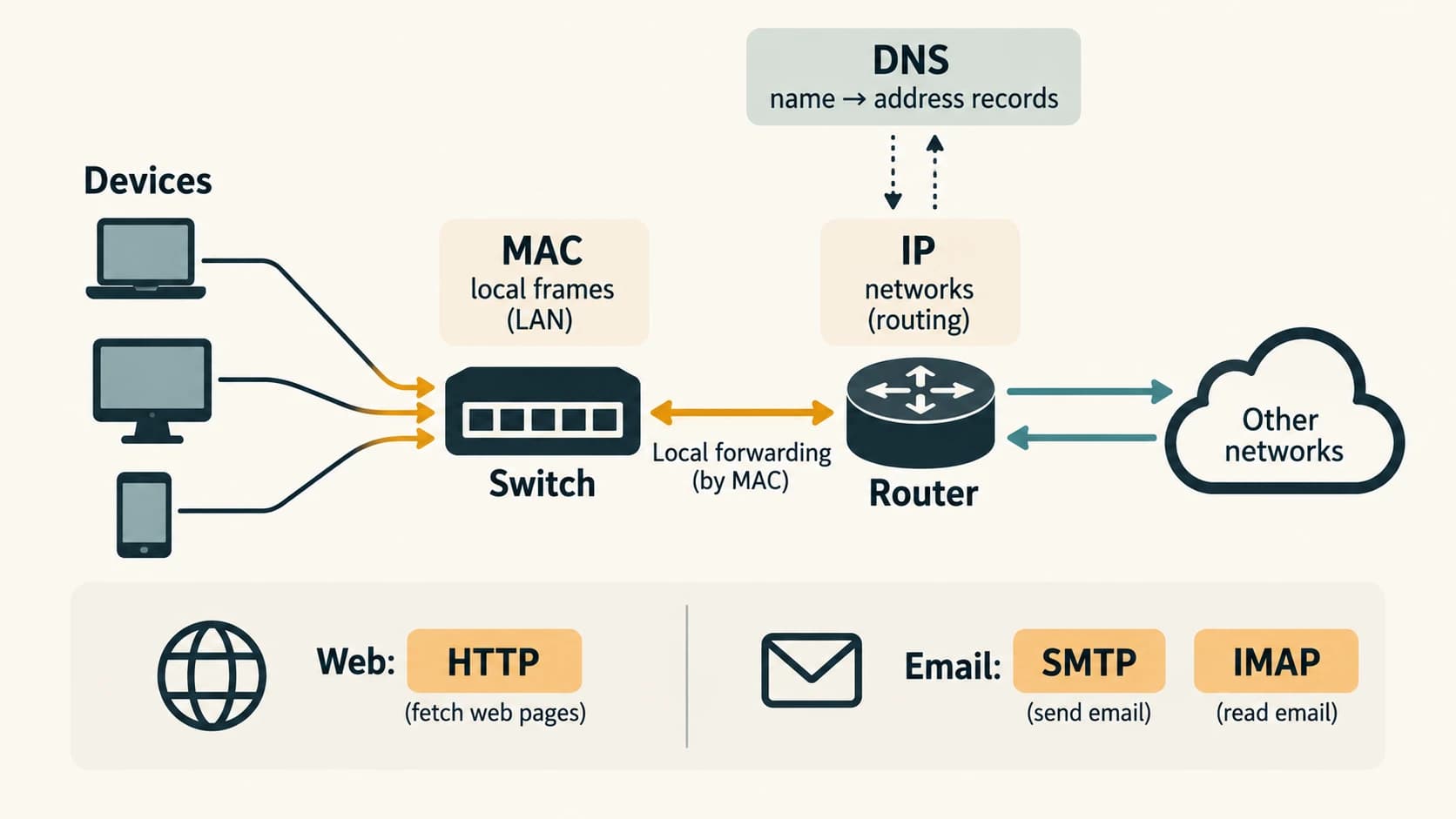
Four worked concept checks
1. Local network without Internet: Computers in a branch share a local printer through a switch. Even if the external line goes down, the local printer may remain usable. Therefore a LAN is not equivalent to the Internet.
2. Correct email protocol: A user sends a message using a mail service: the transfer/relay side typically uses SMTP. A mail client maintaining folders and read/unread status across devices often uses IMAP.
3. Address versus service: A domain like example.org can be associated with DNS records. A web browser then contacts a host/service to retrieve web content; DNS itself does not store the full page.
4. Bits and bytes: A connection advertised at 80 Mbps is theoretically 10 MB/s by decimal-rate conversion (80 ÷ 8), before networking overhead and performance constraints. Do not confuse Mb with MB.
Exam traps
- A switch and router may be built into the same consumer appliance but perform different networking functions.
- A public IP is not itself an encrypted connection; private IP does not guarantee data safety.
- DNS does not make a website trustworthy, and HTTPS does not validate business legitimacy.
- Wi-Fi can connect to a LAN with no live Internet; a mobile phone can also access the Internet through cellular data.
- HTTP/3 exists; do not memorize “HTTP always runs on TCP” as an absolute statement.
Quick revision
LAN—local; WAN—wide; star—central connection; switch—MAC frames; router—IP networks; DNS—name records; DHCP—automatic configuration; IPv4—32 bits; IPv6—128; Ethernet MAC—typically 48; HTTP—web; SMTP—send; IMAP—mailbox synchronization; Wi-Fi—WLAN; NFC—close radio.
Practice MCQs — CA-11-04
1. A bank shares a printer locally while its Internet link is down. What does this demonstrate?
A. A LAN can operate without public Internet access
B. The LAN is necessarily a WAN
C. Printer sharing requires SMTP
D. DNS stores all printed files
2. Which device most commonly forwards local Ethernet frames using learned MAC addresses?
A. Router working only at IP
B. Switch
C. Modem
D. Printer
3. Which network device is intended to route packets between different IP networks?
A. Hub
B. Keyboard
C. Router
D. Scanner
4. What is the address length of IPv6?
A. 32 bits
B. 48 bits
C. 8 bits
D. 128 bits
5. A typical Ethernet MAC address has which length?
A. 48 bits
B. 128 bits
C. 16 bits
D. 256 bits
6. Which service provides DNS records to help clients find IP address information for names?
A. Simple Mail Transfer Protocol
B. Domain Name System
C. High Definition Multimedia Interface
D. Random Access Memory
7. Which protocol is commonly used for sending or relaying email?
A. IMAP
B. POP3
C. SMTP
D. NFC
8. What is the most accurate relationship between Internet and WWW?
A. They are always identical
B. The Internet depends entirely on one browser
C. WWW means Wide Area Network
D. The Web is a service that uses Internet infrastructure
9. A local network is wireless and uses the IEEE 802.11 family. What is the common technology name?
A. Wi-Fi
B. NFC
C. MICR
D. SMTP
10. Which method typically uses close-range radio rather than scanning a printed image?
A. QR code scanning
B. NFC
C. OCR
D. OMR
11. Convert a link speed of 80 Mbps into ideal MB/s using decimal units.
A. 80 MB/s
B. 640 MB/s
C. 10 MB/s
D. 8 MB/s
12. Which statement about HTTPS is correct?
A. It ensures every webpage is genuine
B. It is a type of optical-fibre cable
C. It means the site cannot contain malware
D. It protects transport in supported connections but does not prove a seller is honest
Answers and explanations — CA-11-04
1. A — A LAN can operate without public Internet access. Local communication can continue without an external route if devices and services remain connected.
2. B — Switch. An Ethernet switch uses MAC-related forwarding for local frames; routers principally route between IP networks.
3. C — Router. IP forwarding among networks is a router’s main role.
4. D — 128 bits. IPv6 addresses are 128 bits. IPv4 addresses are 32 bits.
5. A — 48 bits. Common EUI-48 Ethernet addresses use 48 bits and may be locally administered.
6. B — Domain Name System. DNS returns relevant naming records; it is not a full-page web content host.
7. C — SMTP. SMTP handles outgoing/submission and relay roles; IMAP and POP3 are mailbox access/retrieval protocols.
8. D — The Web is a service that uses Internet infrastructure. Many services—email, Web and others—operate over Internet networking.
9. A — Wi-Fi. Wi-Fi is a common WLAN technology; an Internet connection is not mandatory for local WLAN links.
10. B — NFC. Near Field Communication uses close-range radio; QR codes are optical patterns.
11. C — 10 MB/s. Eight bits form a byte, so 80 megabits per second is 10 megabytes per second before overhead.
12. D — It protects transport in supported connections but does not prove a seller is honest. TLS-based protection helps secure communication, but a malicious website can also have a certificate.