
Common Hardware/Software One-Liners
Common Hardware/Software One-Liners. Foundational Computer Awareness explanations, examples and explained practice questions for banking and recruitment exam preparation.
By Akhilesh Saini
Learning objectives
Recall important hardware and software facts quickly, identify the correct category of a device or program, and explain common conceptual exceptions without relying on misleading slogans.
How to use one-liners correctly
One-liners are memory triggers. Read each row as a starting point, then ask “What would make this statement false?” For example, “RAM is volatile” is a helpful statement about conventional main RAM; it does not mean all types of semiconductor memory are volatile. Similarly, “a CPU is the brain of the computer” is a metaphor, not an accurate description of every operation in a modern system.
Hardware, processing and input/output
| No. | Fact to recall | Interpretation / exam trap |
|---|---|---|
| 1 | Hardware comprises physical components. | A motherboard is hardware; an OS is software. |
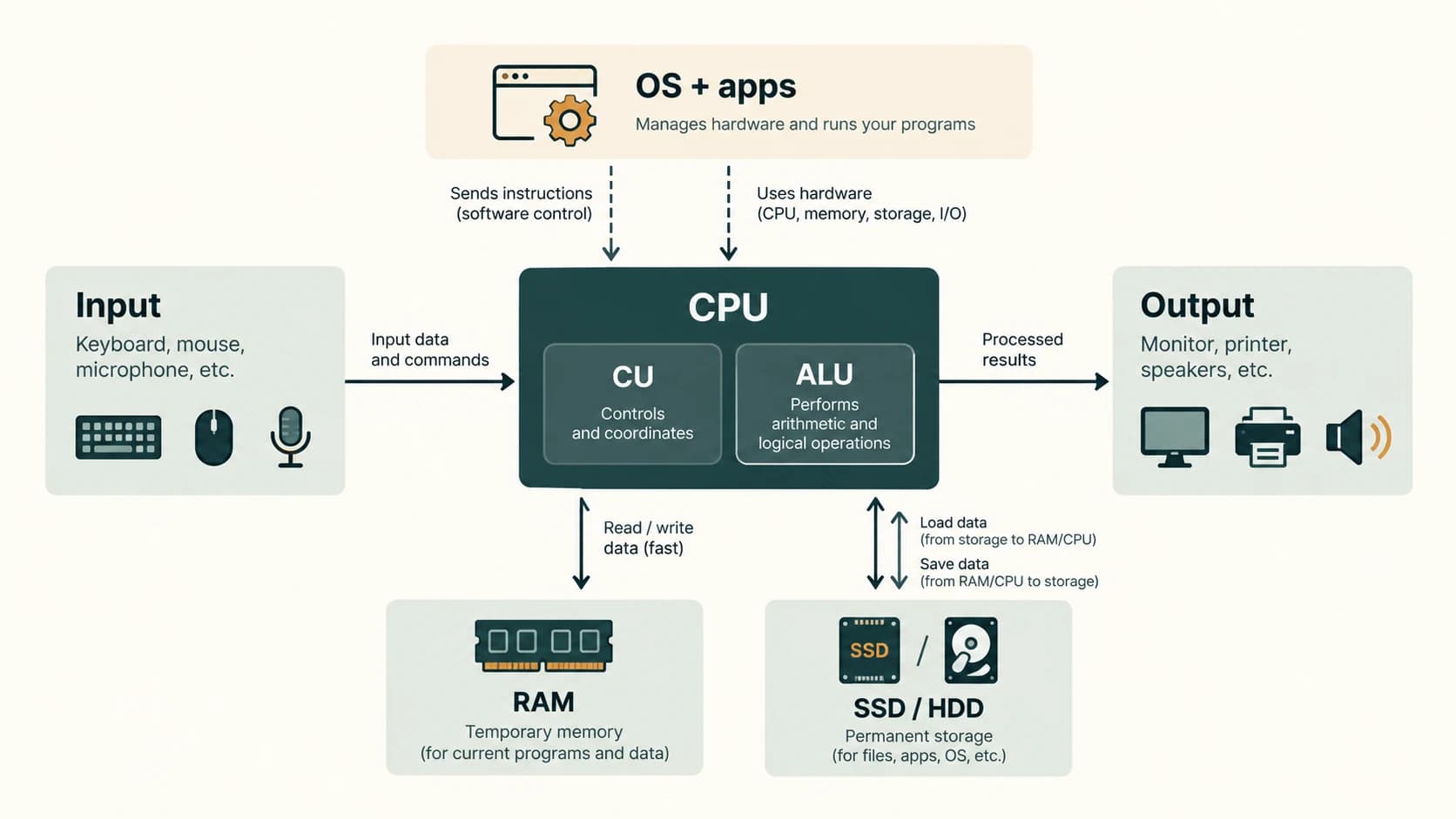
| 2 | CPU executes instructions. | The entire computer cabinet is not the CPU. |
| 3 | ALU performs arithmetic and logical operations. | It is a CPU component, not the full processor. |
| 4 | Control unit coordinates instruction execution. | It is not a permanent file-storage device. |
| 5 | Registers are small, very fast CPU storage locations. | Capacity is much smaller than ordinary RAM. |
| 6 | Cache reduces average access time to frequently used data/instructions. | Cache is not the same as a disk backup. |
| 7 | Motherboard interconnects major hardware components. | It is not the same as a computer's case. |
| 8 | Keyboard is an input device. | A key press is data input, not displayed output. |
| 9 | Mouse is a pointing input device. | Optical sensing does not make it an output device. |
| 10 | Scanner captures physical documents/images. | OCR is subsequent character interpretation. |
| 11 | OCR interprets characters; OMR reads marks. | An answer-sheet reader may use OMR. |
| 12 | MICR recognizes magnetic-ink-printed characters. | Familiar in cheque-reading workflows. |
| 13 | Monitor presents visual output. | A touchscreen also captures touch input. |
| 14 | Printer produces hard copy. | A PDF is a digital document, not itself hard copy. |
| 15 | Impact printer strikes ribbon/paper mechanically. | Dot-matrix is a classic example. |
| 16 | Laser printer uses an electrophotographic process. | Typically non-impact. |
| 17 | Inkjet printer deposits droplets of ink. | Typically non-impact. |
| 18 | Plotter historically refers to specialized large-format drawing output. | Modern wide-format devices may use printer technologies. |
Memory and storage one-liners
| No. | Fact | Interpretation / exam trap |
|---|---|---|
| 19 | Bit is a binary digit, 0 or 1. | Do not confuse lowercase b and uppercase B. |
| 20 | Byte conventionally contains 8 bits. | 1 B = 8 b. |
| 21 | RAM usually loses data when power is lost. | It is volatile working memory. |
| 22 | ROM is non-volatile. | Some ROM-family technologies can be rewritten. |
| 23 | HDD stores data magnetically on rotating media. | Not the same operating principle as an SSD. |
| 24 | SSD uses non-volatile electronic storage. | It has no magnetic spinning platter. |
| 25 | Optical discs use optical reading/writing methods. | CD, DVD and Blu-ray are different families. |
| 26 | Primary memory is directly relevant to active processing. | Storage classification varies by textbook; registers/cache/RAM are key. |
| 27 | Secondary storage retains larger files more persistently. | SSD/HDD are common examples. |
| 28 | Decimal prefixes use powers of 1,000. | 1 MB = 1,000,000 bytes with SI decimal units. |
| 29 | Binary prefixes use powers of 1,024. | 1 MiB = 1,048,576 bytes. |
| 30 | USB-C is a connector design. | Supported protocols/charging are separate capabilities. |
| 31 | HDMI commonly transports digital audio and video. | Not interchangeable with a network router. |
| 32 | UPS supplies temporary electrical continuity. | A UPS is not a data backup. |
Operating system and software one-liners
| No. | Fact | Interpretation / exam trap |
|---|---|---|
| 33 | System software supports operation of hardware/other software. | OS, drivers, utilities and translators may be grouped here. |
| 34 | Application software serves user tasks. | Word processing and spreadsheets are applications. |
| 35 | OS manages processes, memory, files, devices and access. | It is not a single hardware chip. |
| 36 | GUI uses visual interactive controls. | GUI is not synonymous with Windows alone. |
| 37 | CLI uses typed commands. | A CLI can run inside a GUI operating system. |
| 38 | Multitasking manages progress of multiple tasks. | It does not require literally simultaneous CPU execution on one core. |
| 39 | Multiprocessing uses multiple processing units/cores. | Distinct from time-slicing on one core. |
| 40 | Booting initializes the system and loads the OS. | Firmware helps start the boot process. |
| 41 | Device driver lets an OS communicate with hardware. | Driver is software, not the hardware device. |
| 42 | Firmware is software stored for low-level device control. | It can often be updated, not always permanent ROM. |
| 43 | Compiler commonly translates source code for execution. | Translators differ by language/runtime. |
| 44 | Interpreter executes/evaluates program instructions via its runtime. | “Exactly one line at a time” is not universally true. |
| 45 | Assembler translates assembly language. | Assembly is not generally the same as a high-level language. |
| 46 | Open-source licenses permit access to source and specified freedoms. | Open-source does not automatically mean zero cost. |
| 47 | Spreadsheet cell is at a row/column intersection. | B3 is a typical cell reference. |
| 48 | Formula usually starts with = in popular spreadsheets. | =SUM(A1:A5) adds a range. |
| 49 | PowerPoint transition changes slides; animation affects objects. | Questions often swap these terms. |
| 50 | File extension suggests format/association. | Renaming .jpg to .pdf does not convert the content. |
Practical exam mini-cases
Case A — volatile or permanent? A clerk edits an unfinished spreadsheet in working memory. A power failure may lose unsaved edits, even though saved spreadsheet data is stored on an SSD or server. The working-versus-stored distinction matters more than simply memorizing “RAM fast, disk slow.”
Case B — input or output? A multifunction printer can scan documents (input) and print documents (output). Classify its function, not necessarily its entire chassis, when a question asks whether a scanner or printer is an input/output device.
Case C — software class? A word-processing application relies on the operating system and drivers. The OS is system software; the word processor is application software; the printer driver is supporting software.
Case D — copied spreadsheet formula? Copying =A1+B1 down one row normally changes the references to =A2+B2; using $A$1 locks both column and row in ordinary A1-style references. This helps solve a conceptual question about relative versus absolute references.
High-frequency comparison table
| Pair | Distinction |
|---|---|
| Register / Cache / RAM / SSD | Processor-local fast storage / speed buffer / working memory / persistent storage |
| Input / Output | Supplies information to system / presents information from system |
| OS / Application | Platform resource management / user task |
| Compiler / Assembler | Translates appropriate source programming language / assembly language |
| GUI / CLI | Visual controls / command text |
| Hard copy / Soft copy | Printed physical document / electronic document |
| Save / Backup | Store the current file / maintain recoverable additional copy |
Quick revision
ALU—arithmetic and logic; CU—control; RAM—volatile; SSD—solid-state non-volatile; OCR—characters; OMR—marks; MICR—cheque line; OS—system software; driver—hardware interface; compiler—program translator; GUI—visual; CLI—text; relative cell reference—changes on copy; file extension—name hint, not conversion.
Practice MCQs — CA-11-03
1. Which part of the CPU typically carries out arithmetic and Boolean operations?
A. ALU
B. ROM
C. GPU case
D. UPS
2. Which storage component normally retains documents after shutdown?
A. Ordinary RAM
B. SSD
C. CPU register
D. Volatile cache
3. An answer-sheet scanner detecting filled bubbles is commonly associated with which method?
A. MICR
B. SMTP
C. OMR
D. OCR only
4. Which statement about a touchscreen is most accurate?
A. It is only a printer
B. It is only non-volatile storage
C. It is a network router
D. It can provide both input and output functions
5. Which is application software rather than an operating system?
A. Word processor
B. Kernel scheduler
C. Operating-system file manager
D. Device driver
6. Which component helps the operating system communicate with a specific printer?
A. CPU fan
B. Device driver
C. Power socket
D. Spreadsheet chart
7. Which description best fits a compiler?
A. An input device for images
B. A network cable connector
C. A translator that processes a source program into a form for execution
D. An uninterruptible power battery
8. Which statement about a file extension is true?
A. Changing .png to .pdf guarantees conversion
B. Every extension is an encryption key
C. Extensions are hardware addresses
D. It suggests file type but renaming it alone does not convert its content
9. Which formula is a valid spreadsheet range-sum example?
A. =SUM(A1:A5)
B. SUM A1 to A5 without formula syntax
C. =SMTP(A1:A5)
D. =HTML(A1:A5)
10. Which statement about USB-C is correct?
A. USB-C always gives the highest possible speed
B. Connector shape alone does not guarantee every optional USB feature
C. USB-C is the same as an SSD
D. USB-C cannot supply electrical power
11. What distinguishes presentation transition from object animation?
A. Both terms always mean printing
B. Transition is data encryption
C. Transition changes slides; animation affects objects
D. Animation means changing network routes
12. A UPS is principally used for what?
A. Permanent database backup
B. Character recognition
C. Translating source code
D. Temporary backup electrical power
Answers and explanations — CA-11-03
1. A — ALU. ALU means Arithmetic Logic Unit. It is part of the processor’s execution machinery.
2. B — SSD. Solid-state drives use non-volatile storage; ordinary RAM/registers/cache do not normally retain their contents after power loss.
3. C — OMR. Optical Mark Recognition detects marked regions; OCR reads characters and MICR reads magnetic-ink characters.
4. D — It can provide both input and output functions. The display produces output while touch sensing receives input.
5. A — Word processor. Word processors perform user tasks; OS management and hardware drivers support system operation.
6. B — Device driver. A device driver is software that communicates with hardware through the operating system.
7. C — A translator that processes a source program into a form for execution. Compilers translate source programs; exactly how they generate and run results depends on the language/toolchain.
8. D — It suggests file type but renaming it alone does not convert its content. A filename suffix alone does not transform the file’s internal data format.
9. A — =SUM(A1:A5). SUM is a common spreadsheet function; the leading equals sign indicates a formula.
10. B — Connector shape alone does not guarantee every optional USB feature. USB-C is a connector design; supported speed, power and display functions depend on implementation.
11. C — Transition changes slides; animation affects objects. A slide transition controls the move between slides; object animation affects elements within slides.
12. D — Temporary backup electrical power. An uninterruptible power supply can bridge short power interruptions but is not file backup.