AMOLED vs LCD Smartphone Displays: Which Is Better for Outdoor Use, Battery Life and Longevity?
Compare AMOLED and LCD phones for sunlight visibility, battery use, screen burn-in, eye comfort and long-term value—without relying on marketing claims.
An AMOLED label can make a budget phone sound more premium. An LCD label can make another phone seem outdated. Neither tells you whether you will be able to read a map in harsh afternoon sunlight, reach home with battery left, or keep the display looking good after four years.
For most buyers, a well-implemented AMOLED screen is an excellent choice: it can show genuinely black pixels, deliver strong contrast and save power with darker content. But a good LCD can remain bright, comfortable and perfectly practical—and the specific phone's display performance matters more than the panel label.
Here is how to compare the two technologies around the situations that actually affect your purchase.
AMOLED and LCD: what is physically different?
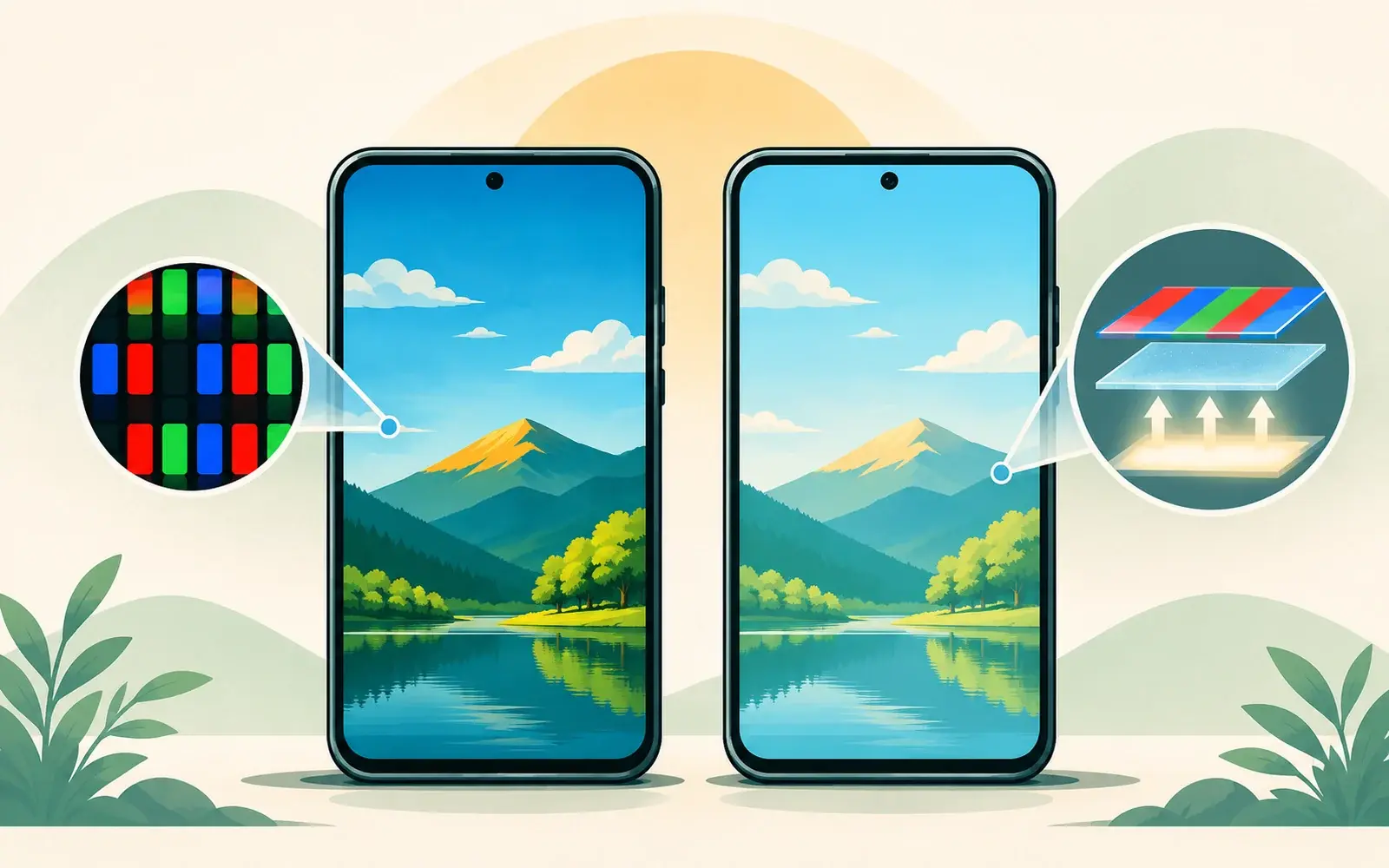
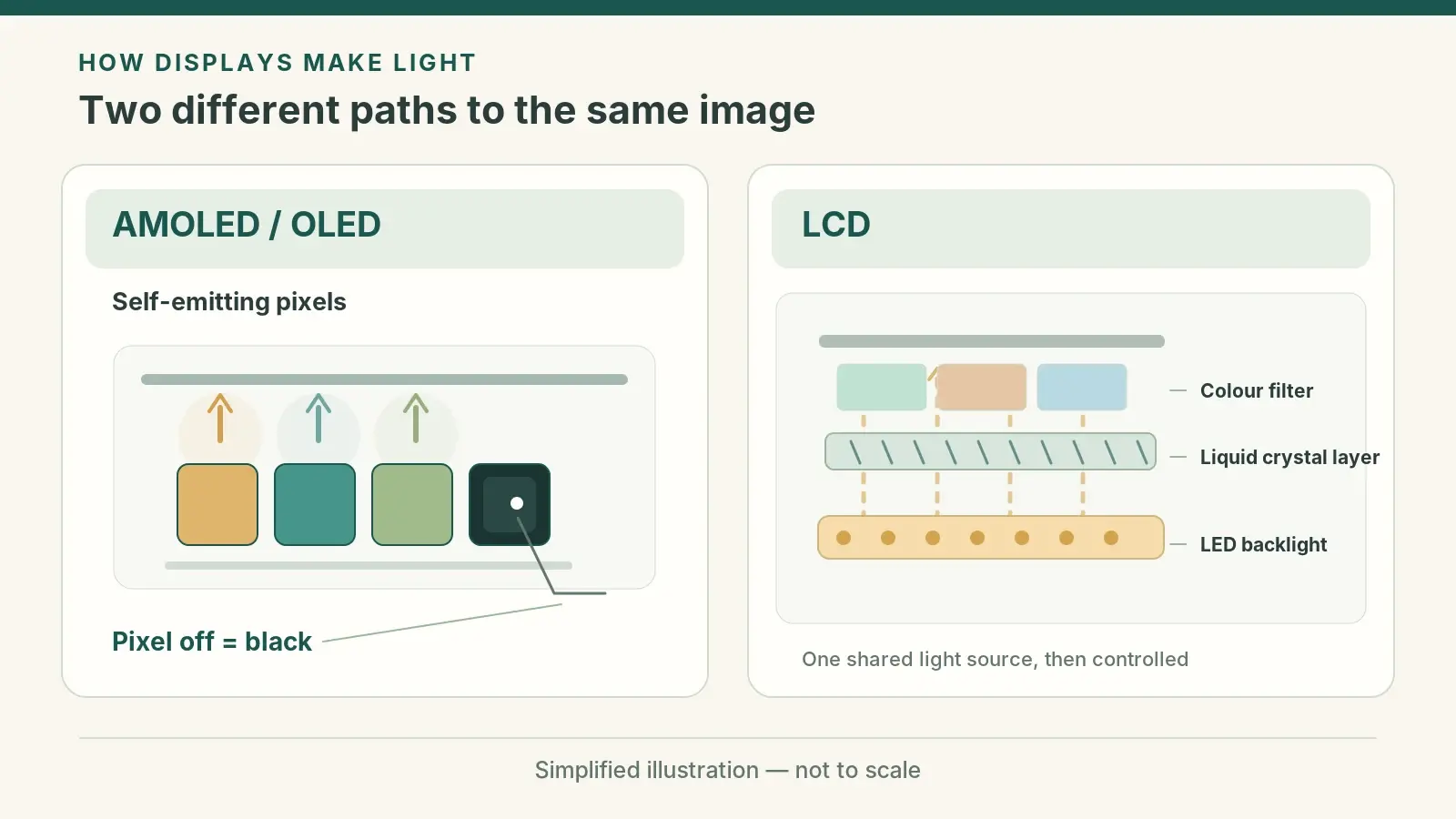
An LCD (liquid crystal display) uses a light source behind the image. In a typical smartphone IPS LCD, LED backlighting passes through layers containing liquid crystals and colour filters. Those layers control how much light reaches your eyes. When an LCD displays black, the backlight is still involved, so some light can leak through and blacks often look dark grey.
An OLED (organic light-emitting diode) panel creates light at its individual pixels instead of using a separate backlight. A pixel showing true black can effectively turn off. AMOLED means active-matrix OLED: the active-matrix circuitry addresses and controls those light-emitting pixels. In smartphone comparisons, AMOLED and OLED generally refer to the same broad self-emissive family rather than two opposing technologies.
The practical consequences are more useful than the acronyms:
| Characteristic | AMOLED / OLED | Typical smartphone LCD |
|---|---|---|
| Light source | Individual pixels emit light | Shared LED backlight filtered by liquid crystals |
| Black scenes | Pixels can switch off for very deep blacks | Some backlight glow usually remains |
| Power use | Strongly affected by content colour and brightness | Driven mainly by backlight level, with implementation-dependent variation |
| Long-term concern | Uneven pixel ageing and possible burn-in | Backlight ageing, unevenness and other display faults; not OLED-type burn-in |
| Outdoor visibility | Depends on usable brightness and reflections | Depends on usable brightness and reflections |
IPS describes a kind of LCD panel. Super AMOLED, pOLED and similar names identify implementations or branding within the wider OLED family; they do not independently guarantee brightness, eye comfort or battery endurance. Display makers Samsung Display and Corning explain the underlying backlight-versus-self-emission distinction.
Which display is easier to see outdoors?
Imagine checking navigation on a sunny street in Delhi, reading a delivery address on a scooter, or using UPI outside a shop. Deep blacks are valuable indoors, but they cannot compensate for a screen overwhelmed by reflected sunlight.
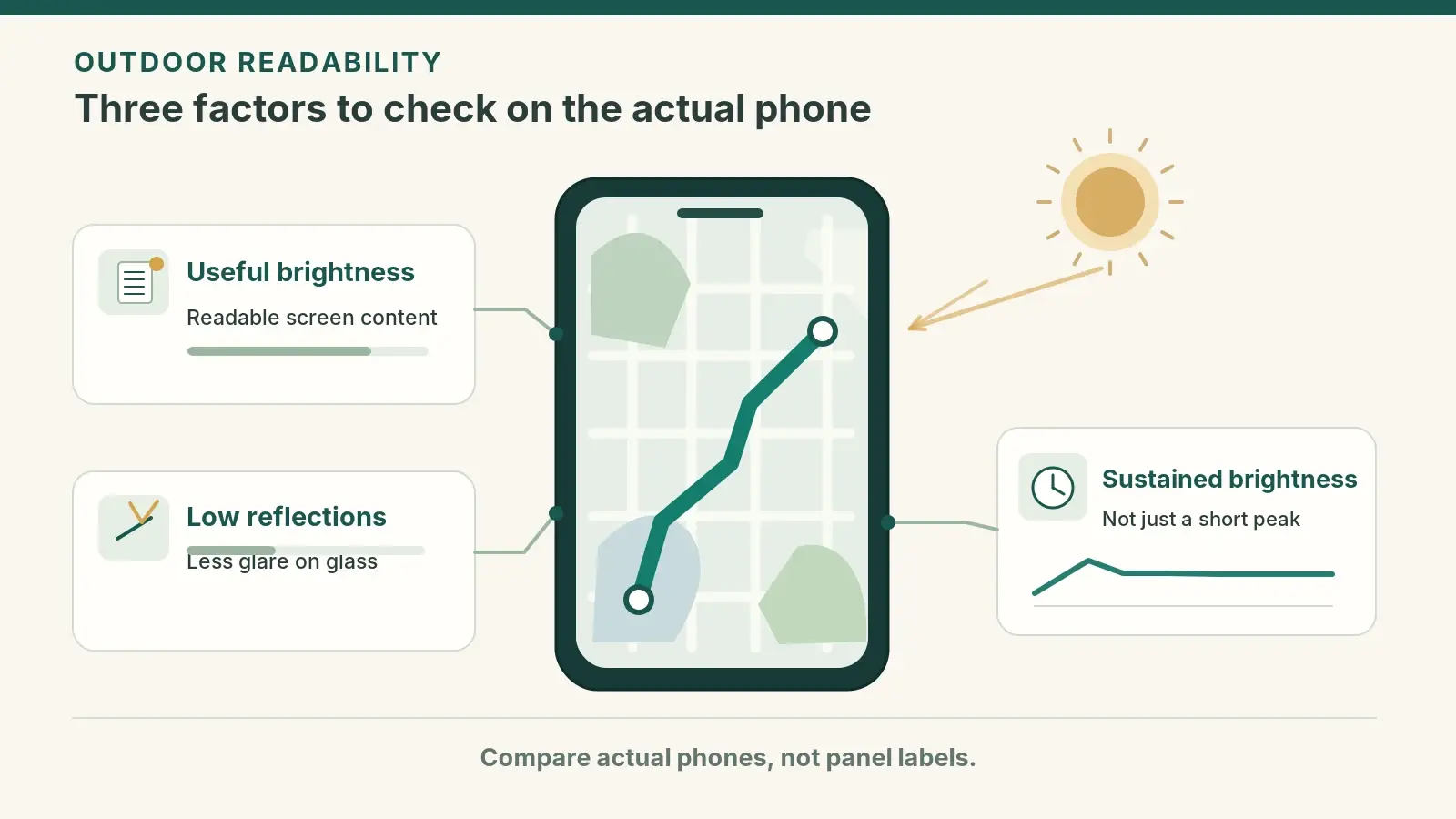
Outdoor readability has three important ingredients: how brightly the screen can display useful content, how much ambient light reflects off its surface, and how long it can maintain that brightness. Both AMOLED and LCD phones can perform well or poorly on these measures.
Understand the brightness numbers
Brightness is usually expressed in nits (candelas per square metre). The difficulty is that manufacturers may publish different kinds of numbers:
- Typical brightness: a reference for ordinary operation under the manufacturer's stated test conditions.
- High brightness mode (HBM) or outdoor brightness: elevated output, often enabled automatically when ambient light is intense.
- Peak brightness: a maximum under particular conditions, sometimes measured on a small bright area or during HDR playback rather than on a full white screen.
These figures are not interchangeable. A claimed 3,000-nit peak does not mean the entire display will remain at 3,000 nits throughout a sunny afternoon.
For a concrete example, Apple's iPhone 16 specifications distinguish 1,000 nits typical, 1,600 nits peak HDR, and 2,000 nits peak outdoors. Google's Pixel 9 specifications state up to 2,700 nits peak. Those claims use different descriptions and must not be treated as a controlled head-to-head comparison.
Independent assessment adds context. In DXOMARK's Pixel 9 display test, the phone reached about 2,670 cd/m² with its high-brightness mode active under very bright conditions, and its content remained readable. That is evidence about that particular phone, not proof that every OLED defeats every LCD.
Reflections and heat can change the result
A screen protector with a reflective finish, smudges on the glass and the angle of the sun can make a bright display difficult to read. Lower-reflection glass or coatings can improve the perceived contrast without changing the underlying AMOLED/LCD technology. Independent testing should therefore consider reflectance alongside emitted brightness.
High screen output also produces heat and consumes energy. Some phones lower brightness after warming up, particularly during navigation, camera recording or gaming outdoors. A short peak test cannot reveal whether the screen stays readable after sustained use.
For outdoor use, prefer a phone with measured sunlight readability, sensible automatic brightness and low reflections over one with the biggest advertised peak-nit number. If possible, test both phones outdoors with a bright webpage or map, not just a colourful wallpaper in a store.
Which one uses less battery?
AMOLED has a meaningful efficiency advantage in the right situation—but “AMOLED always saves battery” is too simple.
On an OLED display, a dark interface lights fewer pixels and usually requires less display energy than an otherwise comparable bright white interface. A largely black screen can be especially efficient. On a conventional LCD, making the picture black does not switch off its shared backlight in the same way; changing the backlight level is a more important lever.
That does not mean an AMOLED phone automatically lasts longer than an LCD phone. A bright OLED showing mostly white webpages can consume considerable power. Actual endurance also depends on battery capacity, chipset, modem signal, refresh rate, software, brightness setting and thermal management.
Does dark mode make a big difference?
A Purdue University research project examined dark and light themes in six Android apps on four OLED smartphones. In its tested normal indoor conditions, switching to dark mode saved about 3–9% of total phone power on average. Under high-brightness conditions, the reported saving could reach 39–47%.
These numbers refer to the researchers' specific phones, apps and settings—not to an across-the-board increase in battery life for today's devices. They illustrate an important principle: brightness and screen content interact. Dark mode is worthwhile on AMOLED, especially at high brightness, but it is not a substitute for an efficient phone.
A useful comparison would hold screen brightness, content, refresh rate and other conditions as similar as possible. Simply comparing battery-test results of two unrelated phones cannot isolate the display technology's contribution.
Everyday scenarios
For messaging in dark mode, reading documents against a dark background and watching films with many dark scenes, AMOLED often has a display-power advantage. For long sessions with white documents, spreadsheets or webpages, that advantage can shrink and may reverse in a particular device comparison. An efficient LCD running at moderate brightness can compete well.
If battery life is your main priority, look for whole-phone battery tests involving browsing, video, calls and navigation. Treat panel type as one input, not the deciding statistic.
Longevity: will AMOLED burn in after a few years?
OLED pixels use organic light-emitting materials that change with use. When some areas repeatedly display bright, fixed elements—navigation bars, a clock, a game interface or a shop's promotional screen—those pixels can age differently from surrounding areas. Over time, a faint outline may remain visible even after the image changes. This is called burn-in.
It helps to distinguish burn-in from temporary image retention. Temporary retention fades; true burn-in is a persistent change and is not normally solved by an app or a “pixel repair” video. A phone displaying varied content at ordinary brightness faces a different risk from a demonstration handset left on a static screen all day.
Apple explicitly acknowledges possible OLED image persistence and burn-in, while describing software protections that reduce their visibility. Its Super Retina support guidance also notes that both LCD and OLED displays can become dimmer as they age. Sony's OLED phone care guidance similarly recommends adaptive brightness and avoiding prolonged static images.
Does that make LCD more durable?
LCD does not have OLED's particular mechanism of uneven ageing among self-emitting pixels. That makes it attractive for a phone displaying fixed information for long hours, such as a business dashboard or kiosk.
But LCD is not immortal. Backlights can dim or become uneven, layers and electronics can fail, and impact or moisture can damage either type. OLED and LCD also differ in replacement costs from one model to another. You cannot infer a phone's exact lifespan from its screen label, and nobody can promise that a particular AMOLED panel will burn in after a set number of years.
For ordinary mixed use, an AMOLED phone can remain satisfactory for years. For heavy, fixed-screen use or a phone intended to operate as a continuously lit information display, LCD avoids one significant risk.
Habits that help either display
Use adaptive brightness rather than leaving the phone at maximum brightness indoors. Choose a reasonably short screen timeout. Avoid keeping an unchanged screen visible unnecessarily for hours. Keep the phone out of prolonged heat, especially when charging or navigating in direct sun.
These are practical precautions, not requirements to baby an OLED screen. A good smartphone should still be used normally.
What about eye comfort and screen flicker?
AMOLED phones often control low-brightness output using pulse-width modulation (PWM) or related dimming methods. The light output changes rapidly, and some people are more sensitive to the resulting flicker than others. LCD backlights can also flicker: there is no universal rule that LCD is flicker-free or that AMOLED is uncomfortable.
A 120 Hz refresh rate describes how often new image frames can be shown. It is not the same as the display's PWM dimming frequency. Nor does a very high advertised PWM frequency, by itself, guarantee that everyone will find a screen comfortable; modulation depth and the device's behaviour at low brightness also matter. DXOMARK's display testing methodology evaluates temporal light behaviour separately from refresh rate.
If you are sensitive to flicker or frequently read at night, try the exact phone model at low brightness before buying. The specific dimming implementation and your comfort matter more than the display category. Do not assume that darker colours, a blue-light filter or a “TÜV” marketing badge automatically resolves every source of discomfort.
Picture quality, smoothness and price
AMOLED's most obvious advantage is its ability to deliver very deep blacks and high contrast. It makes dark film scenes, night-mode interfaces and some HDR content look striking. OLED pixels also generally respond rapidly to image changes, though the final impression of motion depends on tuning and the screen's refresh behaviour.
LCD can still reproduce accurate colours, clear text and smooth motion. A well-calibrated 120 Hz LCD may look better for everyday reading than a poorly tuned AMOLED with exaggerated colours, insufficient outdoor brightness or distracting flicker. A 120 Hz label, like an AMOLED label, is not a quality certificate.
On a fixed budget in India, the display is part of a larger trade-off. One phone might offer AMOLED but compromise on performance, battery capacity or after-sales support. Another might use LCD while providing the processor, connectivity or repairability you value more. Check the actual replacement-screen price and service terms for the model, rather than assuming one technology is always inexpensive to repair.
Which should you choose?
| Your priority | Better starting point | What to verify |
|---|---|---|
| Films, dark themes, deep blacks | AMOLED | Colour accuracy, HDR implementation, brightness |
| Reading maps in strong sunlight | Either | Measured outdoor brightness, reflections, sustained output |
| Long battery life | Either | Independent whole-phone endurance and your screen habits |
| Static content displayed for hours daily | LCD has a practical advantage | Brightness, viewing angles and actual panel quality |
| Sensitive eyes at low brightness | Either | Model-specific PWM/flicker measurements and personal comfort |
| Best value at a limited budget | Either | Entire phone specification, not just panel marketing |
Choose AMOLED when the phones are otherwise comparable and you appreciate contrast, dark interfaces and rich video. It is a particularly compelling choice if the specific panel is bright enough outdoors and comfortable at night.
Choose LCD when it is part of a clearly better-value phone, has stronger measured readability for your use, or your workload involves unusually long periods of static content. Choosing LCD does not automatically mean accepting an unusable or inferior screen.
Before paying, compare these five things on the exact variants sold in India: independent outdoor readability, brightness behaviour after sustained use, battery endurance, low-light dimming comfort and service-screen replacement costs. Those checks turn a broad technology debate into a decision about two actual phones.
The bottom line
AMOLED is generally the more appealing technology for contrast and dark-content efficiency, but it does not win automatically in sunlight, battery life or longevity. LCD remains a sensible choice when its implementation and the rest of the phone suit you better.
Buy the better display on the better phone—not the more impressive acronym.
Related reading: how OLED and AMOLED terminology relates.
Sources and further reading
- Samsung Display — OLED technology explained — display structure and self-emissive pixels.
- Corning — The Glass Stack — LCD and OLED optical structures.
- Apple — iPhone 16 technical specifications (India) — distinct typical, HDR and outdoor brightness figures.
- Google — Pixel phone hardware specifications — manufacturer display specifications.
- DXOMARK — Google Pixel 9 display test — independent outdoor brightness and readability results.
- Purdue University — Shedding light on dark mode to save energy — OLED dark-mode energy measurements and caveats.
- Apple — About the Super Retina display — OLED ageing, image retention and burn-in mitigation.
- Sony — How to take care of an OLED phone screen — practical display-care guidance.
- DXOMARK — Display testing protocol — reflected light, flicker and readability methods.