eSIM vs Physical SIM in India: Which Should You Choose, and What Happens When You Change Phones?
Compare eSIM and physical SIM in India, including Jio, Airtel and Vi transfers, phone upgrades, SMS restrictions, UPI access and security.
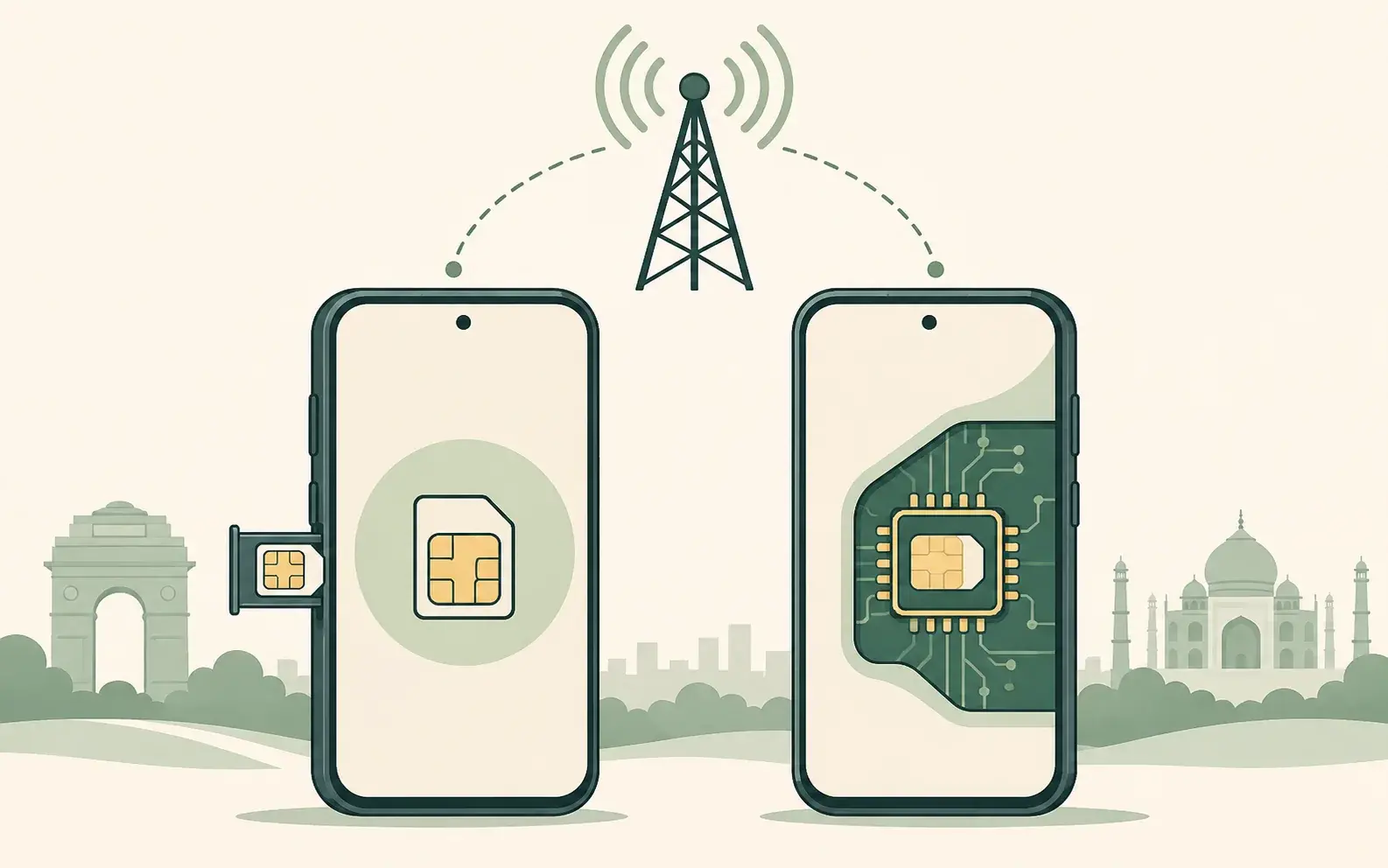
An eSIM sounds like an obvious upgrade: no tiny card to insert, no SIM tray to open, and the possibility of activating a mobile number digitally. But the decision becomes less straightforward when you buy a new phone, need a banking OTP, or discover that your old device has stopped working.
For Indian users, the biggest difference is not network performance. It is how easily you can move your mobile connection to another device. A physical SIM can usually be removed and inserted into a compatible phone. An eSIM needs a supported transfer or fresh activation process, and that process depends on both your handset and telecom operator.
Here is how to choose—and how to avoid losing access to your number during your next phone upgrade.
What actually changes with an eSIM?
A physical SIM is a removable chip that securely stores credentials used to authenticate your subscription with a mobile network. An eSIM uses a programmable, secure component built into a compatible device. Your operator supplies a downloadable SIM profile that enables the phone to authenticate without inserting a separate card.
The number, tariff, mobile network and usual calling/data capabilities are not inherently different. Converting an existing number to eSIM does not mean opening a new connection or changing your bank-registered mobile number. Jio, for example, says an existing plan and its benefits carry over when its SIM is converted or transferred.
An important distinction: eSIM is not simply a file you can copy between phones. Its profile is provisioned through a controlled operator/device process. Copying your photos, restoring a cloud backup or signing into the same Apple or Google account does not, by itself, guarantee that your mobile number will activate on the new phone.
eSIM vs physical SIM: the practical comparison
| Question | Physical SIM | eSIM |
|---|---|---|
| Can you move it to another phone? | Usually by moving the card, if the new phone accepts it | Requires supported device-to-device transfer or operator activation |
| Is the phone compatible? | Needs the appropriate SIM slot and supported network bands | Needs eSIM hardware, relevant software and operator support |
| Can it be physically removed? | Yes | No; the active profile can be disabled or deleted |
| Does it improve signal or 5G speed? | No inherent disadvantage | No inherent advantage |
| Can you keep the same number and plan? | Yes, subject to operator provisioning | Yes, when converting/transferring an existing subscription |
| What if the phone is lost? | Ask the operator to block the line; replace the card | Ask the operator to block the line; obtain a replacement eSIM/activation |
| What about two numbers? | Depends on physical slots and the phone's capabilities | Can complement a physical SIM or another eSIM, subject to active-line limits |
Neither format fixes poor indoor coverage, an overloaded cell tower or an unsuitable tariff. A different phone's antenna design, modem, supported bands and carrier configuration can change reception—but that is not a benefit created merely by switching from a plastic SIM to an eSIM.
Dual SIM does not always mean two active eSIMs
Some phones support one physical SIM plus one eSIM; others allow two active eSIM lines. Several eSIM profiles may be stored, but the number of lines that can operate simultaneously depends on the device. Check the exact Indian model or imported variant rather than assuming every phone with eSIM supports the same combinations.
What happens when you change phones?
Imagine you replace your current Android or iPhone with a new handset while keeping the same Indian mobile number.
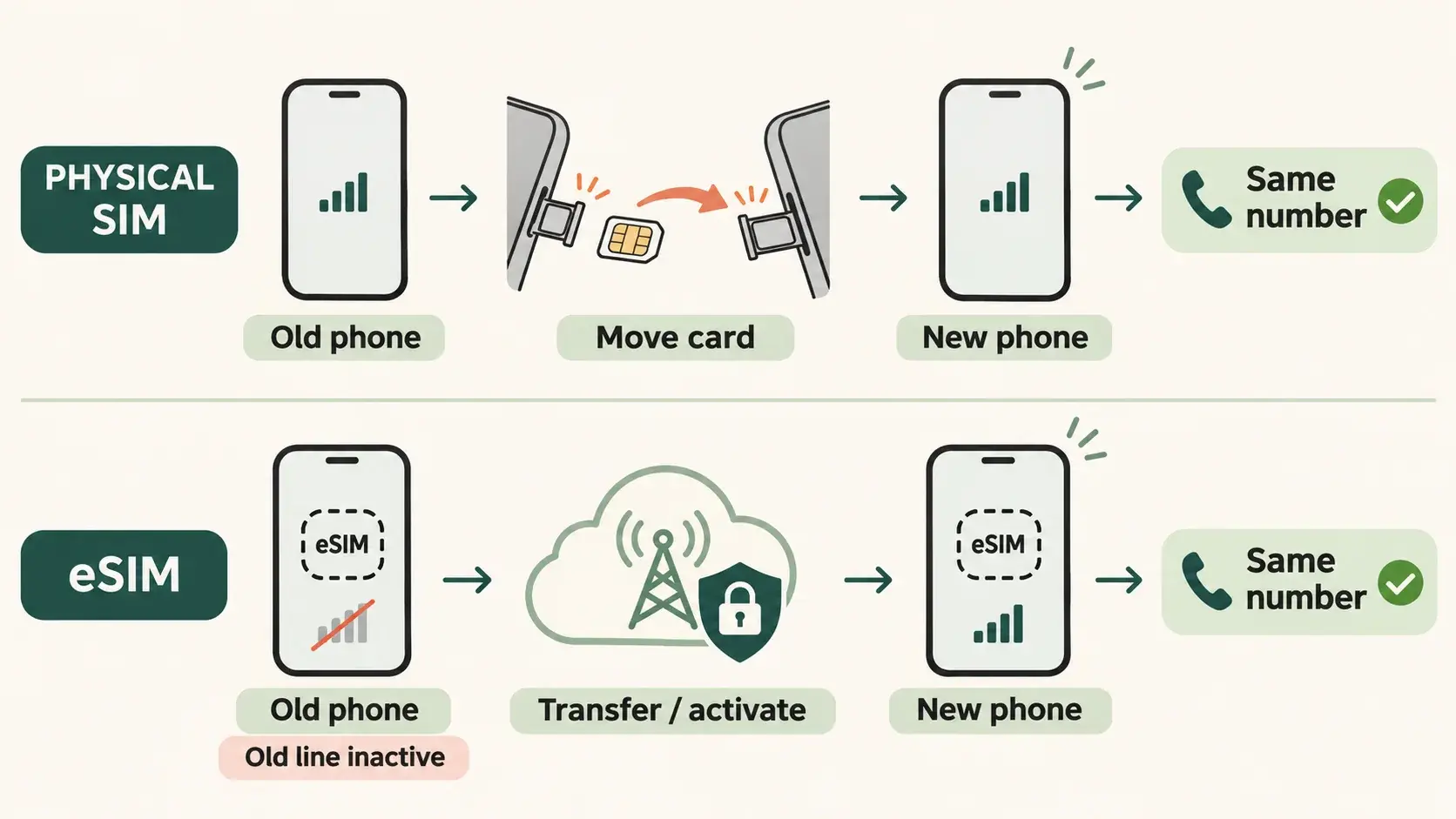
With a physical SIM, you generally power down or otherwise safely remove the card, place it in the compatible new phone, and wait for it to register on the network. You may still need to reverify apps or change phone settings, but moving the SIM usually does not require issuing a replacement subscription profile.
With an eSIM, your old phone does not contain a removable card. The subscription must be transferred through a supported setup flow or reprovisioned by your operator. Once the transfer succeeds, the number normally stops working on the old handset. It is not an ordinary feature that leaves the same primary number independently active on both phones.
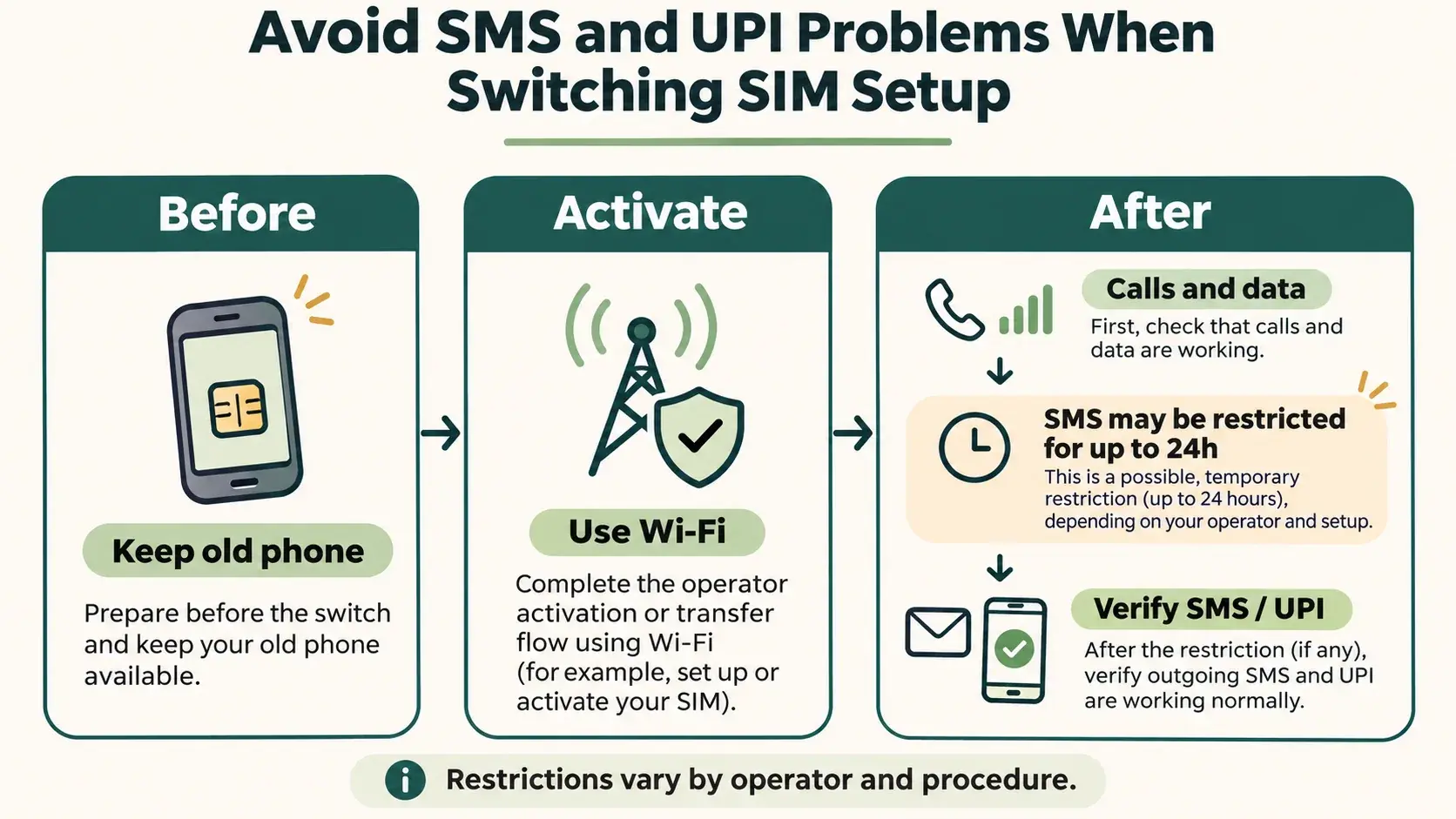
Do not erase, trade in or reset the old phone before verifying that calls, mobile data and later SMS work on the new one. Keeping the old phone available can be essential for OTPs, approvals and transfer confirmation.
iPhone to iPhone: easier when the carrier supports Quick Transfer
Apple lists Airtel and Reliance Jio as supporting eSIM Quick Transfer in India. On eligible devices, you can place both iPhones nearby, connect them appropriately, then choose Settings → Mobile Service/Cellular → Add eSIM → Transfer from Nearby iPhone on the new device. Approve the request on the old iPhone and follow the prompts.
This is a real convenience improvement over the older assumption that every Indian eSIM transfer needs an emailed QR code. However, availability still depends on the exact number, device, software and carrier conditions.
There is a documentation wrinkle with Vi: Vi describes a nearby-iPhone one-click transfer on its own activation page, but Apple's India carrier list does not presently place Vi in its Quick Transfer category. Treat that as a reason to check the transfer option for your own line, not a promise that Vi transfers always work automatically. Vi's app-based eSIM request remains a documented alternative.
Sources: Apple's India carrier support list, Jio's transfer instructions, Airtel's eSIM page and Vi's activation instructions.
Android to Android: improvements, but less uniformity
Newer Android devices can also offer direct transfer. Jio describes Transfer from another device on compatible Android phones, including Samsung Galaxy and Google Pixel models, with both devices nearby, updated and secured by screen locks. Samsung lists Jio among Indian operators that may support its eSIM Instant Transfer feature.
That does not mean every Android-to-Android combination works. A phone may support eSIM installation but not the same transfer method as another brand. Google's Pixel instructions similarly warn that automatic migration depends on the carrier.
If the transfer option is missing, use the operator's official app or activation procedure. Do not treat a missing menu as proof that your number cannot use eSIM.
Android to iPhone—or iPhone to Android
Changing platforms introduces another variable. Some new operating-system and manufacturer combinations support cross-platform transfers, but they are not universally available for Indian carriers. A reliable fallback is to request activation for the destination phone from your operator, using the new phone's eSIM identifier (EID) and whatever authentication that operator requires.
For an important primary number, allow extra time for a cross-platform move. Transfer your personal data separately and keep your old phone running until the cellular line is confirmed on the new device.
How Jio, Airtel, Vi and BSNL handle eSIM in India
The following is a practical snapshot of official processes, not a guarantee that every plan, circle or handset supports every option.
Jio
Jio documents both nearby-device transfers on compatible phones and a MyJio → Switch to eSIM process. The app route asks you to confirm the registered email, supply the destination device's EID and authenticate using an OTP. For that route, Jio describes a two-hour cooling period followed by an automated confirmation call before the profile is issued.
Jio also states that a direct transfer's SMS service may be unavailable for up to 24 hours, even when the transferred plan and benefits remain unchanged. Its exact transfer route may differ between phone models, so follow the current operator instructions rather than copying an old SMS command from another website.
Airtel
Airtel's official eSIM page documents Airtel App → Manage services → Upgrade to eSIM, including the choice to activate on this device or another device using the destination EID. It also documents nearby-iPhone transfers. For a deleted eSIM profile or a return to a physical SIM, Airtel directs customers to an Airtel store with identification proof.
Vi (Vodafone Idea)
Vi offers an app/SMS-led activation flow using the destination EID, verification and a profile download or QR code. Its page describes both an app-based device change and a nearby-iPhone option. Vi expressly warns that incoming and outgoing SMS, including OTPs, are barred for 24 hours after eSIM activation. It also lists regional exclusions, so verify availability for your telecom circle before converting.
BSNL
BSNL should not be described as having no eSIM service: official government releases announced eSIM launches in Kerala and Tamil Nadu/Puducherry in 2025. Those announcements do not establish the same activation or transfer availability in every BSNL circle. Check your local BSNL service centre or current circle guidance before making a purchase decision around BSNL eSIM.
The India-specific issue: SMS, UPI and banking verification
Your bank account does not become unlinked just because the SIM format changes. The mobile number can remain exactly the same. The difficulty arises because some services verify that number by sending an SMS from the phone or receiving an OTP.
The Department of Telecommunications issued instructions in September 2022 requiring a 24-hour bar on incoming and outgoing SMS following SIM swapping/replacement. Operators also document relevant restrictions on eSIM activation or transfer; the exact treatment should be confirmed for your procedure. In particular, Jio warns of up to 24 hours' SMS unavailability for supported direct transfers, while Vi states a 24-hour block after activation.
That means a transferred connection may be able to make calls or use data while SMS-dependent tasks still fail. A UPI app on a new handset may need to verify the bank-linked number again. NPCI's UPI guidance notes that a SIM, phone or app change can require re-registration. An SMS restriction can delay that verification, even though your bank balance, linked accounts and UPI identity were not erased by the eSIM transfer.
For a smoother transition:
- Avoid changing SIM format immediately before a payment deadline, trip or important bank login.
- Keep the old handset available for any pre-transfer verification or consent calls.
- After activation, test calls and data first, then test ordinary SMS when the restriction has expired.
- Re-register or reverify UPI and other sensitive apps only through their official flows; do not repeatedly attempt SMS verification during a known block.
A physical SIM moved between compatible handsets is often more convenient here because it avoids requesting a replacement profile. Nevertheless, moving to a new handset can still trigger app-level security checks, regardless of SIM format.
Is an eSIM safer than a physical SIM?
An eSIM is harder for a thief to physically remove and carry away, because there is no separate card. That can be an advantage after a handset theft, especially when combined with a strong device passcode and the phone's tracking/remote-lock features.
But eSIM does not eliminate SIM-swap fraud. An attacker who deceives an operator into issuing a replacement profile might still redirect service. The danger is in unauthorised account recovery or telecom provisioning, not only in removing a plastic card. Equally, someone who compromises your unlocked phone may access accounts or messages irrespective of SIM format.
Practical protection matters more than the label on the SIM: lock your phone, protect the email account registered with your operator, use available account-security controls, and never forward an eSIM QR code, activation link, verification code or consent request to a stranger. Contact your operator promptly if your phone is lost or your mobile service unexpectedly disappears.
What if you delete the eSIM, reset the phone or lose it?
Deleting an eSIM profile is not the same as cancelling your telecom subscription. It removes the profile from the handset and may leave you without cellular access until the operator issues or restores service. Apple specifically advises against erasing an eSIM as a troubleshooting step unless directed by the carrier.
During an iPhone factory reset, Apple may offer a choice to keep or erase eSIM profiles. Choose deliberately: keeping an eSIM can help if you are resetting a phone you will continue using, whereas selling the phone requires transferring the line first and removing your personal information and remaining eSIM profiles.
If you lose a phone containing an eSIM, use another device to contact the operator, block or secure the line, and request replacement activation after identity checks. If you need to fall back to a spare phone that supports only physical SIM, ask your operator for a physical SIM replacement; you cannot simply download an eSIM onto a phone that lacks eSIM hardware.
Which should you choose?
Choose eSIM if your primary phone fully supports it, you prefer not handling cards, you want the physical slot free for a second number, or you regularly use supported digital transfer and travel connectivity. It is especially attractive when you stay within a well-supported phone ecosystem and can keep both devices available during upgrades.
Choose physical SIM if you frequently move the same number between handsets, rely on basic or older backup phones, want a straightforward fallback during repairs, or cannot tolerate operator-dependent activation when changing devices. For a primary Indian number used heavily for banking and UPI, that flexibility is a genuine advantage—not resistance to newer technology.
A particularly practical arrangement is physical SIM for your critical primary number and eSIM for a secondary line, provided your phone supports that combination. Conversely, an eSIM-only phone makes the decision for you: check carrier support before buying, especially if the device is imported.
Ultimately, eSIM and physical SIM provide the same fundamental mobile service. The better choice is the one that makes your next phone change—and recovery from a lost or broken phone—least disruptive.
Related reading: what to do when a transfer fails or reaches the wrong UPI ID.
Sources and further reading
- GSMA — eSIM technology and specifications
- Apple — Indian carriers and supported iPhone eSIM methods
- Apple — How to erase an eSIM safely
- Google Pixel Help — Transfer a SIM to a new phone
- Samsung India — Galaxy eSIM and carrier support
- Jio — Transfer an eSIM between phones
- Airtel — eSIM activation and transfer help
- Vi — eSIM activation and device transfers
- Department of Telecommunications — 2022 SIM replacement SMS restriction (PDF)
- NPCI — UPI FAQs
- Press Information Bureau — BSNL Kerala eSIM service launch