
URL, Domain Name, DNS and Web Hosting Basics
URL, Domain Name, DNS and Web Hosting Basics. Foundational Computer Awareness explanations, examples and explained practice questions for banking and recruitment exam preparation.
By Akhilesh Saini
What you will learn
- What a URL is and what its major sections mean.
- How a domain name differs from a full web address and an IP address.
- Why DNS lookup is necessary in ordinary web browsing.
- What web hosting and domain registration actually provide.
Why this topic matters
A common objective question asks for the expansion of DNS or URL. More applied questions may ask which system translates names to addresses or whether paying for a domain name automatically gives you a hosted website. Understanding one imaginary web address makes many such questions straightforward.
What is a URL?
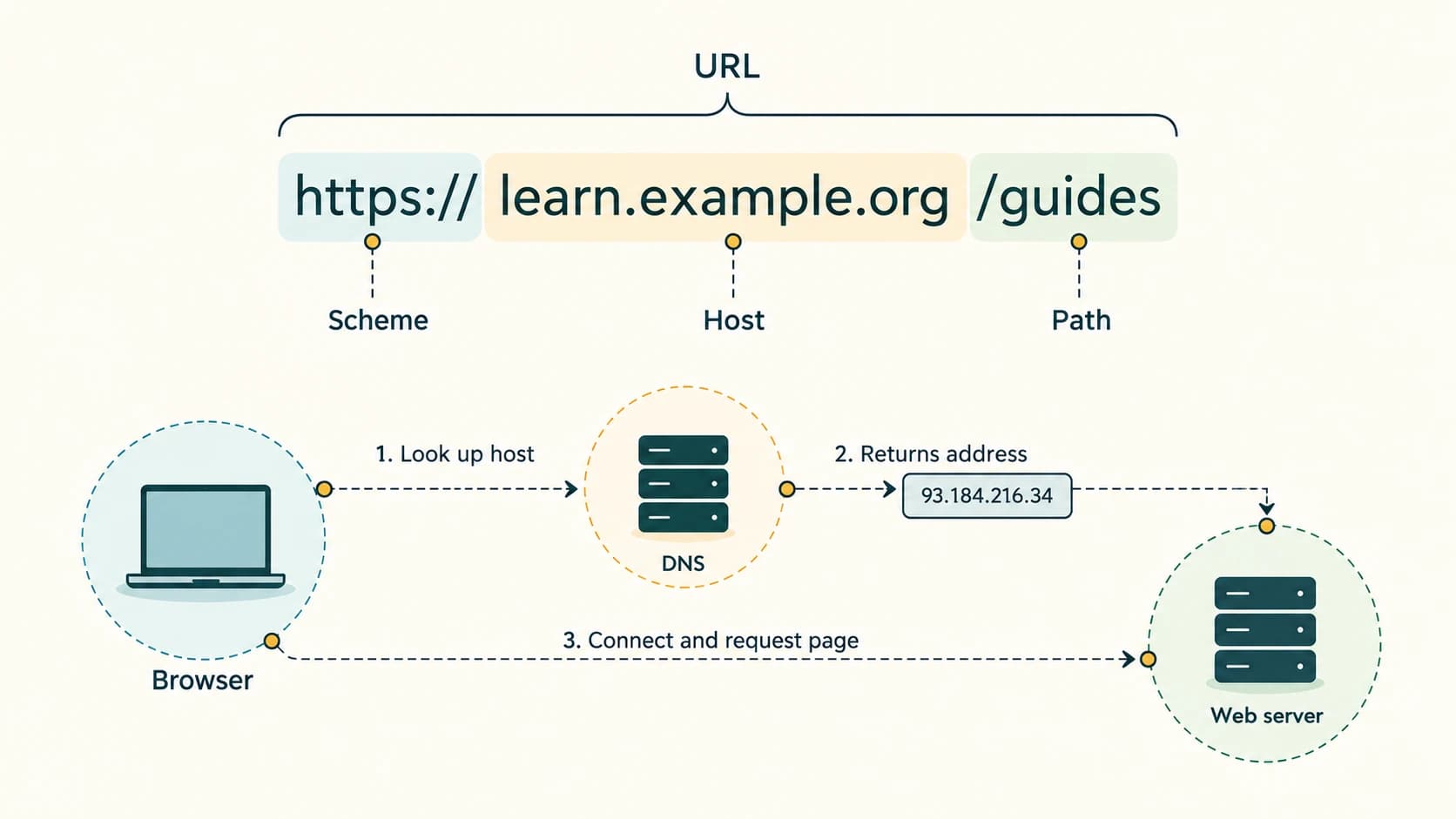
A Uniform Resource Locator (URL) identifies the location of a resource and describes how it can be accessed. A complete web URL commonly includes a scheme such as https, a host name, and sometimes a path, query or fragment.
Consider this fictional teaching example, which uses the reserved example.org domain:
https://learn.example.org/guides/networking?level=basic#summary| Part | Value | Purpose |
|---|---|---|
| Scheme | https | Access method/protocol for the resource |
| Host name | learn.example.org | Identifies the intended web host |
| Subdomain label | learn | One component of the host name |
| Domain (registered example) | example.org | Human-readable naming base |
| Path | /guides/networking | Identifies the requested path/resource |
| Query | ?level=basic | Sends parameter information |
| Fragment | #summary | Typically directs the browser to a location within the retrieved resource |
Not every valid URL contains all these parts. A simple website might be accessible at just https://example.org/. A fragment is generally processed by the client/browser rather than transmitted as part of a normal HTTP request to the server.
Domain names and IP addresses
A domain name is a human-readable Internet name. example.org is easier for people to remember than a numerical IP address. An IP address identifies a network interface for Internet Protocol communication. Many web services can use more than one IP address, and one IP address can host more than one website; the one-name-to-one-address picture is a teaching simplification.
Domain structure: In learn.example.org, .org is the top-level domain (TLD), example is the second-level label, and learn is a subdomain label.
A domain registrar provides the service of registering domain names according to registry rules. Registration usually gives the registrant the right to use a domain for the paid registration term; it is not a permanent purchase of the name itself and is distinct from web hosting.
DNS: the name-to-address directory
DNS stands for Domain Name System. It provides a distributed naming system that helps software find addresses and other records associated with domain names.
A simplified lookup works like this:
- You enter
https://learn.example.org/in a browser. - Your device and DNS resolver check whether they already have a usable record cached.
- If needed, the resolver obtains DNS information through the wider DNS hierarchy.
- An address record such as A (IPv4) or AAAA (IPv6) can help the browser contact the service.
- The browser connects to the appropriate web service and requests the resource using HTTPS.
Other DNS record types include MX for mail-routing information and CNAME for a canonical-name alias. Those are useful awareness facts; you do not need to memorize packet formats here. DNS lookup and a web request are separate steps, even though both occur during the browsing experience.
Web hosting is not domain registration
Web hosting makes the files or application that constitute a website available through web-serving infrastructure. The hosting service may supply compute resources, storage, security settings, and network connectivity; some modern sites use cloud platforms and distributed content delivery systems.
| Service | What it supplies |
|---|---|
| Domain registration | Rights to use a registered domain name during a registration term |
| DNS service | Records that associate domain names with addresses/other services |
| Web hosting | Infrastructure and services that deliver website files or application responses |
| Web browser | Software a user operates to retrieve and display web content |
| Search engine | Search and discovery service, not a prerequisite for visiting a known URL |
Worked examples
Example 1 — Finding the domain: In https://apply.example.org/forms/start, the hostname is apply.example.org and the example registered domain is example.org. The path is /forms/start.
Example 2 — A new domain with no site: A student registers a domain but has not uploaded website files or configured the service. Registering the name alone does not guarantee that a website will appear.
Example 3 — Website moved to new hosting: The domain can remain the same while DNS records and hosting infrastructure change. DNS caches may continue to contain old information temporarily.
Example 4 — DNS is not a search engine: DNS finds information associated with an exact name. A search engine helps discover pages relevant to keywords. The tasks are not interchangeable.
Example 5 — Reading HTTPS: A URL starting with https:// indicates use of HTTPS for that connection. It does not alone guarantee that the owner of the webpage is trustworthy.
Important terms
| Term | Meaning |
|---|---|
| URL | Uniform Resource Locator; resource address/access description |
| Domain name | Human-readable Internet name |
| IP address | Numerical Internet Protocol address |
| DNS | Domain Name System |
| DNS resolver | Service that helps obtain DNS answers |
| TLD | Top-level domain, such as .org |
| Subdomain | Label within a larger domain name, e.g. learn |
| Registrar | Organization providing domain registration services |
| Hosting | Infrastructure/service that serves a website or application |
| A / AAAA record | DNS records commonly carrying IPv4 / IPv6 addresses |
| MX record | DNS record used for email delivery routing |
Common confusions and exam traps
- A domain name is not an entire URL. A URL can include a protocol, path, query and fragment.
- DNS does not contain all webpage content. Its main role is name-related information, such as address and mail-routing records.
- Registering a domain does not equal hosting a site. They are separate functions, even if sold together.
- HTTPS does not mean “official”. Do not judge trust solely by a lock icon or protocol label.
- A web address is not always typed into a search engine. Browsers can directly open URLs.
Objective-exam facts to remember
| Clue | Answer |
|---|---|
| Full form of URL | Uniform Resource Locator |
| Full form of DNS | Domain Name System |
| DNS IPv4 address record | A |
| DNS IPv6 address record | AAAA |
| DNS mail-routing record | MX |
.org in example.org | Top-level domain |
/help after host name | Path |
?topic=network | Query parameter portion |
#section1 | Fragment identifier |
Quick revision
- URLs describe how/where to access resources.
- Domain names are human-readable, while IP addresses support network routing.
- DNS helps turn a name into useful network records.
- A web host delivers content; a registrar registers a domain.
- Protocol, domain and path identify different parts of a web URL.
Practice questions — CA-06-03
1. What is the expansion of DNS?
A. Digital Network Service
B. Domain Name System
C. Data Number Storage
D. Dynamic Name Server
2. The full form of URL is:
A. Universal Registration Link
B. Unique Router Location
C. Uniform Resource Locator
D. Unified Retrieval Language
3. Which part of https://learn.example.org/guide is the scheme?
A. https
B. learn
C. example.org
D. /guide
4. In the hostname learn.example.org, the top-level domain is:
A. learn
B. example
C. .example.org/guide
D. .org
5. A DNS A record normally holds information about an:
A. IPv4 address
B. Word document heading
C. Audio device
D. Email subject
6. Which DNS record is associated with mail routing?
A. TXT only
B. CNAME only
C. MX
D. PDF
7. A domain registrar chiefly provides:
A. Web browser software
B. Domain registration service
C. Wi-Fi hardware
D. A guaranteed top search result
8. What does web hosting primarily do?
A. Guarantees a domain can never expire
B. Makes passwords unnecessary
C. Replaces the need for HTTPS
D. Provides infrastructure to serve a website/application
9. In https://example.org/help?q=ram the part /help is a:
A. Fragment
B. Port number
C. Path
D. Top-level domain
10. In a common web URL, #section is called the:
A. Fragment
B. IP address
C. DNS resolver
D. Query scheme
11. Which statement about domain and hosting is correct?
A. They always come together automatically
B. Registering a name alone does not create a functioning website
C. DNS stores all content of webpages
D. A domain name cannot change hosts
12. One IP address can be involved in serving:
A. Exactly one web name in every case
B. Only one homepage and no other files
C. No websites at all by definition
D. More than one website depending on server configuration
Answers and explanations — CA-06-03
1. B — Domain Name System. DNS stands for Domain Name System.
2. C — Uniform Resource Locator. URL means Uniform Resource Locator.
3. A — https. The scheme before :// is https.
4. D — .org. The rightmost label org is the top-level domain.
5. A — IPv4 address. DNS A records carry IPv4 addresses.
6. C — MX. MX records specify mail-exchanger routing targets for a domain.
7. B — Domain registration service. Domain registrars provide the ability to register domain names under registry policies.
8. D — Provides infrastructure to serve a website/application. Hosting delivers website files or application responses through connected server infrastructure.
9. C — Path. The path follows the hostname and identifies a resource location.
10. A — Fragment. The fragment commonly identifies a location within the retrieved page/resource.
11. B — Registering a name alone does not create a functioning website. Registration, DNS configuration and hosting are separable functions.
12. D — More than one website depending on server configuration. Virtual hosting and related techniques can serve different names from shared infrastructure.