
Search Engines and Effective Web Search
Search Engines and Effective Web Search. Foundational Computer Awareness explanations, examples and explained practice questions for banking and recruitment exam preparation.
By Akhilesh Saini
What you will learn
- How search engines help discover online information.
- What indexing, ranking and snippets mean at awareness level.
- How keywords, quotation marks and simple operators improve search.
- Why the top result or a convincing snippet is not necessarily correct.
Why this topic matters
Recruitment-exam questions may test familiar web-search terminology. Practical computer awareness also includes knowing how to find an official syllabus, notice or help page without mistaking an advertisement or an unrelated result for an authoritative source.
What a search engine does
A search engine is a service that finds and presents information relevant to a query. Web search engines commonly use automated programs called crawlers to discover pages, build an index containing information about discovered resources and use ranking systems to organize relevant results. The exact processes differ between search providers.
Think of a search-engine index as an extensive, continually updated catalog. You ask for a concept, the service looks for matching or related entries, and you receive a Search Engine Results Page (SERP). A result may contain a title, website address and short snippet. A snippet is a preview, not a guarantee that its claim is accurate.
Search engines do not necessarily index every accessible webpage; some resources are private, inaccessible to crawlers, restricted or not yet discovered. Nor do search-engine results represent all content on the Internet.
Search engine versus address bar
Typing example.org into a browser's address bar can take you directly to a website. Typing how to prepare a balance sheet usually triggers a search through the browser's configured search provider. Modern browsers combine navigation and searching within the same visual control. The two tasks remain conceptually different.
Better searches, one step at a time
1. Use focused keywords. recruitment exam syllabus official notice is more targeted than all information about exams. Adding the exam body and subject can help.
2. Use quotation marks for an exact phrase. Searching for "digital signature" tells many search services to look for that phrase more exactly than an unquoted search.
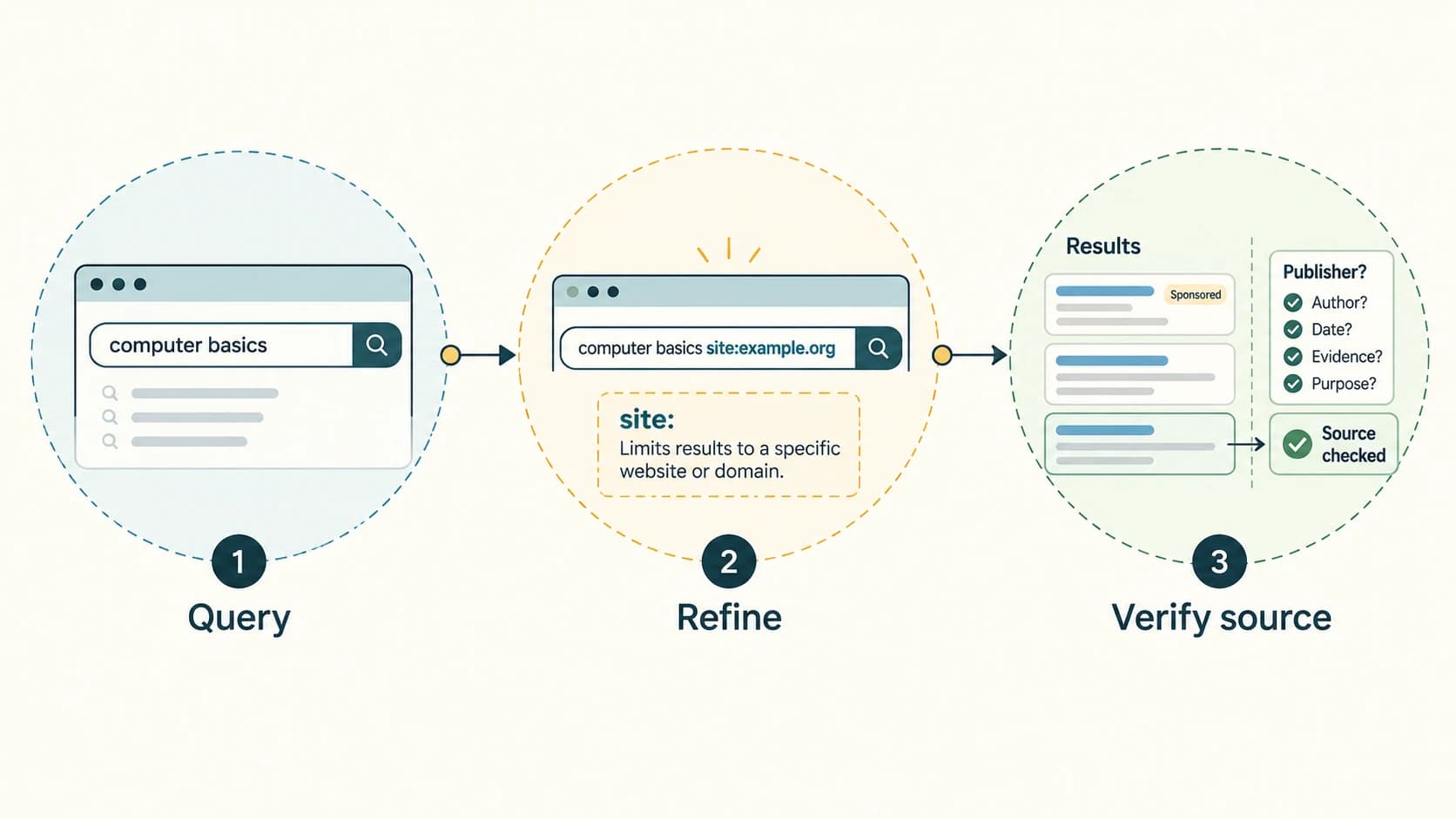
3. Use site: to restrict to a domain or site. An illustrative search is site:example.org handbook; actual official documents should be located on their genuine publishing authority's domain.
4. Use the minus sign to exclude a term where supported. For example, computer mouse -animal can help exclude unwanted meanings.
5. Use file-type searching where supported. A query such as computer basics filetype:pdf can prioritize PDF results. Operators are not identical across every search engine and may change over time.
6. Review sources, not just headlines. For a syllabus, go to the official examination authority or institution; check the document's title, applicability, and whether a newer notice supersedes it. A result that appears first is not necessarily official.
Understanding search results
| Item | Meaning | What to check |
|---|---|---|
| Organic result | Result selected by ordinary search ranking | Source, relevance, date if important |
| Sponsored result | Paid placement marked as advertising | Do not confuse placement with authority |
| Snippet | Short preview/summary | Verify in the full source |
| Search filter | Narrows results by type/topic | Filters may differ between services |
| Search operator | Special syntax to refine a query | Does that provider support it? |
| Search history | Record of earlier searches, if enabled | Privacy and account settings |
Worked examples
Example 1 — Find a policy PDF: Search for the policy's exact title plus a filetype:pdf operator if your search engine supports it. Compare the result with the issuing organization's document library.
Example 2 — Too many irrelevant results: Searching for bank account is broad. difference between savings and current account is a clearer conceptual question.
Example 3 — Unknown term: A student searches what is DNS. A search engine may show a short answer, but a reputable technical reference can better explain the underlying distinction.
Example 4 — False authority: A page containing the word “official” in its headline is not necessarily an official publication. Check who owns and operates the site.
Example 5 — Search result freshness: For evergreen definitions, an older authoritative reference can remain valuable. For examination rules or notices, the relevant official and applicable information is more important.
Important terms
| Term | Meaning |
|---|---|
| Crawler / spider | Automated program discovering online resources |
| Index | Searchable catalog of discovered content |
| Search query | Keywords/questions submitted by user |
| Ranking | Ordering results according to search criteria |
| SERP | Search Engine Results Page |
| Snippet | Short description/preview of a result |
| Operator | Search syntax refining a query |
| Sponsored result | Paid placement labeled as advertising |
Common confusions and exam traps
- Search engine is not a browser. A browser can open search results and destination pages.
- Top result is not proof of truth. Ranking and accuracy are different concerns.
- Indexed does not mean all Web content. Private and unindexed pages may be missing.
- Quotes and
site:are search refinements, not web protocols. - Do not rely on a snippet alone for a regulation, fee, bank notice or application deadline.
Objective-exam facts to remember
| If asked... | Remember |
|---|---|
| Automated page discovery | Crawler / spider |
| Catalog used to find pages | Search index |
| Listing of search results | SERP |
| More exact phrase search | Quotation marks |
| Restrict search to a site | site: (on supporting engines) |
| PDF-oriented search | filetype:pdf (on supporting engines) |
| Paid search placement | Sponsored / advertisement |
Quick revision
- Crawlers discover resources, indexes organize information and ranking orders results.
- Queries work better with precise, relevant terms.
- Quotes and operators can refine results on supporting services.
- Search snippets are previews, not source verification.
- Use genuine official publishers for examination or institutional information.
Practice questions — CA-06-04
1. A search-engine crawler is software that:
A. Discovers online resources
B. Encrypts all email attachments
C. Controls computer RAM
D. Formats printed pages
2. SERP commonly stands for:
A. Search Engine Results Page
B. Secure Email Routing Protocol
C. Standard Electronic Report Path
D. Search Engine Router Port
3. The main purpose of a search index is to:
A. Store computer passwords
B. Organize discovered content for retrieval
C. Convert PDF into Excel automatically
D. Provide keyboard shortcuts
4. To search for an exact phrase on a supporting search engine, use:
A. Commas around the phrase
B. Square brackets only
C. Quotation marks
D. A file extension
5. Which operator commonly restricts Google search to a site/domain?
A. site:
B. RAM:
C. usb:
D. http:
6. What does a search-result snippet usually show?
A. Full verified contents of every page
B. An automatic guarantee of source trust
C. The user password
D. A short preview/description of a result
7. The top-ranked result should be treated as:
A. Always official
B. Likely relevant but still requiring source assessment
C. Always a paid advertisement
D. A replacement for reading the actual notice
8. A sponsored search placement is:
A. An indexed DNS record
B. A web browser bookmark
C. Paid content placement usually labeled as an advertisement
D. A type of computer virus
9. Which query is normally more focused?
A. file
B. exam
C. computer
D. official keyboard shortcuts PDF guide
10. Which operation is commonly used to exclude a search term?
A. Precede it with a minus sign
B. Add a second domain extension
C. Use the plus sign as the only option
D. Delete all spaces
11. Which statement about search indexes is accurate?
A. They include every private file on the Internet
B. They may omit private, restricted or undiscovered resources
C. They contain only photographs
D. They require all pages to be public emails
12. For a current examination syllabus, the best verification step is to:
A. Trust any screenshot from social media
B. Choose the shortest search snippet
C. Consult the issuing authority and applicable official document
D. Assume old coaching notes are definitive
Answers and explanations — CA-06-04
1. A — Discovers online resources. Crawlers discover resources that a search engine may later index.
2. A — Search Engine Results Page. SERP is the webpage/view presenting results for a query.
3. B — Organize discovered content for retrieval. An index helps a search service find content relevant to queries.
4. C — Quotation marks. Quotes commonly direct the engine toward more exact phrase matching.
5. A — site:. The site: operator limits results to a specified site/domain on supporting engines.
6. D — A short preview/description of a result. Snippets summarize or preview matching content; check the source itself.
7. B — Likely relevant but still requiring source assessment. Ranking assesses relevance among other signals, not guaranteed truth or official status.
8. C — Paid content placement usually labeled as an advertisement. Sponsored placement is advertising, not automatic proof of authority.
9. D — official keyboard shortcuts PDF guide. Specific relevant terms narrow the likely meanings and search results.
10. A — Precede it with a minus sign. The minus sign can exclude a term on compatible search engines.
11. B — They may omit private, restricted or undiscovered resources. Search engines cannot necessarily discover or index every resource.
12. C — Consult the issuing authority and applicable official document. Syllabus applicability should be checked against the official issuing authority.