
Email: Fields, Attachments, CC, BCC and Etiquette
Email: Fields, Attachments, CC, BCC and Etiquette. Foundational Computer Awareness explanations, examples and explained practice questions for banking and recruitment exam preparation.
By Akhilesh Saini
What you will learn
- Identify the purpose of To, From, Subject, CC and BCC.
- Understand attachments, Reply, Reply All and Forward.
- Recognize common email terms and simple mail-protocol roles.
- Write professional, clear and safe emails.
Why this topic matters
Email is used for examination correspondence, bank-office communication, account notifications and job applications. Questions may ask which field conceals recipient addresses or which action sends a received message onward to somebody else. The practical lesson is to keep messages accurate, concise and appropriately private.
What is email?
Email, short for electronic mail, is a system for exchanging messages over computer networks. An email address is commonly written in the form local-part@domain, for example support@example.org. The part to the left of @ identifies a mailbox/local recipient in that domain's mail system, and the part to the right names the mail domain.
Email is not the same as the World Wide Web, although browser-based services (webmail) allow you to read and send email using a webpage. Dedicated email applications can also be used.
A simplified email route is: a sender composes a message, the mail-sending service transfers it toward the recipient's mail service, and the recipient reads it through a mail application or webmail. Delivery may involve more than one mail server. SMTP is widely associated with sending/transferring mail; IMAP and POP3 are associated with retrieving/accessing received messages. The detailed protocols are treated in CA-07-07.
Understand the common fields
| Field | Meaning / purpose | Practical caution |
|---|---|---|
| From | Address presented as sender | Can be spoofed; do not trust the label alone |
| To | Main intended recipient(s) | Addresses are visible to usual recipients |
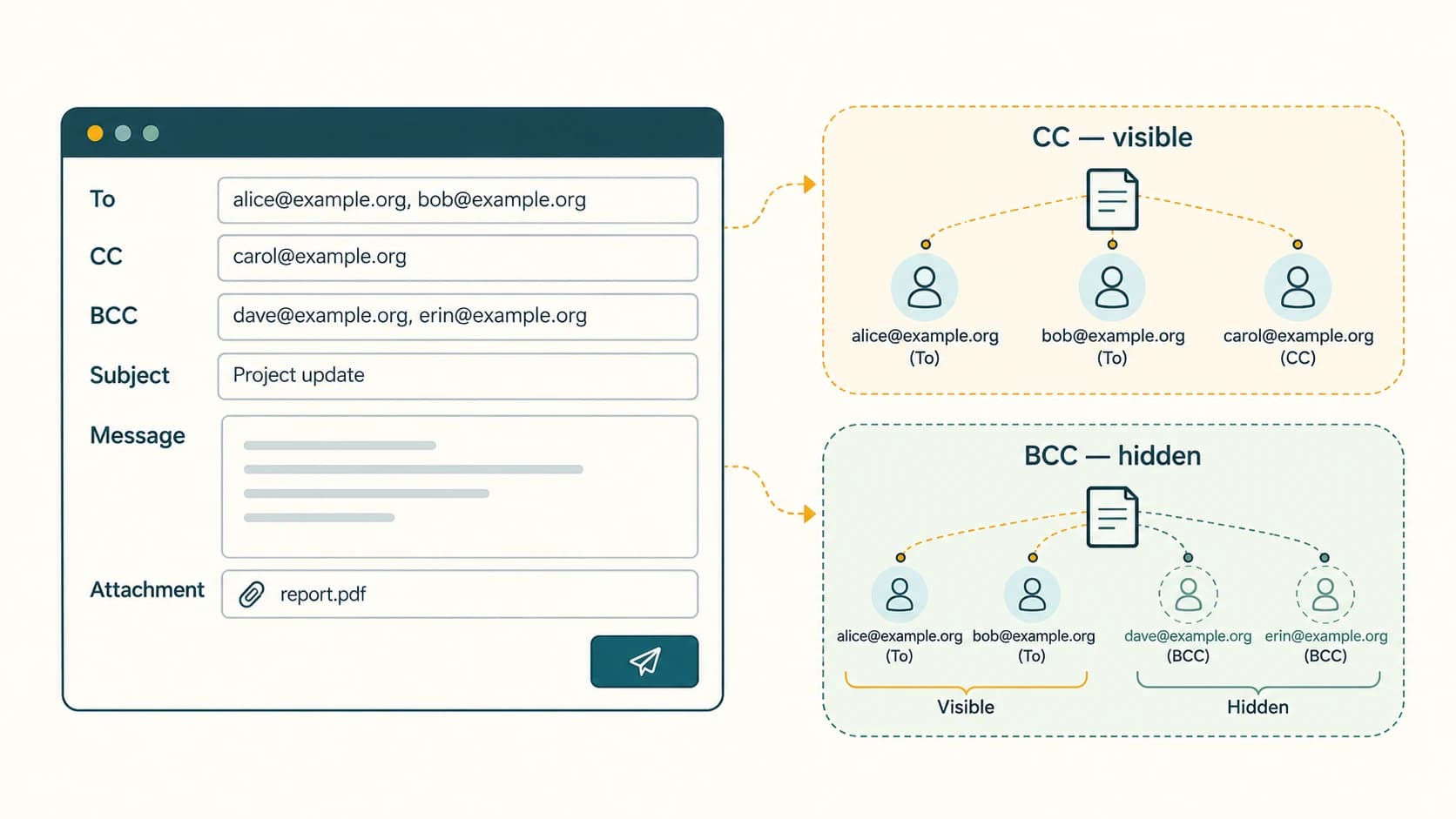
| CC | Carbon Copy: secondary visible recipient(s) | Others usually see CC addresses |
| BCC | Blind Carbon Copy: recipient(s) not shown to other recipients | Not a guarantee of total anonymity or confidentiality |
| Subject | Short description of the message | Should be specific, not misleading |
| Body | Main written content | Clear purpose and respectful wording |
| Attachment | Additional file carried with the email | Check sensitivity, type and size |
BCC privacy nuance: Typically, people in To and CC do not see BCC recipients, and BCC recipients do not see other BCC recipients. The sender and mail system can know whom it was addressed to, and forwarding/replying can still reveal information voluntarily. Use BCC appropriately, not as a substitute for access-control rules.
Reply, Reply All and Forward
- Reply: Responds primarily to the sender of the received message. The exact recipient behavior may depend on email headers and client settings.
- Reply All: Responds to the sender and other relevant visible recipients. Use this only when they need your answer.
- Forward: Sends an existing message or content to a new recipient. Check whether attachments, confidential information or the previous conversation should be shared.
Example: You receive a circular copied to 20 colleagues. To ask its author a private clarification, choose Reply rather than Reply All, unless the entire group truly needs your message.
Attachments and cloud links
An attachment may be a PDF, image, spreadsheet or other file included with a message. Some providers restrict attachment size or prohibit certain potentially dangerous file types. Large files may be shared through an authorized cloud-storage link instead of being directly attached.
The attachment icon is often a paperclip, a common objective-exam clue. A message without an attachment can still include a clickable hyperlink in its body. Similarly, a shared-file link does not necessarily mean the file is attached to the email itself.
Safe handling basics: Verify unexpected requests using a trusted channel, avoid opening suspicious attachments, confirm addresses before sending sensitive documents and follow organizational data-sharing rules. A .pdf or .docx filename is not a guarantee of safety; renamed extensions can be misleading.
Email folders and delivery-related words
| Term | General meaning |
|---|---|
| Inbox | Received email messages |
| Sent | Copies of messages successfully sent from the account/client |
| Drafts | Unsent messages being prepared |
| Outbox | Messages pending sending in clients that support it |
| Spam/Junk | Messages identified as unwanted/suspicious |
| Trash/Deleted items | Messages marked for deletion |
| Signature | Optional text block appended to outgoing messages |
| Mailing list | Address/group mechanism used to distribute to multiple recipients |
Different applications may label or manage these folders differently. “Sent” also does not automatically prove a recipient opened or read the message.
Professional email etiquette
- Use a clear subject such as
Request for clarification on account statement format. - Start with an appropriate greeting and state the purpose early.
- Keep one message focused; use short paragraphs for several points.
- Include only people who need the information. Use CC for visible awareness and BCC where recipient-address privacy is appropriate.
- Mention the attachment by name or purpose if you included one.
- Proofread names, numbers, spelling and tone before sending.
- Confirm the recipient and the intended attachment before handling confidential data.
- Avoid unnecessary Reply All, threatening language, all-capital messages and unverified forwarding.
Worked examples
Example 1 — General notice to unrelated applicants: If you are permitted to email a small group and recipients must not see one another's addresses, a carefully used BCC field may help. For large official mailing, use a proper mailing system and its privacy controls.
Example 2 — Applicant sends a résumé: A descriptive subject, short body and properly named attached PDF are more useful than a blank subject with an unexplained file.
Example 3 — Unexpected “urgent OTP” email: Treat unsolicited requests for one-time passwords as suspicious; a message claiming to be from a bank does not establish that it is genuine.
Example 4 — Forwarding a received message: Forwarding can include earlier message text and any selected included attachments; review everything before sharing.
Important terms
| Term | Meaning |
|---|---|
| Electronic mail | |
| CC | Carbon Copy |
| BCC | Blind Carbon Copy |
| Attachment | File provided along with a message |
| Webmail | Email accessed through a web interface |
| Email client | Application used to send, receive or manage email |
| SMTP | Simple Mail Transfer Protocol |
| IMAP | Internet Message Access Protocol |
| POP3 | Post Office Protocol version 3 |
| Spam | Unsolicited or unwanted messages |
| Phishing | Deceptive messages designed to obtain data or cause harmful action |
Common confusions and exam traps
- CC addresses are normally visible; BCC addresses are hidden from the other recipients.
- Reply All ≠ Reply. An unintended Reply All can distribute a response unnecessarily.
- Attachment ≠ hyperlink. A link may point to a cloud-hosted file.
- From name ≠ authenticated sender identity. Email sender labels can be forged.
- Sent ≠ read. Delivery/read confirmation is not guaranteed by the Sent folder.
- Webmail ≠ the only form of email. Apps may use mail protocols without a browser.
Objective-exam facts to remember
| Clue | Answer |
|---|---|
| Electronic mail | |
| CC expansion | Carbon Copy |
| BCC expansion | Blind Carbon Copy |
| Unsent composition | Draft |
| Received mail | Inbox |
| File accompanying message | Attachment |
| Typical attachment symbol | Paperclip |
| Sends response to visible group | Reply All |
| Sends existing message to someone else | Forward |
| Common outgoing email protocol | SMTP |
Quick revision
- To = main recipient; CC = visible additional recipient; BCC = hidden additional recipient.
- Subject summarizes the message and body provides the details.
- Reply, Reply All and Forward have different recipient consequences.
- Attachments are files; hyperlinks are addresses leading to resources.
- Professional email needs clear purpose, correct recipients and careful data handling.
Practice questions — CA-06-05
1. BCC means:
A. Basic Computer Copy
B. Blind Carbon Copy
C. Backup Client Contact
D. Browser Carbon Code
2. Which field commonly identifies the main intended recipient?
A. To
B. Subject
C. Signature
D. Archive
3. An additional recipient whose address is normally visible belongs in:
A. BCC
B. Drafts
C. CC
D. Trash
4. Which action responds to the sender and additional visible recipients?
A. Download
B. Bookmark
C. Forward to spam
D. Reply All
5. A file included with an email message is an:
A. Attachment
B. Hyperlink only
C. Intranet
D. Index
6. Which icon is commonly associated with email attachments?
A. Magnifying glass
B. Paperclip
C. Speaker
D. Printer cartridge
7. Which folder generally stores unsent messages being prepared?
A. Sent
B. Inbox
C. Drafts
D. Spam
8. Which protocol is primarily associated with sending/relaying email?
A. FTP
B. IMAP
C. POP3
D. SMTP
9. The best purpose of the Subject field is to:
A. Briefly describe what the message concerns
B. Store the entire attachment data
C. Hide all recipients
D. Guarantee delivery
10. Email forwarding most directly means:
A. Permanently deleting the message
B. Sending received message content to another recipient
C. Adding a new website to search results
D. Turning the message into a cloud backup automatically
11. If you need to answer only the author of a large-group circular, normally choose:
A. Reply All
B. Forward to everyone
C. Reply
D. Print
12. Which email safety statement is correct?
A. The From name always proves identity
B. PDF attachment names guarantee safety
C. Every link in email is genuine
D. Sender names and unexpected attachments should be verified
Answers and explanations — CA-06-05
1. B — Blind Carbon Copy. Blind Carbon Copy hides recipient addresses from other recipients in ordinary email handling.
2. A — To. The To field identifies main addressees.
3. C — CC. CC (Carbon Copy) recipients are generally visible to other recipients.
4. D — Reply All. Reply All includes additional relevant visible recipients where the client supports it.
5. A — Attachment. An attachment is file content sent along with a message.
6. B — Paperclip. The paperclip commonly represents an attached file.
7. C — Drafts. The Drafts folder holds incomplete unsent messages.
8. D — SMTP. SMTP is associated with email sending and transfer between mail systems.
9. A — Briefly describe what the message concerns. A meaningful subject helps recipients understand and manage the email.
10. B — Sending received message content to another recipient. Forward sends existing message content onward; check privacy first.
11. C — Reply. Reply avoids unnecessarily including the other recipients.
12. D — Sender names and unexpected attachments should be verified. Email identity can be forged and attachments/links may be unsafe.