
Download, Upload, Bandwidth and Data Transfer
Download, Upload, Bandwidth and Data Transfer. Foundational Computer Awareness explanations, examples and explained practice questions for banking and recruitment exam preparation.
By Akhilesh Saini
What you will learn
- Tell downloading from uploading by the direction of data flow.
- Understand bandwidth, throughput, latency and transfer speed at beginner level.
- Convert between bits and bytes accurately.
- Make simple best-case transfer-time estimates without assuming perfect network conditions.
Why this topic matters
Exams often ask whether sending a file to cloud storage is an upload or a download, or ask the difference between Mbps and MB/s. Everyday digital work also depends on knowing why a connection advertised at one speed may transfer files more slowly in practice.
Upload versus download
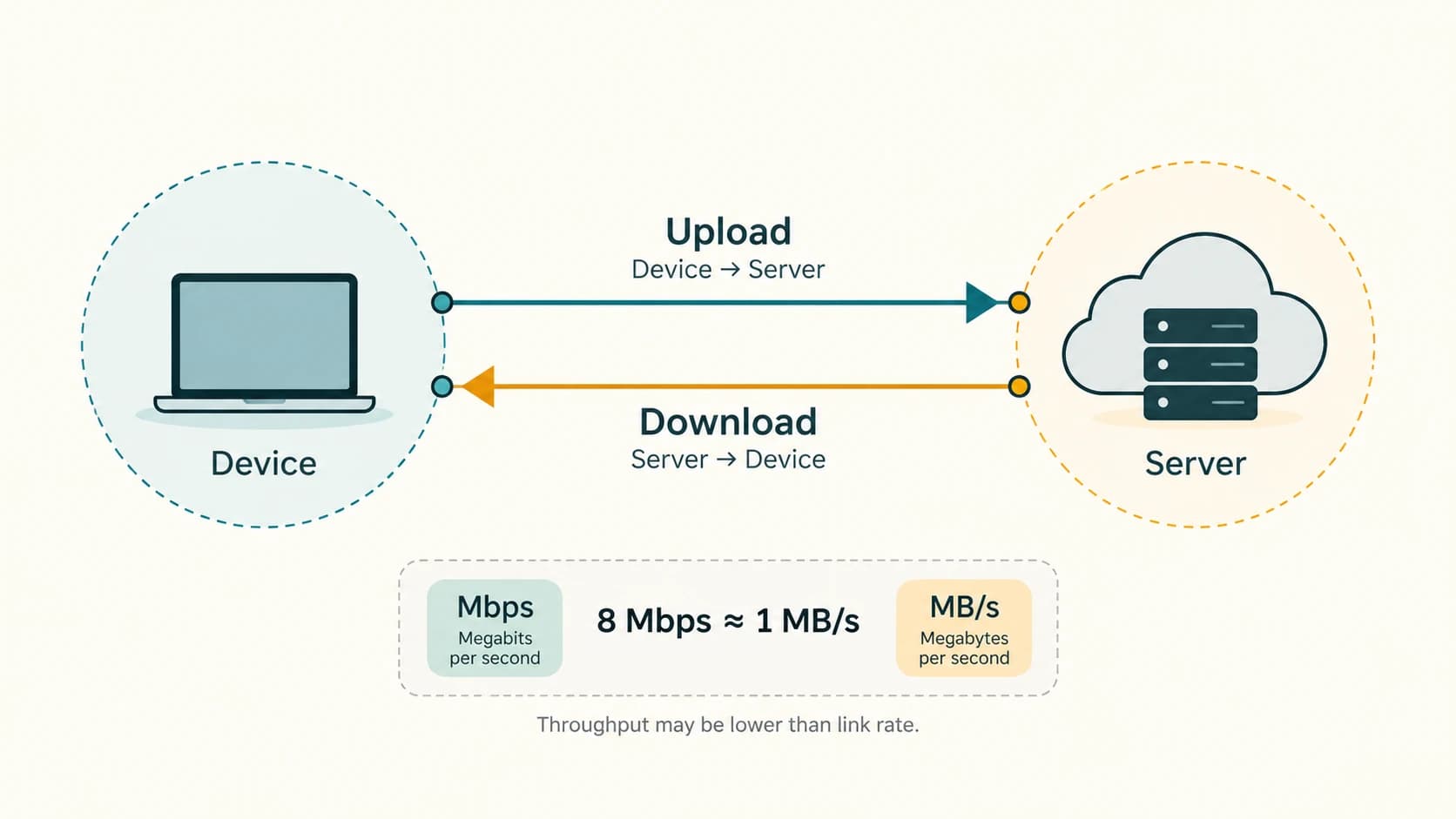
Download: Receiving a file or data from a remote server/service onto your device. For example, saving a PDF admit card from a website to your laptop is downloading.
Upload: Sending data from your device to a remote service. For example, submitting a photograph or a signed application PDF through a recruitment form is uploading.
Two-way communication: Online calls, chats and collaborative work may upload and download data simultaneously. The direction is defined from the point of view of the device/user, so one computer's upload is another system's receipt.
| Activity | Typical direction |
|---|---|
| Open/save an online PDF to your device | Download |
| Submit scanned form from laptop to a portal | Upload |
| Send a large email attachment | Upload to mail service during sending |
| Receive an attached document | Download/receive attachment data |
| Watch streamed video | Primarily receive/download a stream |
| Video conference | Both send and receive |
Bandwidth, throughput and latency
Bandwidth is commonly used in consumer networking to describe the link's data-carrying capacity or rated data rate. It may be stated in Mbps (megabits per second) or Gbps (gigabits per second).
Throughput is the rate at which data is actually delivered successfully during an interval, and it can be lower than the nominal link capacity because of protocol overhead, congestion, Wi-Fi conditions, competing traffic or the server's limitations.
Latency is the time delay before a response or data begins to arrive, frequently expressed in milliseconds (ms). High latency can make a web application feel sluggish even if the link has high capacity.
Example: A connection with a stated capacity of 100 Mbps does not promise that every individual file downloads at 100 Mbps throughout the entire transfer.
Bits, bytes and transfer calculations
The distinction is crucial:
- b (lowercase) = bit.
- B (uppercase) = byte.
- 1 byte = 8 bits.
- Mbps = megabits per second.
- MB/s = megabytes per second.
For decimal rate calculations: 8 Mbps ≈ 1 MB/s of raw bit-to-byte rate (before overhead). MB and MiB are not identical: 1 MB = 1,000,000 bytes, while 1 MiB = 1,048,576 bytes. See CA-02-07 for storage units.
Simple theoretical transfer-time relationship:
Or convert a file size expressed in MB to Mb by multiplying by 8, using decimal units.
Worked examples
Example 1 — Ideal 40 MB file on 20 Mbps: 40 MB × 8 = 320 megabits. 320 ÷ 20 = 16 seconds as an idealized lower-bound calculation if the effective rate is held at 20 Mbps; real downloads may take longer.
Example 2 — 16 Mbps expressed in MB/s: 16 ÷ 8 = 2 MB/s as the simple decimal conversion. It does not prove a file will actually transfer at that speed.
Example 3 — Online exam form: Your device sends a passport photo to the portal: upload. Later the portal sends a generated acknowledgment PDF to your device: download.
Example 4 — Slow response despite fast data rate: A website may respond slowly because its server is busy or the connection has high latency; nominal bandwidth alone cannot explain the full experience.
Example 5 — 50 MB uploaded at 10 Mbps ideal rate: 50 × 8 = 400 megabits; 400 ÷ 10 = 40 seconds in an ideal calculation, excluding overhead and other delays.
Wired, wireless and transfer media
Data can travel over copper cable, optical fibre and radio-based wireless links. The choice influences achievable speeds, range and reliability but does not redefine the terms upload and download. Network media and devices are covered in more detail in CA-07-05 and CA-07-08.
Important terms
| Term | Meaning |
|---|---|
| Download | Receive data from a remote service/device |
| Upload | Send data to a remote service/device |
| Bandwidth | Data-carrying capacity/rated link rate in everyday networking language |
| Throughput | Actual achieved successful transfer rate |
| Latency | Communication delay |
| Mbps | Megabits per second |
| MB/s | Megabytes per second |
| Gbps | Gigabits per second |
| Packet | Small unit of transferred network data |
| Stream | Flow of content data, e.g. audio/video |
Common confusions and exam traps
MbpsandMB/sdiffer by a factor of eight for the same numerical data rate units.- Bandwidth ≠ observed throughput. Congestion and overhead can reduce usable speed.
- Latency ≠ bandwidth. A low data rate and a long delay are different measurements.
- Streaming is not the same as saving a permanent file. Both involve incoming data, but user access and local persistence may differ.
- Wi-Fi signal strength alone does not establish Internet speed. Router, ISP and destination service also matter.
Objective-exam facts to remember
| Clue | Answer |
|---|---|
| Saving a file from website to device | Download |
| Sending photo to application portal | Upload |
Lowercase b | Bit |
Uppercase B | Byte |
| 1 byte | 8 bits |
| 8 Mbps ideal bit/byte conversion | 1 MB/s |
| Experienced successful data rate | Throughput |
| Response delay | Latency |
| Common access-rate unit | Mbps / Gbps |
Quick revision
- Download = receive; upload = send.
- Bandwidth is capacity or rated data rate; throughput is achieved transfer rate.
- Latency is time delay, not file size.
- Multiply MB by 8 to estimate megabits using decimal units.
- Transfer-time arithmetic gives an approximation under stated conditions, not a guaranteed completion time.
Practice questions — CA-06-06
1. Saving an online PDF from a portal onto your laptop is a:
A. Download
B. Upload
C. Search query
D. DNS registration
2. Sending a scanned form from your computer to a website is an:
A. HTTP browser bookmark
B. Upload
C. Print command
D. Intranet
3. Which symbol correctly represents a bit?
A. B
B. MB
C. b
D. GB
4. One byte contains how many bits?
A. 2
B. 4
C. 16
D. 8
5. Mbps is short for:
A. Megabits per second
B. Megabytes per screen
C. Memory bits per sector
D. Mail bytes per session
6. 16 Mbps is approximately how many MB/s by simple decimal conversion?
A. 16
B. 2
C. 128
D. 0.5
7. A 40 MB file at a steady effective rate of 20 Mbps ideally takes:
A. 2 seconds
B. 8 seconds
C. 16 seconds
D. 80 seconds
8. In everyday networking, throughput means:
A. Type of power cable
B. A domain name
C. The latency only
D. Actual successful data-transfer rate
9. Latency most directly measures:
A. Delay in communication
B. Total spreadsheet rows
C. Amount of cloud storage
D. Screen resolution
10. Why may actual download speed be lower than advertised bandwidth?
A. Bytes cannot travel on the Internet
B. Overhead, congestion and server limitations
C. All downloads become uploads
D. DNS eliminates all latency
11. A video call normally:
A. Only downloads data
B. Only uploads data
C. Uploads and downloads data
D. Never uses packets
12. At an ideal 10 Mbps, sending 50 MB requires approximately:
A. 5 s
B. 10 s
C. 20 s
D. 40 s
Answers and explanations — CA-06-06
1. A — Download. A download receives data from a remote system onto the device.
2. B — Upload. Upload means sending data from a device to a remote service.
3. C — b. A lowercase b is commonly used to denote a bit.
4. D — 8. One byte is eight bits.
5. A — Megabits per second. Mbps represents millions of bits per second using decimal prefix conventions.
6. B — 2. Divide megabits per second by eight: 16/8 = 2 MB/s before overhead.
7. C — 16 seconds. 40 MB = 320 Mb; 320/20 = 16 s under the stated ideal rate.
8. D — Actual successful data-transfer rate. Throughput is the effective achieved rate, which may be below link capacity.
9. A — Delay in communication. Latency concerns time taken for data or response to travel/arrive.
10. B — Overhead, congestion and server limitations. Real throughput depends on multiple conditions, not only nominal capacity.
11. C — Uploads and downloads data. Outgoing audio/video is sent and incoming audio/video is received.
12. D — 40 s. 50 MB = 400 Mb; at 10 Mb/s the ideal time is 400/10 = 40 s.